Forex Profit Scouter
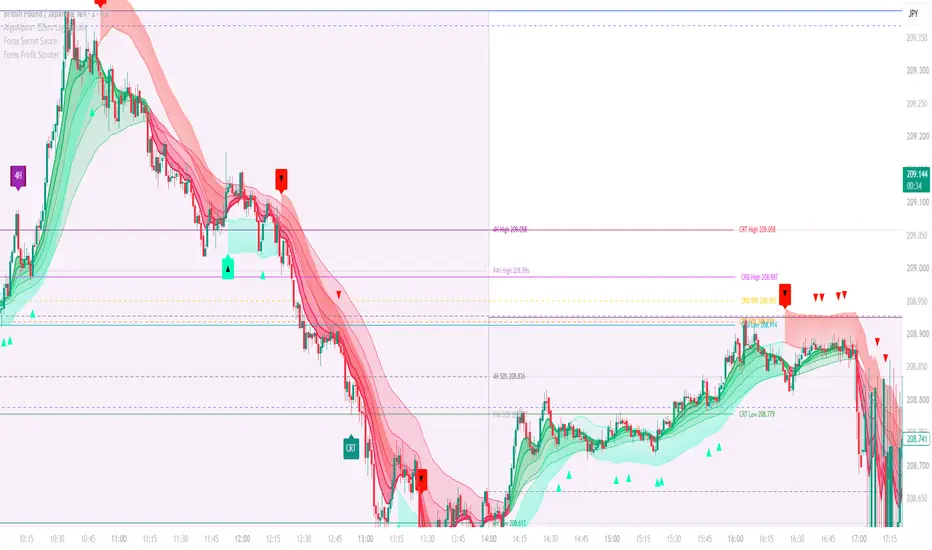
Forex Profit Scouter is an intraday trade-setup tool for forex and metals (EURUSD, GBPJPY, XAUUSD and other pairs). It watches several CRT (Candle Range Theory) ranges and an opening range, and when a setup meets its rules it draws a full trade plan on the chart: entry, stop loss, three take-profit levels and a position size.
SETUP MODELS (each can be turned on or off)
- Daily CRT – sweep of the previous day's high or low, then a reclaim back inside
- 4H CRT – same logic on the previous 4H candle (NY 1/5/9 AM anchor or your broker's 4H candles)
- 8–9 AM CRT – sweep and reclaim of the New York 8:00–9:00 range
- Hourly CRT – sweep and reclaim of the previous hour
- Opening Range Breakout – close outside a configurable opening range (NY 9:30 by default; London 3:00 or COMEX 8:20 can be set)
CRT CONFIRMATION MODES
- CISD – the sweep must be followed by a change in candle delivery (close back through the open of the move that made the sweep)
- HTF candle close – waits for the higher-timeframe candle to close back inside the range
- Fast – enters on the first close back inside
TRADE PLAN
- Stop placed beyond the sweep extreme plus a buffer, with minimum and maximum stop limits
- CRT targets: TP1 = range 50%, TP2 = opposite end of the range, TP3 = an extension beyond it. ORB targets are set in R multiples.
- Scales out in thirds, moves the stop to breakeven after TP1 and to TP1 after TP2 (configurable), with an optional ATR trailing stop for the final third
- Open trades are closed at a set time of day
WORKS ON ANY PAIR
- Stops can scale to each pair automatically (a % of daily ATR) or be set in pips, with automatic pip-size detection
- Lot size is calculated from your risk per trade in your account currency, converting pip value for cross and JPY pairs automatically. Contract size, minimum lot and lot step are adjustable.
- Spread (in pips) and commission per lot are deducted from each result in the stats
FILTERS
- Trading session window and an 8:30 US news block
- Skips spike candles, trades with too little room to the target, and stops wider than your maximum
- Daily limits on number of trades and losses
- Optional market regime filter (ADX or trend ribbon), extreme-volatility filter and daily premium/discount filter
- "Show skipped setups" marks each rejected setup with the reason in a tooltip
PANEL & ALERTS
- The panel shows trend, regime, current signal, entry/SL/TPs, which targets have been hit and the stop status
- Running stats on the chart history: trades, win %, total and average R, plus a scorecard for each model
- Alerts for entries (with SL, TPs and lot size), TP1, TP2, stop moves and exits. Set one alert with "Any alert() function call" to receive all of them.
HOW TO USE
- Use a 1–5 minute chart. All times are New York time. Daily and 4H ranges follow your broker's session.
- Before trading, set your account currency, risk per trade and typical spread for each pair, and check your broker's contract size.
IMPORTANT
The stats in the panel are a simplified simulation on chart prices: fills at candle close, no slippage, spread estimated from your input. They are for comparing settings, not a prediction of future results. This is an indicator, not an automated strategy – it does not place trades. Educational use only – not financial advice. Test on historical data and a demo account before trading real money.
SETUP MODELS (each can be turned on or off)
- Daily CRT – sweep of the previous day's high or low, then a reclaim back inside
- 4H CRT – same logic on the previous 4H candle (NY 1/5/9 AM anchor or your broker's 4H candles)
- 8–9 AM CRT – sweep and reclaim of the New York 8:00–9:00 range
- Hourly CRT – sweep and reclaim of the previous hour
- Opening Range Breakout – close outside a configurable opening range (NY 9:30 by default; London 3:00 or COMEX 8:20 can be set)
CRT CONFIRMATION MODES
- CISD – the sweep must be followed by a change in candle delivery (close back through the open of the move that made the sweep)
- HTF candle close – waits for the higher-timeframe candle to close back inside the range
- Fast – enters on the first close back inside
TRADE PLAN
- Stop placed beyond the sweep extreme plus a buffer, with minimum and maximum stop limits
- CRT targets: TP1 = range 50%, TP2 = opposite end of the range, TP3 = an extension beyond it. ORB targets are set in R multiples.
- Scales out in thirds, moves the stop to breakeven after TP1 and to TP1 after TP2 (configurable), with an optional ATR trailing stop for the final third
- Open trades are closed at a set time of day
WORKS ON ANY PAIR
- Stops can scale to each pair automatically (a % of daily ATR) or be set in pips, with automatic pip-size detection
- Lot size is calculated from your risk per trade in your account currency, converting pip value for cross and JPY pairs automatically. Contract size, minimum lot and lot step are adjustable.
- Spread (in pips) and commission per lot are deducted from each result in the stats
FILTERS
- Trading session window and an 8:30 US news block
- Skips spike candles, trades with too little room to the target, and stops wider than your maximum
- Daily limits on number of trades and losses
- Optional market regime filter (ADX or trend ribbon), extreme-volatility filter and daily premium/discount filter
- "Show skipped setups" marks each rejected setup with the reason in a tooltip
PANEL & ALERTS
- The panel shows trend, regime, current signal, entry/SL/TPs, which targets have been hit and the stop status
- Running stats on the chart history: trades, win %, total and average R, plus a scorecard for each model
- Alerts for entries (with SL, TPs and lot size), TP1, TP2, stop moves and exits. Set one alert with "Any alert() function call" to receive all of them.
HOW TO USE
- Use a 1–5 minute chart. All times are New York time. Daily and 4H ranges follow your broker's session.
- Before trading, set your account currency, risk per trade and typical spread for each pair, and check your broker's contract size.
IMPORTANT
The stats in the panel are a simplified simulation on chart prices: fills at candle close, no slippage, spread estimated from your input. They are for comparing settings, not a prediction of future results. This is an indicator, not an automated strategy – it does not place trades. Educational use only – not financial advice. Test on historical data and a demo account before trading real money.

1 Trade Away
Thông báo miễn trừ trách nhiệm
Thông tin và các ấn phẩm này không nhằm mục đích, và không cấu thành, lời khuyên hoặc khuyến nghị về tài chính, đầu tư, giao dịch hay các loại khác do TradingView cung cấp hoặc xác nhận. Đọc thêm tại Điều khoản Sử dụng.
1 Trade Away
Thông báo miễn trừ trách nhiệm
Thông tin và các ấn phẩm này không nhằm mục đích, và không cấu thành, lời khuyên hoặc khuyến nghị về tài chính, đầu tư, giao dịch hay các loại khác do TradingView cung cấp hoặc xác nhận. Đọc thêm tại Điều khoản Sử dụng.