OPEN-SOURCE SCRIPT
DKS 30 Minute ORB with Multi-Timeframe Bias and HTF Zones
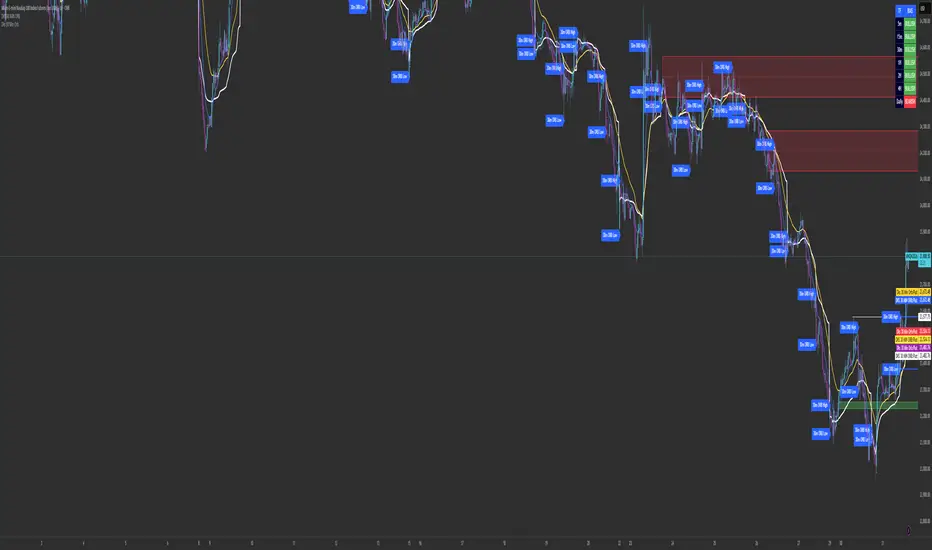
This script combines a 30-minute Opening Range Breakout (ORB) model with higher-timeframe supply and demand zones and a multi-timeframe directional bias dashboard to create a structured intraday trading framework.
🔹 Core Components
Opening Range Breakout (ORB):
The script defines the first 30-minute range of the selected session and highlights the high and low. These levels act as key breakout points, where price is monitored for continuation or rejection.
Higher Timeframe Supply & Demand Zones:
Only higher timeframe zones (1H, 2H, and 4H) are plotted on lower timeframes to reduce noise and focus on stronger areas of interest. These zones help identify potential reversal or continuation areas in confluence with the ORB levels.
Multi-Timeframe Bias Dashboard:
A built-in bias table displays directional sentiment across multiple timeframes (5m, 15m, 30m, 1H, 2H, 4H, Daily).
Bullish conditions are highlighted in green
Bearish conditions are highlighted in red
This allows traders to align intraday entries with higher timeframe direction.
🔹 How It Works Together
The script is designed to:
Identify breakout opportunities from the ORB range
Confirm direction using higher timeframe bias
Use supply/demand zones as targets or invalidation areas
This combination helps filter low-probability trades and improves overall trade structure.
🔹 How To Use
Mark the ORB range during your session (e.g., market open)
Wait for price to break and retest the range
Confirm direction using the bias dashboard
Use HTF zones for entries, targets, or stop placement
🔹 Notes
This script is intended as a decision-support tool and should be used alongside proper risk management.
🔹 Core Components
Opening Range Breakout (ORB):
The script defines the first 30-minute range of the selected session and highlights the high and low. These levels act as key breakout points, where price is monitored for continuation or rejection.
Higher Timeframe Supply & Demand Zones:
Only higher timeframe zones (1H, 2H, and 4H) are plotted on lower timeframes to reduce noise and focus on stronger areas of interest. These zones help identify potential reversal or continuation areas in confluence with the ORB levels.
Multi-Timeframe Bias Dashboard:
A built-in bias table displays directional sentiment across multiple timeframes (5m, 15m, 30m, 1H, 2H, 4H, Daily).
Bullish conditions are highlighted in green
Bearish conditions are highlighted in red
This allows traders to align intraday entries with higher timeframe direction.
🔹 How It Works Together
The script is designed to:
Identify breakout opportunities from the ORB range
Confirm direction using higher timeframe bias
Use supply/demand zones as targets or invalidation areas
This combination helps filter low-probability trades and improves overall trade structure.
🔹 How To Use
Mark the ORB range during your session (e.g., market open)
Wait for price to break and retest the range
Confirm direction using the bias dashboard
Use HTF zones for entries, targets, or stop placement
🔹 Notes
This script is intended as a decision-support tool and should be used alongside proper risk management.
Mã nguồn mở
Theo đúng tinh thần TradingView, tác giả của tập lệnh này đã công bố nó dưới dạng mã nguồn mở, để các nhà giao dịch có thể xem xét và xác minh chức năng. Chúc mừng tác giả! Mặc dù bạn có thể sử dụng miễn phí, hãy nhớ rằng việc công bố lại mã phải tuân theo Nội quy.

Thông báo miễn trừ trách nhiệm
Thông tin và các ấn phẩm này không nhằm mục đích, và không cấu thành, lời khuyên hoặc khuyến nghị về tài chính, đầu tư, giao dịch hay các loại khác do TradingView cung cấp hoặc xác nhận. Đọc thêm tại Điều khoản Sử dụng.
Mã nguồn mở
Theo đúng tinh thần TradingView, tác giả của tập lệnh này đã công bố nó dưới dạng mã nguồn mở, để các nhà giao dịch có thể xem xét và xác minh chức năng. Chúc mừng tác giả! Mặc dù bạn có thể sử dụng miễn phí, hãy nhớ rằng việc công bố lại mã phải tuân theo Nội quy.
Thông báo miễn trừ trách nhiệm
Thông tin và các ấn phẩm này không nhằm mục đích, và không cấu thành, lời khuyên hoặc khuyến nghị về tài chính, đầu tư, giao dịch hay các loại khác do TradingView cung cấp hoặc xác nhận. Đọc thêm tại Điều khoản Sử dụng.