OPEN-SOURCE SCRIPT
BTC CME Weekend Gap Tracker
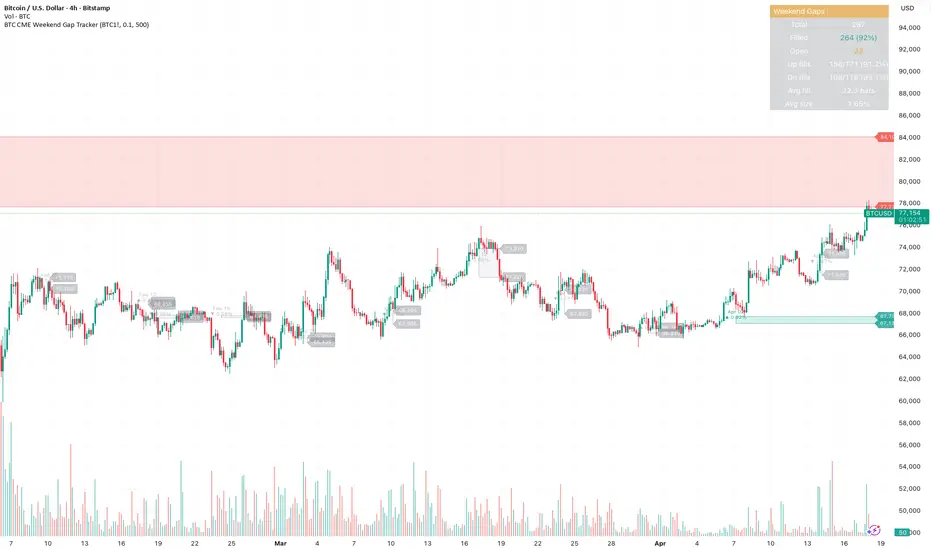
BTC CME Weekend Gap Tracker
Automatically detects and tracks weekend gaps on CME Bitcoin futures (BTC1!). When CME closes Friday evening and reopens Sunday/Monday, any price movement in spot during that window creates a gap — this indicator marks those gaps directly on your chart.
What it shows
Red boxes — weekend gap down (CME reopened lower than Friday close)
Green boxes — weekend gap up (CME reopened higher than Friday close)
Gray boxes — filled gaps (price has since traded back through the range)
Key features
Weekend-only filter — ignores daily maintenance gaps, only tracks the meaningful Friday-to-Monday gaps (and extended holiday closures)
Price levels labeled at the right edge of each unfilled gap so you can see exact gap boundaries at a glance
Date and percentage size shown inside each box
Unfilled gaps extend right until filled, then fade to gray
Stats table tracking total gaps, fill rate, gap-up vs gap-down fill rates, average fill time, and average gap size
How to use
Apply to any BTC chart (BTCUSD, BTCUSDT, BTCUSDT.P) on daily or intraday timeframes. The script pulls CME data automatically. Use unfilled gaps as potential price targets — historically, the majority of CME gaps fill over time, though large gaps in strong trends can remain open for extended periods.
Settings
Minimum gap size threshold (filter noise)
Max bars to track (history depth)
Toggle price levels, percentages, and dates independently
Customize gap colors
Alerts
Two alert conditions included: new weekend gap up and new weekend gap down. Set these up to get notified when CME reopens Monday with a gap.
Automatically detects and tracks weekend gaps on CME Bitcoin futures (BTC1!). When CME closes Friday evening and reopens Sunday/Monday, any price movement in spot during that window creates a gap — this indicator marks those gaps directly on your chart.
What it shows
Red boxes — weekend gap down (CME reopened lower than Friday close)
Green boxes — weekend gap up (CME reopened higher than Friday close)
Gray boxes — filled gaps (price has since traded back through the range)
Key features
Weekend-only filter — ignores daily maintenance gaps, only tracks the meaningful Friday-to-Monday gaps (and extended holiday closures)
Price levels labeled at the right edge of each unfilled gap so you can see exact gap boundaries at a glance
Date and percentage size shown inside each box
Unfilled gaps extend right until filled, then fade to gray
Stats table tracking total gaps, fill rate, gap-up vs gap-down fill rates, average fill time, and average gap size
How to use
Apply to any BTC chart (BTCUSD, BTCUSDT, BTCUSDT.P) on daily or intraday timeframes. The script pulls CME data automatically. Use unfilled gaps as potential price targets — historically, the majority of CME gaps fill over time, though large gaps in strong trends can remain open for extended periods.
Settings
Minimum gap size threshold (filter noise)
Max bars to track (history depth)
Toggle price levels, percentages, and dates independently
Customize gap colors
Alerts
Two alert conditions included: new weekend gap up and new weekend gap down. Set these up to get notified when CME reopens Monday with a gap.
Mã nguồn mở
Theo đúng tinh thần TradingView, tác giả của tập lệnh này đã công bố nó dưới dạng mã nguồn mở, để các nhà giao dịch có thể xem xét và xác minh chức năng. Chúc mừng tác giả! Mặc dù bạn có thể sử dụng miễn phí, hãy nhớ rằng việc công bố lại mã phải tuân theo Nội quy.

Thông báo miễn trừ trách nhiệm
Thông tin và các ấn phẩm này không nhằm mục đích, và không cấu thành, lời khuyên hoặc khuyến nghị về tài chính, đầu tư, giao dịch hay các loại khác do TradingView cung cấp hoặc xác nhận. Đọc thêm tại Điều khoản Sử dụng.
Mã nguồn mở
Theo đúng tinh thần TradingView, tác giả của tập lệnh này đã công bố nó dưới dạng mã nguồn mở, để các nhà giao dịch có thể xem xét và xác minh chức năng. Chúc mừng tác giả! Mặc dù bạn có thể sử dụng miễn phí, hãy nhớ rằng việc công bố lại mã phải tuân theo Nội quy.
Thông báo miễn trừ trách nhiệm
Thông tin và các ấn phẩm này không nhằm mục đích, và không cấu thành, lời khuyên hoặc khuyến nghị về tài chính, đầu tư, giao dịch hay các loại khác do TradingView cung cấp hoặc xác nhận. Đọc thêm tại Điều khoản Sử dụng.