Option Moneyness Heatmap Auto
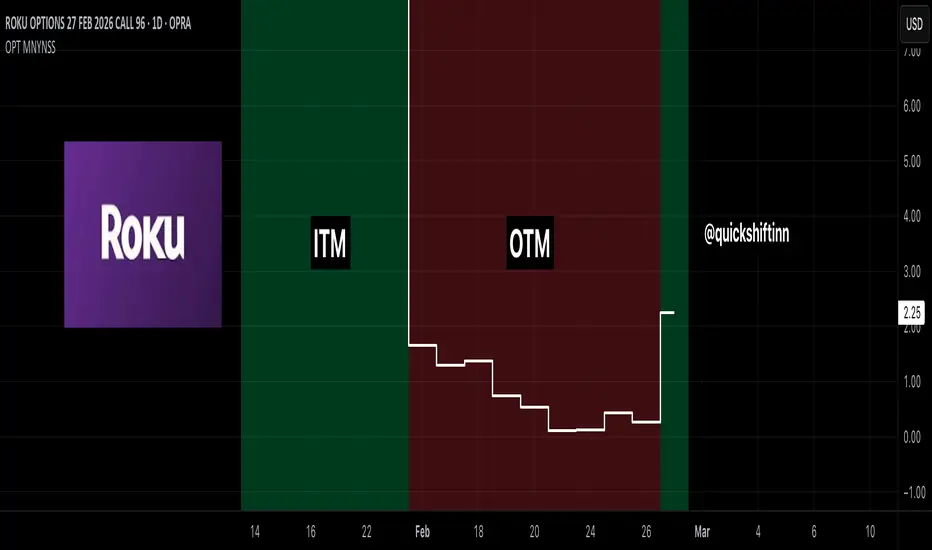
Option Moneyness Background Auto is designed to make an option chart instantly more readable by coloring the chart background based on the option’s moneyness state relative to the underlying asset price and the option’s strike price.
Unlike many existing moneyness-style scripts that are built for the underlying chart (or require manual inputs every time), this script is built to run directly on the option contract chart itself. It automatically parses the option symbol (when available in OPRA-style format) to detect the underlying ticker, whether the contract is a call or put, and the strike price, then applies ITM / ATM / OTM background highlighting in real time.
Because it is designed to operate inline on the option chart being traded, it pairs especially well with a second chart showing the underlying asset. This setup gives a clean side-by-side workflow: one chart for the option’s price action and one chart for the underlying’s structure, while this indicator keeps moneyness context visible at a glance.
What it does
The script highlights the background using a simple visual system:
The logic automatically handles the difference between calls and puts:
So the ITM/OTM behavior is correctly inverted depending on contract type.
Key features
1) Automatic option symbol parsing (OPRA-style)
When the TradingView symbol format supports it, the script automatically detects:
This reduces setup friction and makes it easier to move between contracts quickly.
2) Manual override mode (fallback for non-standard symbols)
If your feed or instrument uses a non-standard symbol format, the script includes manual inputs for:
This allows the indicator to remain usable even when auto-parse is not available.
3) Adjustable ATM sensitivity
ATM status can be tuned using an adjustable band:
This lets you define how tight or loose the “ATM” zone should be for your trading style and the instrument you trade.
4) Designed for option-chart workflow
This script is not just a generic background highlighter. It is built specifically for option traders viewing the option contract chart itself, where moneyness context is often easy to lose while focusing on premium movement.
Suggested use case (recommended layout)
A very effective setup is:
This gives you immediate visibility into both:
Notes
Screenshots / examples
Call contract example (ITM / OTM)

Put contract examples (ITM / ATM / OTM)

Unlike many existing moneyness-style scripts that are built for the underlying chart (or require manual inputs every time), this script is built to run directly on the option contract chart itself. It automatically parses the option symbol (when available in OPRA-style format) to detect the underlying ticker, whether the contract is a call or put, and the strike price, then applies ITM / ATM / OTM background highlighting in real time.
Because it is designed to operate inline on the option chart being traded, it pairs especially well with a second chart showing the underlying asset. This setup gives a clean side-by-side workflow: one chart for the option’s price action and one chart for the underlying’s structure, while this indicator keeps moneyness context visible at a glance.
What it does
The script highlights the background using a simple visual system:
- Green = In The Money (ITM)
- Yellow = At The Money (ATM)
- Red = Out of The Money (OTM)
The logic automatically handles the difference between calls and puts:
- Calls become more valuable as the underlying price rises relative to strike
- Puts become more valuable as the underlying price falls relative to strike
So the ITM/OTM behavior is correctly inverted depending on contract type.
Key features
1) Automatic option symbol parsing (OPRA-style)
When the TradingView symbol format supports it, the script automatically detects:
- Underlying symbol
- Call vs Put
- Strike price
This reduces setup friction and makes it easier to move between contracts quickly.
2) Manual override mode (fallback for non-standard symbols)
If your feed or instrument uses a non-standard symbol format, the script includes manual inputs for:
- Underlying symbol
- Call/Put selection
- Strike price
This allows the indicator to remain usable even when auto-parse is not available.
3) Adjustable ATM sensitivity
ATM status can be tuned using an adjustable band:
- Percent mode (relative to underlying price)
- Fixed dollar mode
This lets you define how tight or loose the “ATM” zone should be for your trading style and the instrument you trade.
4) Designed for option-chart workflow
This script is not just a generic background highlighter. It is built specifically for option traders viewing the option contract chart itself, where moneyness context is often easy to lose while focusing on premium movement.
Suggested use case (recommended layout)
A very effective setup is:
- Chart 1: The option contract (with this indicator applied)
- Chart 2: The underlying asset (for market structure / levels / trend context)
This gives you immediate visibility into both:
- what the option premium is doing, and
- where the underlying price sits relative to the strike.
Notes
- Auto-detection depends on the option symbol format provided by your TradingView data feed (best compatibility with OPRA-style symbols).
- If auto-detection fails, use the built-in manual override inputs.
- ATM band settings are user-defined by design, since “ATM” tolerance can vary by instrument and trading approach.
Screenshots / examples
Call contract example (ITM / OTM)
Put contract examples (ITM / ATM / OTM)

Follow me on X for all my thoughts on the markets!
x.com/quickshiftinn
Signup with my Robinhood link and we'll both pick our own gift stock 🎁
bit.ly/4cm60iA
Use my link to get a Tradingview deal!
bit.ly/46wEqLE
x.com/quickshiftinn
Signup with my Robinhood link and we'll both pick our own gift stock 🎁
bit.ly/4cm60iA
Use my link to get a Tradingview deal!
bit.ly/46wEqLE
Thông báo miễn trừ trách nhiệm
Thông tin và các ấn phẩm này không nhằm mục đích, và không cấu thành, lời khuyên hoặc khuyến nghị về tài chính, đầu tư, giao dịch hay các loại khác do TradingView cung cấp hoặc xác nhận. Đọc thêm tại Điều khoản Sử dụng.
Follow me on X for all my thoughts on the markets!
x.com/quickshiftinn
Signup with my Robinhood link and we'll both pick our own gift stock 🎁
bit.ly/4cm60iA
Use my link to get a Tradingview deal!
bit.ly/46wEqLE
x.com/quickshiftinn
Signup with my Robinhood link and we'll both pick our own gift stock 🎁
bit.ly/4cm60iA
Use my link to get a Tradingview deal!
bit.ly/46wEqLE
Thông báo miễn trừ trách nhiệm
Thông tin và các ấn phẩm này không nhằm mục đích, và không cấu thành, lời khuyên hoặc khuyến nghị về tài chính, đầu tư, giao dịch hay các loại khác do TradingView cung cấp hoặc xác nhận. Đọc thêm tại Điều khoản Sử dụng.