OPEN-SOURCE SCRIPT
Cập nhật Decision zone V2
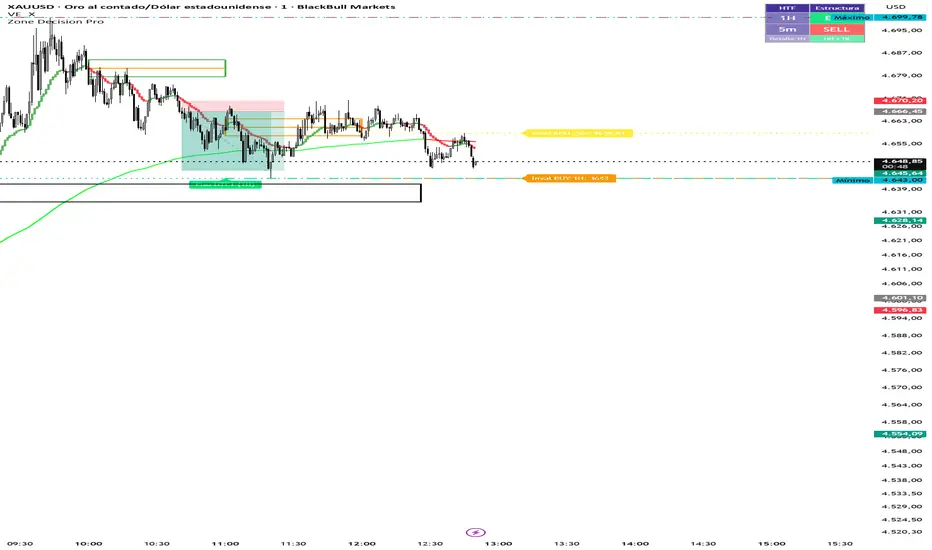
Multi Cuadros PRO + HTF Levels is a trading indicator that plots configurable time-based boxes with midlines, along with the latest higher timeframe (HTF) support and resistance levels using pivot detection. It is fully customizable in size, style, and timing, designed to identify key market zones efficiently
Phát hành các Ghi chú
Multi Cuadros PRO + HTF Levels is a trading indicator that plots configurable time-based boxes with midlines, along with the latest higher timeframe (HTF) support and resistance levels using pivot detection. It is fully customizable in size, style, and timing, designed to identify key market zones efficientlyPhát hành các Ghi chú
Multi Cuadros PRO + HTF Levels is a trading indicator that plots configurable time-based boxes with midlines, along with the latest higher timeframe (HTF) support and resistance levels using pivot detection. It is fully customizable in size, style, and timing, designed to identify key market zones efficiently.Phát hành các Ghi chú
Evaluates market structure (HH/HL vs LH/LL) across two configurable timeframes and displays a BUY/SELL/NEUTRAL panel in the corner of the chart. Includes invalidation lines.Phát hành các Ghi chú
Zone Decision Pro — Update Summary (April 2026)1. HTF Pisos y Techos — Group Renaming (Modules 2 & 3)
Groups renamed to ━━ HTF 1 — Pisos y Techos and ━━ HTF 2 — Pisos y Techos for clarity.
Settings compacted using inline rows: timeframe + ON toggle on one row, pivot bars + visibility on the next, colors + style on the last.
Bug fix: added h2Level / l2Level tracking to Module 3 so lines correctly disappear when price touches them.
2. HTF Structure Bias — Settings Compacted (Module 4)
Former separate groups gBiasPanel, gInval1, gInval2 eliminated.
━━ Bias — Configuración now holds the direction mode and the three BUY / SELL / NEUTRAL colors in a single inline row.
━━ Bias HTF 1 and ━━ Bias HTF 2 each consolidate their timeframe, pivot bars, invalidation toggle, color, weight, and style into one single row per group.
HTF 2 includes its own ON/OFF toggle at the start of the row.
3. Time-Based Alerts & Icons Per Box (Module 1)
Each of the 8 boxes received a new inline row (c1d … c8d) with three fields:
Mã nguồn mở
Theo đúng tinh thần TradingView, tác giả của tập lệnh này đã công bố nó dưới dạng mã nguồn mở, để các nhà giao dịch có thể xem xét và xác minh chức năng. Chúc mừng tác giả! Mặc dù bạn có thể sử dụng miễn phí, hãy nhớ rằng việc công bố lại mã phải tuân theo Nội quy.

Thông báo miễn trừ trách nhiệm
Thông tin và các ấn phẩm này không nhằm mục đích, và không cấu thành, lời khuyên hoặc khuyến nghị về tài chính, đầu tư, giao dịch hay các loại khác do TradingView cung cấp hoặc xác nhận. Đọc thêm tại Điều khoản Sử dụng.
Mã nguồn mở
Theo đúng tinh thần TradingView, tác giả của tập lệnh này đã công bố nó dưới dạng mã nguồn mở, để các nhà giao dịch có thể xem xét và xác minh chức năng. Chúc mừng tác giả! Mặc dù bạn có thể sử dụng miễn phí, hãy nhớ rằng việc công bố lại mã phải tuân theo Nội quy.
Thông báo miễn trừ trách nhiệm
Thông tin và các ấn phẩm này không nhằm mục đích, và không cấu thành, lời khuyên hoặc khuyến nghị về tài chính, đầu tư, giao dịch hay các loại khác do TradingView cung cấp hoặc xác nhận. Đọc thêm tại Điều khoản Sử dụng.