OPEN-SOURCE SCRIPT
Past Session POC / VAH / VAL (Full Day)
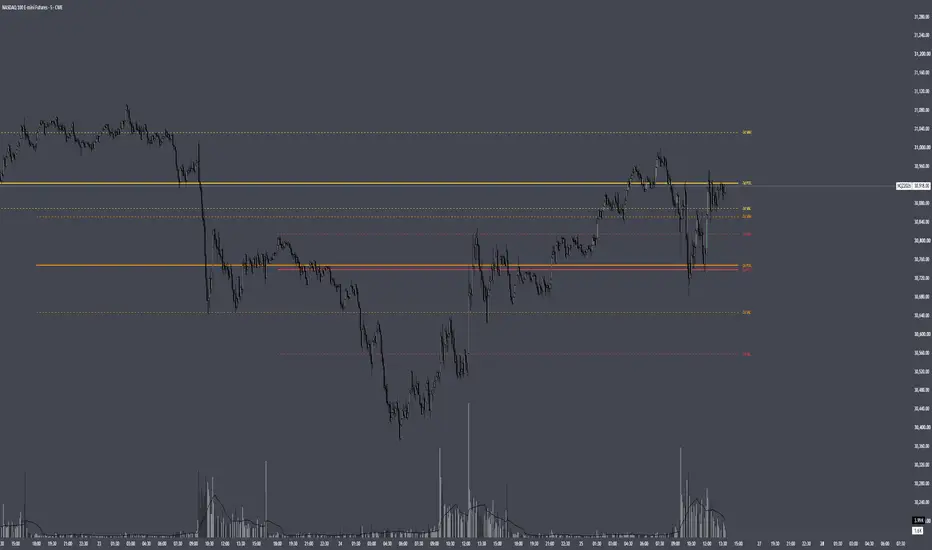
Past Session POC / VAH / VAL (Full Day)
Plots the Point of Control, Value Area High and Value Area Low from up to 5 previous full trading sessions (for CME futures, the 18:00 ET open through the 17:00 ET close).
HOW IT WORKS
Instead of estimating volume from chart candles, the script pulls lower-timeframe data (1 minute by default) and distributes each intrabar's volume across the price levels it actually traded through. This builds a full volume-at-price profile for each session, so the levels closely match TradingView's built-in Session Volume Profile when the row settings are the same.
- POC: the price row with the highest traded volume
- Value Area: expands outward from the POC, comparing the next two rows above and below and adding the larger side, until the chosen % of session volume (default 70%) is covered
- VAH / VAL: the top and bottom of that value area
SETTINGS
Profile: set Rows Layout, Row Size and Value Area % to match your Session Volume Profile. "Ticks Per Row" is recommended for precise levels (e.g. 4 ticks = 1 point on NQ).
Sessions: show or hide the POC, VAH and VAL for each of the last 5 sessions individually, each with its own colour.
Display: line widths and styles, how far lines extend past the current bar, and label position and size.
NOTES
- Intrabar Timeframe must be equal to or lower than the chart timeframe.
- Levels are calculated once each session closes, so they do not repaint.
- Built from intrabar candle data, not tick data, so on sessions where two rows are nearly tied the POC can occasionally differ by one row from the built-in profile.
Plots the Point of Control, Value Area High and Value Area Low from up to 5 previous full trading sessions (for CME futures, the 18:00 ET open through the 17:00 ET close).
HOW IT WORKS
Instead of estimating volume from chart candles, the script pulls lower-timeframe data (1 minute by default) and distributes each intrabar's volume across the price levels it actually traded through. This builds a full volume-at-price profile for each session, so the levels closely match TradingView's built-in Session Volume Profile when the row settings are the same.
- POC: the price row with the highest traded volume
- Value Area: expands outward from the POC, comparing the next two rows above and below and adding the larger side, until the chosen % of session volume (default 70%) is covered
- VAH / VAL: the top and bottom of that value area
SETTINGS
Profile: set Rows Layout, Row Size and Value Area % to match your Session Volume Profile. "Ticks Per Row" is recommended for precise levels (e.g. 4 ticks = 1 point on NQ).
Sessions: show or hide the POC, VAH and VAL for each of the last 5 sessions individually, each with its own colour.
Display: line widths and styles, how far lines extend past the current bar, and label position and size.
NOTES
- Intrabar Timeframe must be equal to or lower than the chart timeframe.
- Levels are calculated once each session closes, so they do not repaint.
- Built from intrabar candle data, not tick data, so on sessions where two rows are nearly tied the POC can occasionally differ by one row from the built-in profile.
Mã nguồn mở
Theo đúng tinh thần TradingView, tác giả của tập lệnh này đã công bố nó dưới dạng mã nguồn mở, để các nhà giao dịch có thể xem xét và xác minh chức năng. Chúc mừng tác giả! Mặc dù bạn có thể sử dụng miễn phí, hãy nhớ rằng việc công bố lại mã phải tuân theo Nội quy.

Thông báo miễn trừ trách nhiệm
Thông tin và các ấn phẩm này không nhằm mục đích, và không cấu thành, lời khuyên hoặc khuyến nghị về tài chính, đầu tư, giao dịch hay các loại khác do TradingView cung cấp hoặc xác nhận. Đọc thêm tại Điều khoản Sử dụng.
Mã nguồn mở
Theo đúng tinh thần TradingView, tác giả của tập lệnh này đã công bố nó dưới dạng mã nguồn mở, để các nhà giao dịch có thể xem xét và xác minh chức năng. Chúc mừng tác giả! Mặc dù bạn có thể sử dụng miễn phí, hãy nhớ rằng việc công bố lại mã phải tuân theo Nội quy.
Thông báo miễn trừ trách nhiệm
Thông tin và các ấn phẩm này không nhằm mục đích, và không cấu thành, lời khuyên hoặc khuyến nghị về tài chính, đầu tư, giao dịch hay các loại khác do TradingView cung cấp hoặc xác nhận. Đọc thêm tại Điều khoản Sử dụng.