OPEN-SOURCE SCRIPT
Trading Checklist with Score
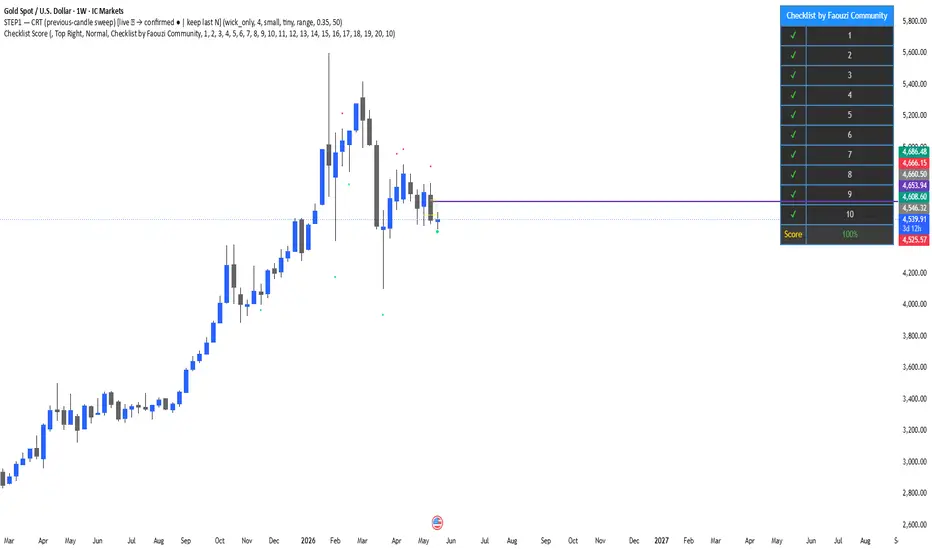
This indicator displays a customizable trading checklist directly on the chart.
It is designed to help discretionary traders organize their trade validation process before entering a position. The script does not generate buy or sell signals, does not automate trading decisions, and does not make any performance claims.
Main features:
• Up to 20 checklist rows
• 10 rows displayed by default
• Adjustable number of visible rows from 1 to 20
• Optional trade score based only on the visible checklist rows
• Custom text for each checklist item
• Custom table position, colors, text size, and header
• Optional symbol pinning, so the checklist can be linked to one chart symbol
How to use:
1. Add the indicator to the chart.
2. Open the indicator settings.
3. Edit each checklist row with your own trading criteria.
4. Select the number of visible rows.
5. Check or uncheck each row depending on your trade plan.
6. Use the score as an organizational aid, not as a trading signal.
This script is intended for education, journaling, and discretionary trade preparation. It does not predict market direction and should not be used as a standalone trading system.
Credits:
This version was customized and published by Faouzi Community. If this script is based on or inspired by another open-source checklist script, credit to the original author must be preserved according to TradingView’s open-source reuse rules.
It is designed to help discretionary traders organize their trade validation process before entering a position. The script does not generate buy or sell signals, does not automate trading decisions, and does not make any performance claims.
Main features:
• Up to 20 checklist rows
• 10 rows displayed by default
• Adjustable number of visible rows from 1 to 20
• Optional trade score based only on the visible checklist rows
• Custom text for each checklist item
• Custom table position, colors, text size, and header
• Optional symbol pinning, so the checklist can be linked to one chart symbol
How to use:
1. Add the indicator to the chart.
2. Open the indicator settings.
3. Edit each checklist row with your own trading criteria.
4. Select the number of visible rows.
5. Check or uncheck each row depending on your trade plan.
6. Use the score as an organizational aid, not as a trading signal.
This script is intended for education, journaling, and discretionary trade preparation. It does not predict market direction and should not be used as a standalone trading system.
Credits:
This version was customized and published by Faouzi Community. If this script is based on or inspired by another open-source checklist script, credit to the original author must be preserved according to TradingView’s open-source reuse rules.
Mã nguồn mở
Theo đúng tinh thần TradingView, tác giả của tập lệnh này đã công bố nó dưới dạng mã nguồn mở, để các nhà giao dịch có thể xem xét và xác minh chức năng. Chúc mừng tác giả! Mặc dù bạn có thể sử dụng miễn phí, hãy nhớ rằng việc công bố lại mã phải tuân theo Nội quy.

Thông báo miễn trừ trách nhiệm
Thông tin và các ấn phẩm này không nhằm mục đích, và không cấu thành, lời khuyên hoặc khuyến nghị về tài chính, đầu tư, giao dịch hay các loại khác do TradingView cung cấp hoặc xác nhận. Đọc thêm tại Điều khoản Sử dụng.
Mã nguồn mở
Theo đúng tinh thần TradingView, tác giả của tập lệnh này đã công bố nó dưới dạng mã nguồn mở, để các nhà giao dịch có thể xem xét và xác minh chức năng. Chúc mừng tác giả! Mặc dù bạn có thể sử dụng miễn phí, hãy nhớ rằng việc công bố lại mã phải tuân theo Nội quy.
Thông báo miễn trừ trách nhiệm
Thông tin và các ấn phẩm này không nhằm mục đích, và không cấu thành, lời khuyên hoặc khuyến nghị về tài chính, đầu tư, giao dịch hay các loại khác do TradingView cung cấp hoặc xác nhận. Đọc thêm tại Điều khoản Sử dụng.