Cập nhật
Precision GapFinder
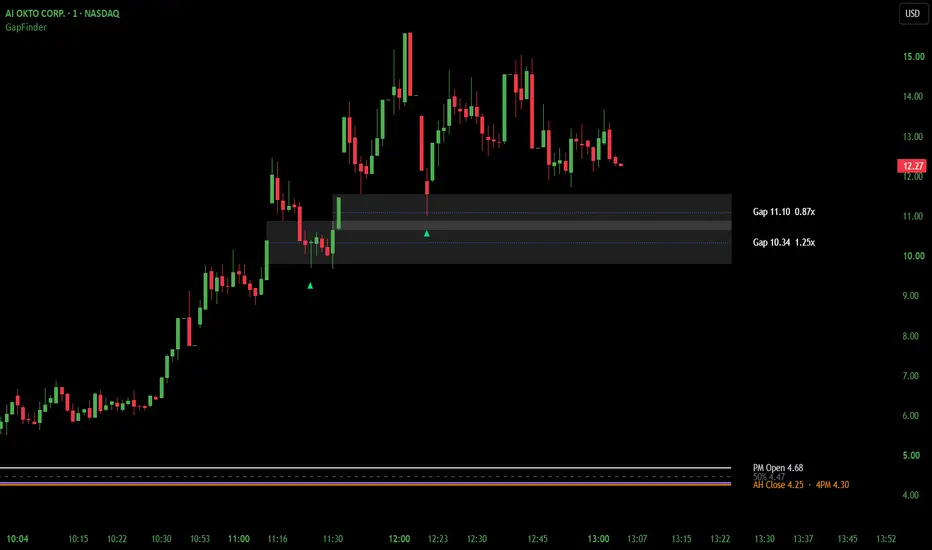
WHAT GAPFINDER IS
GapFinder is a price overlay that draws fair value gaps and the overnight gap, and marks the bar where price reclaims a gap. A fair value gap forms when one candle moves fast enough that the candles on either side of it don't overlap, leaving a space price skipped through. GapFinder finds these gaps on a higher timeframe, keeps them on the chart as zones until price closes through them, and marks the first time price comes back and reclaims one.
The overnight gap is the space between the prior after-hours close and the premarket open. GapFinder draws both levels with a 50% line between them, so you can see at a glance whether price is holding the gap, working back into it or filling it.
It is intended for intraday traders who want gap structure and overnight levels drawn on the chart, with a mark that shows when a gap held, and who make the trading decision themselves.
WHAT MAKES IT DIFFERENT
Gaps behave like structure, not a timer. There is no time expiry. A gap stays on the chart until a bar on the gap timeframe closes below it, and then it leaves the chart instead of staying as a faded box. Gaps far from price are hidden, not deleted, and come back when price returns.
The chart stays readable. When one push leaves a stack of gaps, Nearest Gap Only hides a lower gap while a newer gap sits above it, until price trades back into it. A new gap that mostly overlaps a live one is not drawn twice.
Gaps and overnight levels share one view. The overnight gap gives context for the open, and the fair value gaps show where price may find support. GapFinder draws both on the same chart.
The mark describes price, not a trade. The Reclaim mark shows that price came back to a gap and reclaimed it. It does not say whether to buy.
FAIR VALUE GAPS
Gaps are found on the FVG Timeframe, 5 minutes by default, and drawn on the chart you are viewing. The chart timeframe must be at or below the FVG Timeframe; a warning appears if it isn't. A gap is confirmed when the third candle of the pattern closes. Confirmed gaps do not repaint.
Each gap is labeled with its midpoint and its size as a multiple of ATR on the FVG Timeframe. Gaps smaller than the Minimum Size, 0.75 x ATR by default, are skipped. A blue box is a live gap. It turns white once its Reclaim mark has printed, and stays on the chart as possible support until it is closed through.
A gap is removed when a bar on the FVG Timeframe closes below its bottom. A wick below does not remove it. Max Gaps Shown sets how many gaps are kept; when a new gap forms past that count, the oldest is removed.
Relevance Distance hides gaps whose midpoint is farther than 5 x ATR from price by default. The check is made on bar close, and a Relevance Buffer keeps a gap near that edge from flickering in and out. Nearest Gap Only hides a lower gap while a newer gap sits above it and price has not traded back into it, so a premarket stair-step of gaps shows only the nearest floor.
RECLAIM MARK
The ▲ marks the bar where price reclaimed a gap. Two methods are available.
Midpoint Reclaim, the default, prints on the first close back above a gap's midpoint after price has traded below it. It waits for price to test the gap.
Higher Low + Break prints when price enters the gap, its lowest low holds for at least one bar, and a bar then closes above the high of the bar that made that low. It can mark a shallow hold that never reaches the midpoint.
Each gap gets one mark. The mark is committed on bar close. With Live Reclaim Preview on, it also shows on the forming bar as soon as the condition passes, and disappears if the bar fades before it closes. Hovering the mark shows the gap, its midpoint, its size and the method that fired. The mark shows what price did. It is not a buy signal. Use confirmation of your choice.
OVERNIGHT GAP
Lines are drawn for the prior after-hours close and the premarket open, with a dashed 50% line between them when the gap is large enough to matter. The prior 4PM close can be turned on. When the 4PM close sits close to the after-hours close, the two share one label so they don't print on top of each other. These lines draw only on an intraday chart with extended hours on.
ALERTS
Two events can alert: a committed Reclaim mark, and a new gap being drawn. Create one alert on GapFinder using "Any alert() function call" and choose which events send in the Alerts settings. All alerts fire on bar close. An existing alert keeps the settings it was created with, so recreate it after changing them.
HOW TO READ IT
Read the overnight gap first. Whether price holds above the premarket open, works back to the 50% line or fills to the after-hours close tells you a lot about the day. Then read the fair value gaps as the places price may find support on a pullback. A Reclaim mark means price came back to a gap and recovered it under the selected method. A gap that is closed through is gone, and the next gap below becomes the level to watch. Treat an empty area as no nearby gap structure, not a missing calculation.
LIMITATIONS
A gap is confirmed only when its third candle closes on the FVG Timeframe, so it appears after the move that made it. GapFinder is built for a 1-min chart; on seconds charts a single bar close can print a mark. A gap that forms across a trading halt is drawn like any other gap, though no trading took place inside it. The overnight layer depends on extended-hours data and does not draw on regular-hours charts or on instruments without an extended session. On very wide-range days the overnight labels can crowd together when zoomed far out.
GapFinder does not predict future prices, does not manage risk, and does not guarantee any outcome.
LICENSE
GapFinder is original work by MohaveTrader, published open-source under the Mozilla Public License 2.0.
DISCLAIMER
GapFinder's gaps, levels and marks are analytical structures derived from the rules described above, not recommendations to buy or sell any instrument. You remain solely responsible for every trading decision.
GapFinder is a price overlay that draws fair value gaps and the overnight gap, and marks the bar where price reclaims a gap. A fair value gap forms when one candle moves fast enough that the candles on either side of it don't overlap, leaving a space price skipped through. GapFinder finds these gaps on a higher timeframe, keeps them on the chart as zones until price closes through them, and marks the first time price comes back and reclaims one.
The overnight gap is the space between the prior after-hours close and the premarket open. GapFinder draws both levels with a 50% line between them, so you can see at a glance whether price is holding the gap, working back into it or filling it.
It is intended for intraday traders who want gap structure and overnight levels drawn on the chart, with a mark that shows when a gap held, and who make the trading decision themselves.
WHAT MAKES IT DIFFERENT
Gaps behave like structure, not a timer. There is no time expiry. A gap stays on the chart until a bar on the gap timeframe closes below it, and then it leaves the chart instead of staying as a faded box. Gaps far from price are hidden, not deleted, and come back when price returns.
The chart stays readable. When one push leaves a stack of gaps, Nearest Gap Only hides a lower gap while a newer gap sits above it, until price trades back into it. A new gap that mostly overlaps a live one is not drawn twice.
Gaps and overnight levels share one view. The overnight gap gives context for the open, and the fair value gaps show where price may find support. GapFinder draws both on the same chart.
The mark describes price, not a trade. The Reclaim mark shows that price came back to a gap and reclaimed it. It does not say whether to buy.
FAIR VALUE GAPS
Gaps are found on the FVG Timeframe, 5 minutes by default, and drawn on the chart you are viewing. The chart timeframe must be at or below the FVG Timeframe; a warning appears if it isn't. A gap is confirmed when the third candle of the pattern closes. Confirmed gaps do not repaint.
Each gap is labeled with its midpoint and its size as a multiple of ATR on the FVG Timeframe. Gaps smaller than the Minimum Size, 0.75 x ATR by default, are skipped. A blue box is a live gap. It turns white once its Reclaim mark has printed, and stays on the chart as possible support until it is closed through.
A gap is removed when a bar on the FVG Timeframe closes below its bottom. A wick below does not remove it. Max Gaps Shown sets how many gaps are kept; when a new gap forms past that count, the oldest is removed.
Relevance Distance hides gaps whose midpoint is farther than 5 x ATR from price by default. The check is made on bar close, and a Relevance Buffer keeps a gap near that edge from flickering in and out. Nearest Gap Only hides a lower gap while a newer gap sits above it and price has not traded back into it, so a premarket stair-step of gaps shows only the nearest floor.
RECLAIM MARK
The ▲ marks the bar where price reclaimed a gap. Two methods are available.
Midpoint Reclaim, the default, prints on the first close back above a gap's midpoint after price has traded below it. It waits for price to test the gap.
Higher Low + Break prints when price enters the gap, its lowest low holds for at least one bar, and a bar then closes above the high of the bar that made that low. It can mark a shallow hold that never reaches the midpoint.
Each gap gets one mark. The mark is committed on bar close. With Live Reclaim Preview on, it also shows on the forming bar as soon as the condition passes, and disappears if the bar fades before it closes. Hovering the mark shows the gap, its midpoint, its size and the method that fired. The mark shows what price did. It is not a buy signal. Use confirmation of your choice.
OVERNIGHT GAP
Lines are drawn for the prior after-hours close and the premarket open, with a dashed 50% line between them when the gap is large enough to matter. The prior 4PM close can be turned on. When the 4PM close sits close to the after-hours close, the two share one label so they don't print on top of each other. These lines draw only on an intraday chart with extended hours on.
ALERTS
Two events can alert: a committed Reclaim mark, and a new gap being drawn. Create one alert on GapFinder using "Any alert() function call" and choose which events send in the Alerts settings. All alerts fire on bar close. An existing alert keeps the settings it was created with, so recreate it after changing them.
HOW TO READ IT
Read the overnight gap first. Whether price holds above the premarket open, works back to the 50% line or fills to the after-hours close tells you a lot about the day. Then read the fair value gaps as the places price may find support on a pullback. A Reclaim mark means price came back to a gap and recovered it under the selected method. A gap that is closed through is gone, and the next gap below becomes the level to watch. Treat an empty area as no nearby gap structure, not a missing calculation.
LIMITATIONS
A gap is confirmed only when its third candle closes on the FVG Timeframe, so it appears after the move that made it. GapFinder is built for a 1-min chart; on seconds charts a single bar close can print a mark. A gap that forms across a trading halt is drawn like any other gap, though no trading took place inside it. The overnight layer depends on extended-hours data and does not draw on regular-hours charts or on instruments without an extended session. On very wide-range days the overnight labels can crowd together when zoomed far out.
GapFinder does not predict future prices, does not manage risk, and does not guarantee any outcome.
LICENSE
GapFinder is original work by MohaveTrader, published open-source under the Mozilla Public License 2.0.
DISCLAIMER
GapFinder's gaps, levels and marks are analytical structures derived from the rules described above, not recommendations to buy or sell any instrument. You remain solely responsible for every trading decision.
Phát hành các Ghi chú
V1.1 UPDATE — October 2026RECLAIM
• Reclaim Method now has three choices, and All is the new default (Midpoint Reclaim was the default in v1.0). All marks a gap with whichever method qualifies first, Midpoint Reclaim or Higher Low + Break, so shallow and deep dips are both caught. If both qualify on the same bar, it counts as Midpoint Reclaim. Each method is still available on its own.
• Re-arm Each Session, on by default. A gap can now print one Reclaim per trading day instead of one in total. At the start of the day (04:00 with extended hours on, 09:30 without), every gap's Reclaim setup starts over and a white gap turns blue again. Turn it off for v1.0's one Reclaim per gap.
• Higher Low + Break now starts only after a candle closes at or below the top of the gap. A wick into the gap that closes back above it no longer starts a setup, as it did in v1.0. In v1.0, a wick that only brushed the top of a gap could start a setup, and those marks often came before price fell back through the gap. Requiring a close at or below the gap top means the mark only follows a real test of the gap.
• The alert now names the method that fired, as the mark's tooltip does. Show Method on Mark writes M or HL under the mark.
• Reclaim marks are white by default (were green), the same color a gap turns once it is reclaimed.
• Reclaim marks are anchored just below their candle and keep that position at every zoom level. Mark Spacing is removed, since TradingView now sets the distance.
• If you added GapFinder before this update, your saved settings are kept. Choose All in Reclaim Method to use the new default.
The following images illustrate some of the changes regarding Reclaim Markers and Reclaim Setups. The first image shows the most recent HL reclaim marker in live replay while the bar was still forming. Note the gap is blue. The second image shows the gap turning white after the bar closed, and the lower gap hidden from the chart because price moved outside the Relevance Distance. The third image shows the start of the next session, confirmed by the PM Open of 46.59, and the same gap changing back to blue. The fourth image shows a new gap forming above in the new session.
GAPS
• Auto FVG Timeframe, off by default, picks the gap timeframe from the chart: seconds and 1-min charts use 5-min gaps, 2 to 5-min charts use 15-min gaps, 10 and 15-min charts use 1-hour gaps, 30-min and 1-hour charts use 4-hour gaps, and 2 and 4-hour charts use daily gaps. Switching between a 1-min and a 5-min chart then needs no settings change. With it off, the FVG Timeframe setting works as before.
CHART
• A gap label that sits close to an overnight line is added to that line's label instead of drawing on top of it.
• Gaps and overnight lines extend 10 bars past the last bar by default (was 20).
PINE SCREENER
• New outputs for Pine Screener. These outputs appear only in the Data Window and in Pine Screener. They do not draw anything on the chart.
• Bars Since Reclaim: bars since the last Reclaim mark.
• Inside Gap: 1 when the close is inside a live gap, otherwise 0.
• Gap Distance ATR: distance from the close to the nearest live gap, in ATR on the FVG timeframe. 0 inside a gap.
• Nearest Gap Mid: midpoint price of that gap.
• Live Gaps: gaps still on the chart, hidden ones included.
• Overnight Gap %: premarket open versus the prior after-hours close. Positive is a gap up.
• Overnight Fill %: how much of the overnight gap price has given back. 0 is at the PM Open, 50 is the 50% line, 100 is the AH Close.
• The overnight outputs read extended-hours data on their own, so they also work on regular-hours charts. The overnight lines themselves still draw only with extended hours on.
• To use: add GapFinder to your favorites, open Pine Screener, choose a watchlist and the 5-min timeframe. Pine Screener calculates on the last 500 bars only. GapFinder's settings in Pine Screener are opened from the gear icon next to the timeframe. With Auto FVG Timeframe on, a 5-min scan uses 15-min gaps.
• Pine Screener limitation: FVG detection in the Screener uses regular-session bars. Gaps formed during premarket or after-hours trading may appear on the chart but will not appear in the Screener's FVG columns. Overnight Gap % and Overnight Fill % remain available to monitor the overnight price gap.

@MohaveTrader
Context First — Signals Second
Precision Trading Tools
Structure • Flow • Momentum
Context First — Signals Second
Precision Trading Tools
Structure • Flow • Momentum
Thông báo miễn trừ trách nhiệm
Thông tin và các ấn phẩm này không nhằm mục đích, và không cấu thành, lời khuyên hoặc khuyến nghị về tài chính, đầu tư, giao dịch hay các loại khác do TradingView cung cấp hoặc xác nhận. Đọc thêm tại Điều khoản Sử dụng.
@MohaveTrader
Context First — Signals Second
Precision Trading Tools
Structure • Flow • Momentum
Context First — Signals Second
Precision Trading Tools
Structure • Flow • Momentum
Thông báo miễn trừ trách nhiệm
Thông tin và các ấn phẩm này không nhằm mục đích, và không cấu thành, lời khuyên hoặc khuyến nghị về tài chính, đầu tư, giao dịch hay các loại khác do TradingView cung cấp hoặc xác nhận. Đọc thêm tại Điều khoản Sử dụng.