OPEN-SOURCE SCRIPT
Quiet Period Box with Key Earnings Level
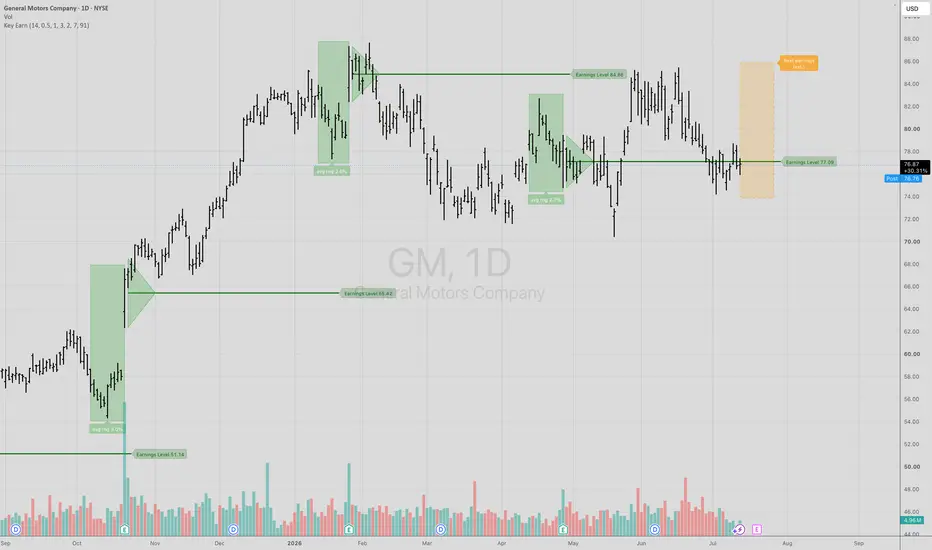
The green box is the new programming for the "Quiet Period" to show when a company doesn't comment on anything about the prospects for the company which means that analysts can have an undue influence on the stock price during the quiet period.
Once the company reports earnings, a "Green Triangle" is created to include the day before and the day after the earnings announcement to then reveal the important price level, or "Key Level" which is the mid-point of this price action around the earnings release.
How to USE the indicator: The interesting part of this analysis is how these reference price levels have an influence in the future trading of shares. If a stock is in a bullish trend, the mid-point of the earnings release is the ideal, low-risk point to enter long with a stop 1, 2 or 3 ranges on the other side of the "Key Level" in case it doesn't work out. The target can be a variety of techniques from using the width of the "quiet period" range added to the "earnings level" to derive a price target.
The inverse would also be true. If the general trend of a stock was down, the mid-point of the 'earnings level' would provide supply and stop the price advance after a down move on earnings. You can see for yourself looking back over the history of the stock whether or not this method would be a profitable approach or not.
What I like is having the knowledge of where the important levels are on a stock chart so when the price gets there I can then decide whether or not to take a trade. You can set alerts on the "earnings level" and the highs and lows of the "quiet period" box to alert you to when a stock is worth looking at.
Over a year ago, I made the "Earnings Level" free to all users here at TradingView after keeping it a fee-based private indicator for close to 10 years. I feel a great debt of gratitude for TradingView for creating this wonderful platform for all of us to share ideas and I wanted everyone to have this powerful indicator to help investors and traders alike.
Now with this "Quiet Period" box publication, the patterns in the chaos of market action can be more easily found and you can be more at peace with the volatility in each stock when you can see the stock has been in a pre-defined time-zone for comparison.
Wishing you all the best of good fortune in your investing and trading and I look forward to hearing your questions.
A huge thank you goes to Ivan Labrie here at TradingView IvanLabrie for writing the code for this indicator. He is a champion of technical analysis and the many methods of the Timemode, Key Earnings, Risk, Reward, Psychology, Trend and options strategies.
Once the company reports earnings, a "Green Triangle" is created to include the day before and the day after the earnings announcement to then reveal the important price level, or "Key Level" which is the mid-point of this price action around the earnings release.
How to USE the indicator: The interesting part of this analysis is how these reference price levels have an influence in the future trading of shares. If a stock is in a bullish trend, the mid-point of the earnings release is the ideal, low-risk point to enter long with a stop 1, 2 or 3 ranges on the other side of the "Key Level" in case it doesn't work out. The target can be a variety of techniques from using the width of the "quiet period" range added to the "earnings level" to derive a price target.
The inverse would also be true. If the general trend of a stock was down, the mid-point of the 'earnings level' would provide supply and stop the price advance after a down move on earnings. You can see for yourself looking back over the history of the stock whether or not this method would be a profitable approach or not.
What I like is having the knowledge of where the important levels are on a stock chart so when the price gets there I can then decide whether or not to take a trade. You can set alerts on the "earnings level" and the highs and lows of the "quiet period" box to alert you to when a stock is worth looking at.
Over a year ago, I made the "Earnings Level" free to all users here at TradingView after keeping it a fee-based private indicator for close to 10 years. I feel a great debt of gratitude for TradingView for creating this wonderful platform for all of us to share ideas and I wanted everyone to have this powerful indicator to help investors and traders alike.
Now with this "Quiet Period" box publication, the patterns in the chaos of market action can be more easily found and you can be more at peace with the volatility in each stock when you can see the stock has been in a pre-defined time-zone for comparison.
Wishing you all the best of good fortune in your investing and trading and I look forward to hearing your questions.
A huge thank you goes to Ivan Labrie here at TradingView IvanLabrie for writing the code for this indicator. He is a champion of technical analysis and the many methods of the Timemode, Key Earnings, Risk, Reward, Psychology, Trend and options strategies.
Mã nguồn mở
Theo đúng tinh thần TradingView, tác giả của tập lệnh này đã công bố nó dưới dạng mã nguồn mở, để các nhà giao dịch có thể xem xét và xác minh chức năng. Chúc mừng tác giả! Mặc dù bạn có thể sử dụng miễn phí, hãy nhớ rằng việc công bố lại mã phải tuân theo Nội quy.

Join me in the trading room KEY HIDDEN LEVELS here at TradingView.com
Thông báo miễn trừ trách nhiệm
Thông tin và các ấn phẩm này không nhằm mục đích, và không cấu thành, lời khuyên hoặc khuyến nghị về tài chính, đầu tư, giao dịch hay các loại khác do TradingView cung cấp hoặc xác nhận. Đọc thêm tại Điều khoản Sử dụng.
Mã nguồn mở
Theo đúng tinh thần TradingView, tác giả của tập lệnh này đã công bố nó dưới dạng mã nguồn mở, để các nhà giao dịch có thể xem xét và xác minh chức năng. Chúc mừng tác giả! Mặc dù bạn có thể sử dụng miễn phí, hãy nhớ rằng việc công bố lại mã phải tuân theo Nội quy.
Thông báo miễn trừ trách nhiệm
Thông tin và các ấn phẩm này không nhằm mục đích, và không cấu thành, lời khuyên hoặc khuyến nghị về tài chính, đầu tư, giao dịch hay các loại khác do TradingView cung cấp hoặc xác nhận. Đọc thêm tại Điều khoản Sử dụng.