OPEN-SOURCE SCRIPT
Auto-Basis ES to SPX
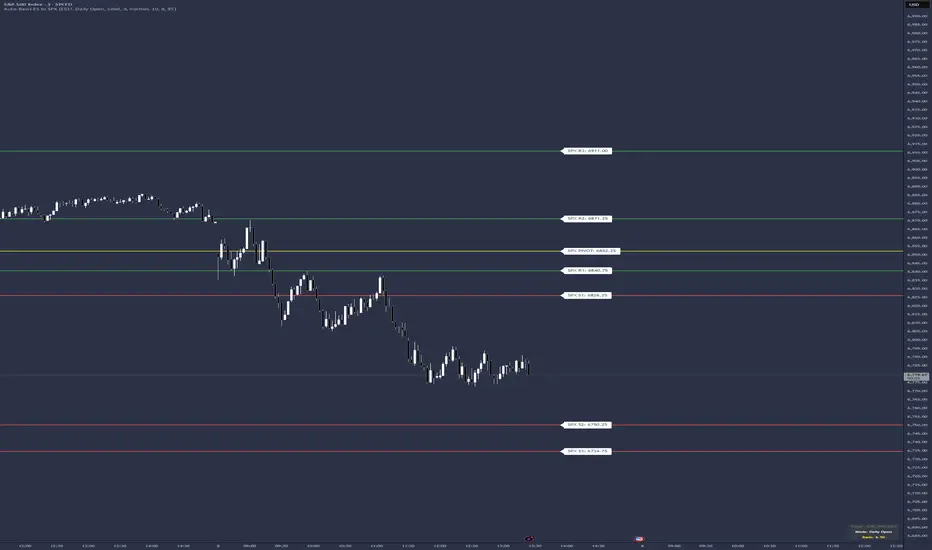
This indicator is a specialized utility for traders who analyze market structure using ES (S&P 500 E-mini Futures) levels but execute or monitor trades on the SPX (S&P 500 Cash Index).
Because futures contracts trade at a premium or discount to the cash index (the "Basis"), ES levels cannot be plotted directly on an SPX chart without significant manual math. This script automates that conversion by calculating the spread between a user-defined ES contract and the SPX index, applying that offset to your levels instantly.
How to Use
Input Levels: Paste your ES levels into the "Paste ES levels here" text area. The script recognizes the following format:
Pivot Level: 6150.25
Resistance Levels: 6165.50, 6180.75
Support Levels: 6140.25, 6125.00
Select Your Contract: Under the "ES Contract Ticker" setting, you can choose which contract to use for the basis calculation. It defaults to the front-month continuous contract (CME_MINI:ES1!), but can be changed to specific quarterly contracts (e.g., ESH2026).
Choose Basis Mode:
Daily Open: Capture and lock the spread at the 9:30 AM EST market open. This provides static, non-moving levels for the duration of the session.
Live: Continuously updates the spread, allowing levels to drift in real-time as the futures-to-cash relationship fluctuates.
Key Features
Automated Numbering: Automatically parses your input to label levels as R1, R2, R3... and S1, S2, S3... sequentially.
Customizable Line Styles: Choose between Solid, Dashed, or Dotted lines and adjust the thickness to fit your chart's theme.
Visual Zones: Toggle "Show Zones" to display a shaded area (adjustable in ticks) around each level for better context on supply and demand areas.
High-Contrast Labels: Labels default to Normal size with Black Text on a White Background, positioned to the right of the price action for maximum readability.
Information Dashboard: A small table in the Bottom Right displays the active Ticker, Basis Mode, and the current mathematical offset being applied.
Because futures contracts trade at a premium or discount to the cash index (the "Basis"), ES levels cannot be plotted directly on an SPX chart without significant manual math. This script automates that conversion by calculating the spread between a user-defined ES contract and the SPX index, applying that offset to your levels instantly.
How to Use
Input Levels: Paste your ES levels into the "Paste ES levels here" text area. The script recognizes the following format:
Pivot Level: 6150.25
Resistance Levels: 6165.50, 6180.75
Support Levels: 6140.25, 6125.00
Select Your Contract: Under the "ES Contract Ticker" setting, you can choose which contract to use for the basis calculation. It defaults to the front-month continuous contract (CME_MINI:ES1!), but can be changed to specific quarterly contracts (e.g., ESH2026).
Choose Basis Mode:
Daily Open: Capture and lock the spread at the 9:30 AM EST market open. This provides static, non-moving levels for the duration of the session.
Live: Continuously updates the spread, allowing levels to drift in real-time as the futures-to-cash relationship fluctuates.
Key Features
Automated Numbering: Automatically parses your input to label levels as R1, R2, R3... and S1, S2, S3... sequentially.
Customizable Line Styles: Choose between Solid, Dashed, or Dotted lines and adjust the thickness to fit your chart's theme.
Visual Zones: Toggle "Show Zones" to display a shaded area (adjustable in ticks) around each level for better context on supply and demand areas.
High-Contrast Labels: Labels default to Normal size with Black Text on a White Background, positioned to the right of the price action for maximum readability.
Information Dashboard: A small table in the Bottom Right displays the active Ticker, Basis Mode, and the current mathematical offset being applied.
Mã nguồn mở
Theo đúng tinh thần TradingView, tác giả của tập lệnh này đã công bố nó dưới dạng mã nguồn mở, để các nhà giao dịch có thể xem xét và xác minh chức năng. Chúc mừng tác giả! Mặc dù bạn có thể sử dụng miễn phí, hãy nhớ rằng việc công bố lại mã phải tuân theo Nội quy.

Tatanka Trading | Auction Market Theory tools for futures
Thông báo miễn trừ trách nhiệm
Thông tin và các ấn phẩm này không nhằm mục đích, và không cấu thành, lời khuyên hoặc khuyến nghị về tài chính, đầu tư, giao dịch hay các loại khác do TradingView cung cấp hoặc xác nhận. Đọc thêm tại Điều khoản Sử dụng.
Mã nguồn mở
Theo đúng tinh thần TradingView, tác giả của tập lệnh này đã công bố nó dưới dạng mã nguồn mở, để các nhà giao dịch có thể xem xét và xác minh chức năng. Chúc mừng tác giả! Mặc dù bạn có thể sử dụng miễn phí, hãy nhớ rằng việc công bố lại mã phải tuân theo Nội quy.
Tatanka Trading | Auction Market Theory tools for futures
Thông báo miễn trừ trách nhiệm
Thông tin và các ấn phẩm này không nhằm mục đích, và không cấu thành, lời khuyên hoặc khuyến nghị về tài chính, đầu tư, giao dịch hay các loại khác do TradingView cung cấp hoặc xác nhận. Đọc thêm tại Điều khoản Sử dụng.