OPEN-SOURCE SCRIPT
LRLR & HRLR Liquidity Runs V2
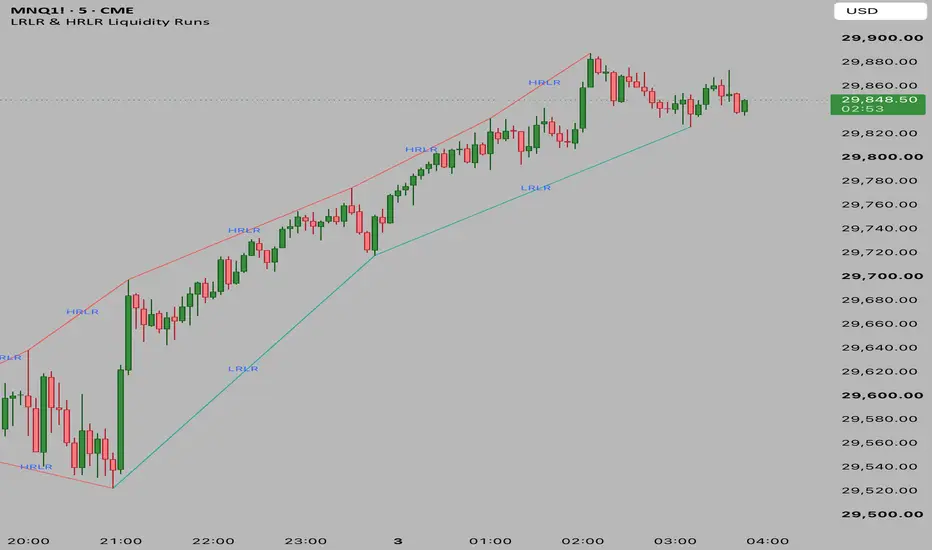
Its primary purpose is to automatically identify, classify, and connect consecutive swing highs and swing lows to highlight potential Liquidity Runs based on ICT/Smart Money Concepts.
Here is a breakdown of how it works:
1. Pivot Identification
The script relies on identifying structural pivot points (swing highs and lows).
It uses ta.pivothigh and ta.pivotlow to find these points.
By default, a pivot is confirmed if the price is the highest/lowest point compared to the 5 bars on its left and 5 bars on its right (customizable via leftBars and rightBars inputs).
2. Core Logic (LRLR vs HRLR)
Once a new pivot is identified, the script compares it to the immediate previous pivot of the same type to classify the resistance of the liquidity run:
For Pivot Highs (Resistance/Tops):
LRLR (Low Resistance Liquidity Run): If the new Pivot High is Lower than or Equal to the previous Pivot High. (Price failed to break the previous high, leaving clean liquidity above).
HRLR (High Resistance Liquidity Run): If the new Pivot High is Higher than the previous Pivot High. (Price successfully broke the previous high, taking out the liquidity).
For Pivot Lows (Support/Bottoms):
LRLR (Low Resistance Liquidity Run): If the new Pivot Low is Higher than or Equal to the previous Pivot Low. (Price failed to break the previous low, leaving clean liquidity below).
HRLR (High Resistance Liquidity Run): If the new Pivot Low is Lower than the previous Pivot Low. (Price successfully broke the previous low, taking out the liquidity).
3. Visual Output
Whenever a new pivot is confirmed, the script draws a Line connecting the previous pivot to the new pivot.
The color of the line changes based on whether it's an LRLR (default Greenish) or an HRLR (default Reddish).
A Text Label ("LRLR" or "HRLR") is plotted precisely at the midpoint of the line for easy visual identification.
Here is a breakdown of how it works:
1. Pivot Identification
The script relies on identifying structural pivot points (swing highs and lows).
It uses ta.pivothigh and ta.pivotlow to find these points.
By default, a pivot is confirmed if the price is the highest/lowest point compared to the 5 bars on its left and 5 bars on its right (customizable via leftBars and rightBars inputs).
2. Core Logic (LRLR vs HRLR)
Once a new pivot is identified, the script compares it to the immediate previous pivot of the same type to classify the resistance of the liquidity run:
For Pivot Highs (Resistance/Tops):
LRLR (Low Resistance Liquidity Run): If the new Pivot High is Lower than or Equal to the previous Pivot High. (Price failed to break the previous high, leaving clean liquidity above).
HRLR (High Resistance Liquidity Run): If the new Pivot High is Higher than the previous Pivot High. (Price successfully broke the previous high, taking out the liquidity).
For Pivot Lows (Support/Bottoms):
LRLR (Low Resistance Liquidity Run): If the new Pivot Low is Higher than or Equal to the previous Pivot Low. (Price failed to break the previous low, leaving clean liquidity below).
HRLR (High Resistance Liquidity Run): If the new Pivot Low is Lower than the previous Pivot Low. (Price successfully broke the previous low, taking out the liquidity).
3. Visual Output
Whenever a new pivot is confirmed, the script draws a Line connecting the previous pivot to the new pivot.
The color of the line changes based on whether it's an LRLR (default Greenish) or an HRLR (default Reddish).
A Text Label ("LRLR" or "HRLR") is plotted precisely at the midpoint of the line for easy visual identification.
Mã nguồn mở
Theo đúng tinh thần TradingView, tác giả của tập lệnh này đã công bố nó dưới dạng mã nguồn mở, để các nhà giao dịch có thể xem xét và xác minh chức năng. Chúc mừng tác giả! Mặc dù bạn có thể sử dụng miễn phí, hãy nhớ rằng việc công bố lại mã phải tuân theo Nội quy.

Thông báo miễn trừ trách nhiệm
Thông tin và các ấn phẩm này không nhằm mục đích, và không cấu thành, lời khuyên hoặc khuyến nghị về tài chính, đầu tư, giao dịch hay các loại khác do TradingView cung cấp hoặc xác nhận. Đọc thêm tại Điều khoản Sử dụng.
Mã nguồn mở
Theo đúng tinh thần TradingView, tác giả của tập lệnh này đã công bố nó dưới dạng mã nguồn mở, để các nhà giao dịch có thể xem xét và xác minh chức năng. Chúc mừng tác giả! Mặc dù bạn có thể sử dụng miễn phí, hãy nhớ rằng việc công bố lại mã phải tuân theo Nội quy.
Thông báo miễn trừ trách nhiệm
Thông tin và các ấn phẩm này không nhằm mục đích, và không cấu thành, lời khuyên hoặc khuyến nghị về tài chính, đầu tư, giao dịch hay các loại khác do TradingView cung cấp hoặc xác nhận. Đọc thêm tại Điều khoản Sử dụng.