OPEN-SOURCE SCRIPT
Day-of-Week Effect
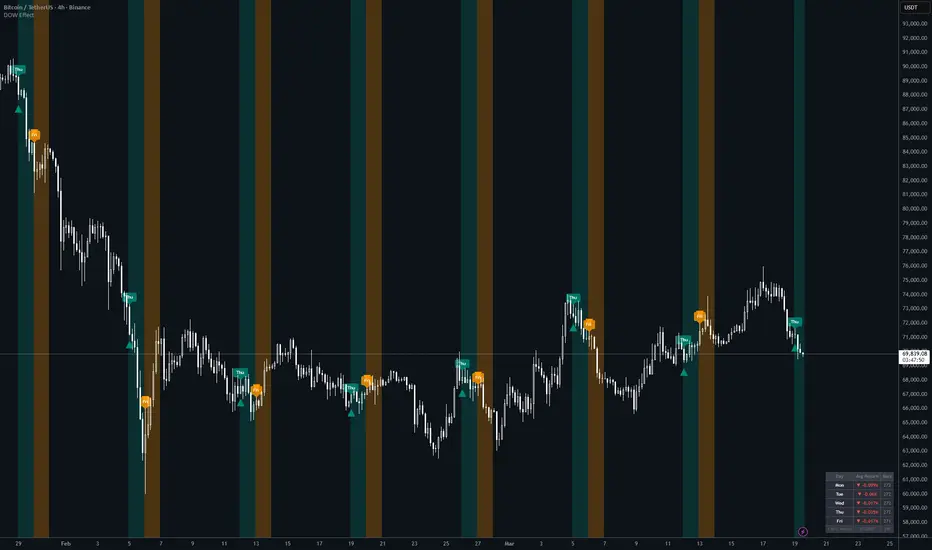
What the script does
The Day-of-Week Effect indicator visualises a well-known market anomaly: certain days of the week produce statistically different average returns. The script identifies your chosen entry and exit days on any chart, highlights them visually, and calculates the historical average close-to-close return for every weekday — so you can see at a glance whether the effect actually holds on your chosen instrument.
How it works
On each bar, the script reads the day of the week using Pine Script's built-in dayofweek variable. It detects the first bar of each new trading day using ta.change(time("D")), which prevents signals from firing on every intraday bar if you're on a sub-daily timeframe. It then accumulates a running sum and count of close-to-close returns per weekday across the entire chart history, dividing them at the last bar to produce the average return table.
How to use it
Open TradingView, paste the script into the Pine Editor and click "Add to chart." The indicator works best on the 1D timeframe. In the Settings panel, toggle which days you want highlighted as entry days (teal) and exit days (orange)
Why it's original
Most DOW indicators simply colour-code days. This one goes further by pairing the visual highlighting with a live per-weekday return breakdown calculated directly from your chart's own price history — so rather than applying a generic market assumption, you're validating the effect on your specific ticker and timeframe before acting on it.
Alerts
The script does not currently include alertcondition() calls. To add alerts, you can extend the script with:
Pine Script®
The Day-of-Week Effect indicator visualises a well-known market anomaly: certain days of the week produce statistically different average returns. The script identifies your chosen entry and exit days on any chart, highlights them visually, and calculates the historical average close-to-close return for every weekday — so you can see at a glance whether the effect actually holds on your chosen instrument.
How it works
On each bar, the script reads the day of the week using Pine Script's built-in dayofweek variable. It detects the first bar of each new trading day using ta.change(time("D")), which prevents signals from firing on every intraday bar if you're on a sub-daily timeframe. It then accumulates a running sum and count of close-to-close returns per weekday across the entire chart history, dividing them at the last bar to produce the average return table.
How to use it
Open TradingView, paste the script into the Pine Editor and click "Add to chart." The indicator works best on the 1D timeframe. In the Settings panel, toggle which days you want highlighted as entry days (teal) and exit days (orange)
- Use the stats table in the bottom-right to identify which days have historically been strongest on your instrument
- Tthen configure your entry/exit days accordingly
- The display settings let you turn off labels, background shading, or the table independently
Why it's original
Most DOW indicators simply colour-code days. This one goes further by pairing the visual highlighting with a live per-weekday return breakdown calculated directly from your chart's own price history — so rather than applying a generic market assumption, you're validating the effect on your specific ticker and timeframe before acting on it.
Alerts
The script does not currently include alertcondition() calls. To add alerts, you can extend the script with:
Mã nguồn mở
Theo đúng tinh thần TradingView, tác giả của tập lệnh này đã công bố nó dưới dạng mã nguồn mở, để các nhà giao dịch có thể xem xét và xác minh chức năng. Chúc mừng tác giả! Mặc dù bạn có thể sử dụng miễn phí, hãy nhớ rằng việc công bố lại mã phải tuân theo Nội quy.

Thông báo miễn trừ trách nhiệm
Thông tin và các ấn phẩm này không nhằm mục đích, và không cấu thành, lời khuyên hoặc khuyến nghị về tài chính, đầu tư, giao dịch hay các loại khác do TradingView cung cấp hoặc xác nhận. Đọc thêm tại Điều khoản Sử dụng.
Mã nguồn mở
Theo đúng tinh thần TradingView, tác giả của tập lệnh này đã công bố nó dưới dạng mã nguồn mở, để các nhà giao dịch có thể xem xét và xác minh chức năng. Chúc mừng tác giả! Mặc dù bạn có thể sử dụng miễn phí, hãy nhớ rằng việc công bố lại mã phải tuân theo Nội quy.
Thông báo miễn trừ trách nhiệm
Thông tin và các ấn phẩm này không nhằm mục đích, và không cấu thành, lời khuyên hoặc khuyến nghị về tài chính, đầu tư, giao dịch hay các loại khác do TradingView cung cấp hoặc xác nhận. Đọc thêm tại Điều khoản Sử dụng.