Cập nhật
Dealing Range
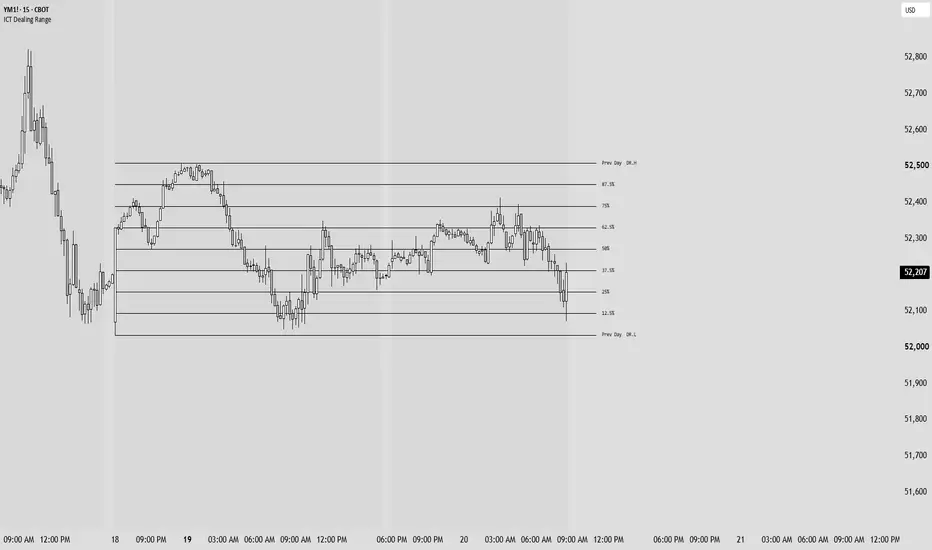
Dealing Range (DR) — Session Range Tracker
Automatically maps the full CME session range from 6:00 PM to 4:15 PM New York time, tracking the highest high and lowest low as the session develops in real time. DR.High and DR.Low expand bar by bar and freeze at session close, giving you a clean visual boundary of the day's full price delivery range.
Within that range, the indicator plots the 25%, 50%, and 75% equilibrium levels. The 50% acts as the session's premium/discount divide — price trading above it is in premium, below it is in discount. The 25% and 75% levels mark the first standard reaction zones within each half of the range, useful for anticipating where price may stall, reverse, or accelerate through.
At the open of each new session, the completed range is preserved as the Previous Dealing Range (PDR.High, PDR.Low) with its own set of percentage levels. These static reference lines carry forward as key context for the incoming session — particularly the PDR 50%, which frequently acts as a draw on liquidity or a decision point during the early hours of the new session.
All visual elements are independently configurable. Current DR boundaries, current DR levels, previous DR lines, and labels for both sessions can each be toggled, recolored, resized, and restyled without affecting one another.
Can set to only having one Range active at once, just used both to show both the ranges off, Works the same as the MTF DR just not using individual sessions for Higher time frame analysis.
Enjoy. :)
Automatically maps the full CME session range from 6:00 PM to 4:15 PM New York time, tracking the highest high and lowest low as the session develops in real time. DR.High and DR.Low expand bar by bar and freeze at session close, giving you a clean visual boundary of the day's full price delivery range.
Within that range, the indicator plots the 25%, 50%, and 75% equilibrium levels. The 50% acts as the session's premium/discount divide — price trading above it is in premium, below it is in discount. The 25% and 75% levels mark the first standard reaction zones within each half of the range, useful for anticipating where price may stall, reverse, or accelerate through.
At the open of each new session, the completed range is preserved as the Previous Dealing Range (PDR.High, PDR.Low) with its own set of percentage levels. These static reference lines carry forward as key context for the incoming session — particularly the PDR 50%, which frequently acts as a draw on liquidity or a decision point during the early hours of the new session.
All visual elements are independently configurable. Current DR boundaries, current DR levels, previous DR lines, and labels for both sessions can each be toggled, recolored, resized, and restyled without affecting one another.
Can set to only having one Range active at once, just used both to show both the ranges off, Works the same as the MTF DR just not using individual sessions for Higher time frame analysis.
Enjoy. :)
Phát hành các Ghi chú
Label Positioning Standard Deviation Levels
Phát hành các Ghi chú
Level names sit at the end of their linesEvery line now stops at one shared right edge, 10 bars past the live candle, and its name sits right there, centred on the level. Before, the lines ran on to the edge of the chart and passed straight through their own names, and in Boxed Zone mode the names drifted away from the box. "Right offset (bars)" moves the whole edge, and "Extend lines across chart" brings back the old look.
DR.L name back on its line
The DR.L name was pushed below its line by 10% of the range by default, so on a 60 point range it hung 6 points under the level it named. It now sits on the line. "DR.L Label Offset" still lifts it off when wanted.
Faded previous ranges stop at the handoff
With Show Previous Range on, the old range now ends where the new one locks instead of running on underneath it.
Smaller default text
Label size now defaults to small. Charts that already carry the script keep their saved settings, so reset to defaults to pick up the new layout.
Phát hành các Ghi chú
Tidied source comments; no change to how it works.Phát hành các Ghi chú
Clean look: the Boxed Zone and the previous range fill grey with no border, and the window tint is grey.Range logic and levels unchanged.

Thông báo miễn trừ trách nhiệm
Thông tin và các ấn phẩm này không nhằm mục đích, và không cấu thành, lời khuyên hoặc khuyến nghị về tài chính, đầu tư, giao dịch hay các loại khác do TradingView cung cấp hoặc xác nhận. Đọc thêm tại Điều khoản Sử dụng.
Thông báo miễn trừ trách nhiệm
Thông tin và các ấn phẩm này không nhằm mục đích, và không cấu thành, lời khuyên hoặc khuyến nghị về tài chính, đầu tư, giao dịch hay các loại khác do TradingView cung cấp hoặc xác nhận. Đọc thêm tại Điều khoản Sử dụng.