OPEN-SOURCE SCRIPT
MAGIC Auto Fib Extension Entry SL TP with Win Loss Stats
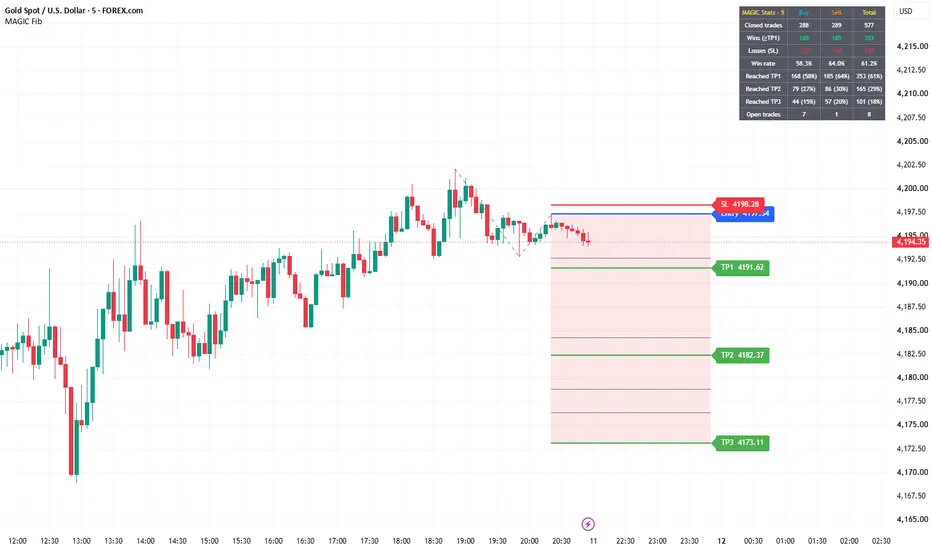
MAGIC Auto Fib Extension automatically finds market swings and draws a Trend-Based Fibonacci Extension with ready-made Entry, Stop Loss and three Take Profit levels — plus a dashboard that tracks how every past signal performed.
HOW IT WORKS
1. Swing detection
The script uses pivot highs and lows (adjustable left/right bars) to build an alternating chain of swing points.
2. A → B → C pattern
- Bullish: A = swing low, B = swing high, C = higher low between A and B.
- Bearish: A = swing high, B = swing low, C = lower high between B and A.
3. Fib extension
Levels are projected from point C using the A→B leg:
Level price = C ± (B − A) × ratio
Default "MAGIC" ratios: 0, 0.5, 0.618, 1.414, 1.618, 2, 2.272, 2.618 (all editable, each can be turned on/off).
4. Trade levels
- Entry = point C (level 0)
- Stop Loss = beyond point C or beyond point A, with an ATR(14) buffer
- TP1 / TP2 / TP3 = selectable fib levels (default 0.618 / 1.618 / 2.618)
Labels are updated with ✓ when a TP is reached and ✗ when the SL is hit.
CLEAN CHART
Only the latest setup is drawn by default ("Setups kept on chart" = 1). Older setups are removed from the chart but are still tracked in the background, so the statistics stay complete.
WIN / LOSS DASHBOARD
Shows Buy, Sell and Total columns:
- Closed trades, Wins, Losses, Win rate
- How many trades reached TP1, TP2 and TP3
- Currently open trades
Rules: a trade that reaches TP1 counts as a win (even if SL is hit afterwards). A trade that hits SL before TP1 counts as a loss. A trade closes at SL or TP3. If SL and a TP are touched in the same candle, SL is assumed first (conservative).
ALERTS
- New bullish / bearish setup (with Entry, SL, TP1–TP3 in the message)
- TP1, TP2, TP3 hit
- SL hit
SETTINGS
Pivot lengths, bull/bear filter, fib levels, TP levels, SL mode and ATR buffer, colours, background fill, level values/prices, dashboard position, and optional markers for past signals.
IMPORTANT NOTES
- A setup is confirmed only after point C is confirmed as a pivot (after "Pivot right bars" candles). By then price may have moved away from point C, so the dashboard statistics assume an entry at C and may look better than real-time trading results.
- Statistics are based on the chart history loaded in TradingView and change with symbol and timeframe.
- This indicator is a tool for analysis and education. It is not financial advice and past results do not guarantee future performance. Always use proper risk management.
TRADE MANAGEMENT
Once TP1 is reached, move the Stop Loss to Cost to Cost (breakeven at the entry price). This protects the trade, and the remaining position can run towards TP2 and TP3 risk-free.
HOW IT WORKS
1. Swing detection
The script uses pivot highs and lows (adjustable left/right bars) to build an alternating chain of swing points.
2. A → B → C pattern
- Bullish: A = swing low, B = swing high, C = higher low between A and B.
- Bearish: A = swing high, B = swing low, C = lower high between B and A.
3. Fib extension
Levels are projected from point C using the A→B leg:
Level price = C ± (B − A) × ratio
Default "MAGIC" ratios: 0, 0.5, 0.618, 1.414, 1.618, 2, 2.272, 2.618 (all editable, each can be turned on/off).
4. Trade levels
- Entry = point C (level 0)
- Stop Loss = beyond point C or beyond point A, with an ATR(14) buffer
- TP1 / TP2 / TP3 = selectable fib levels (default 0.618 / 1.618 / 2.618)
Labels are updated with ✓ when a TP is reached and ✗ when the SL is hit.
CLEAN CHART
Only the latest setup is drawn by default ("Setups kept on chart" = 1). Older setups are removed from the chart but are still tracked in the background, so the statistics stay complete.
WIN / LOSS DASHBOARD
Shows Buy, Sell and Total columns:
- Closed trades, Wins, Losses, Win rate
- How many trades reached TP1, TP2 and TP3
- Currently open trades
Rules: a trade that reaches TP1 counts as a win (even if SL is hit afterwards). A trade that hits SL before TP1 counts as a loss. A trade closes at SL or TP3. If SL and a TP are touched in the same candle, SL is assumed first (conservative).
ALERTS
- New bullish / bearish setup (with Entry, SL, TP1–TP3 in the message)
- TP1, TP2, TP3 hit
- SL hit
SETTINGS
Pivot lengths, bull/bear filter, fib levels, TP levels, SL mode and ATR buffer, colours, background fill, level values/prices, dashboard position, and optional markers for past signals.
IMPORTANT NOTES
- A setup is confirmed only after point C is confirmed as a pivot (after "Pivot right bars" candles). By then price may have moved away from point C, so the dashboard statistics assume an entry at C and may look better than real-time trading results.
- Statistics are based on the chart history loaded in TradingView and change with symbol and timeframe.
- This indicator is a tool for analysis and education. It is not financial advice and past results do not guarantee future performance. Always use proper risk management.
TRADE MANAGEMENT
Once TP1 is reached, move the Stop Loss to Cost to Cost (breakeven at the entry price). This protects the trade, and the remaining position can run towards TP2 and TP3 risk-free.
Mã nguồn mở
Theo đúng tinh thần TradingView, tác giả của tập lệnh này đã công bố nó dưới dạng mã nguồn mở, để các nhà giao dịch có thể xem xét và xác minh chức năng. Chúc mừng tác giả! Mặc dù bạn có thể sử dụng miễn phí, hãy nhớ rằng việc công bố lại mã phải tuân theo Nội quy.

Thông báo miễn trừ trách nhiệm
Thông tin và các ấn phẩm này không nhằm mục đích, và không cấu thành, lời khuyên hoặc khuyến nghị về tài chính, đầu tư, giao dịch hay các loại khác do TradingView cung cấp hoặc xác nhận. Đọc thêm tại Điều khoản Sử dụng.
Mã nguồn mở
Theo đúng tinh thần TradingView, tác giả của tập lệnh này đã công bố nó dưới dạng mã nguồn mở, để các nhà giao dịch có thể xem xét và xác minh chức năng. Chúc mừng tác giả! Mặc dù bạn có thể sử dụng miễn phí, hãy nhớ rằng việc công bố lại mã phải tuân theo Nội quy.
Thông báo miễn trừ trách nhiệm
Thông tin và các ấn phẩm này không nhằm mục đích, và không cấu thành, lời khuyên hoặc khuyến nghị về tài chính, đầu tư, giao dịch hay các loại khác do TradingView cung cấp hoặc xác nhận. Đọc thêm tại Điều khoản Sử dụng.