OPEN-SOURCE SCRIPT
Position Sizer
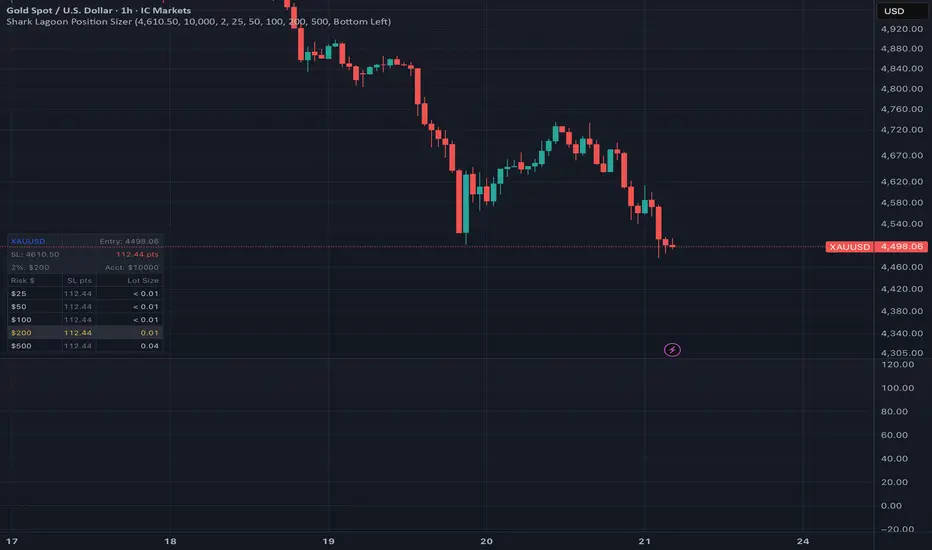
Position Sizer is a lightweight on-chart helper that calculates the correct lot size for your trade — instantly, across
any instrument.
Set your stop-loss level by dragging the red line to your intended SL price. The table updates in real time, showing you
the exact lot size for each of your configured risk amounts.
---
How It Works
The lot size formula is fully instrument-agnostic — it uses TradingView's built-in syminfo.pointvalue and syminfo.mintick
to automatically handle the different pip/point values across Forex pairs, Gold, Oil, indices, and more. No manual pip
value lookup needed.
Lot Size = Risk Amount / (SL Distance in Ticks × Point Value per Tick)
---
How To Use
1. Add the indicator to any chart
2. Open Settings → Stop Loss and type your SL price, or drag the red line directly on the chart to your stop level
3. Read off the lot size for your chosen risk amount from the table
---
Table Layout
The table shows an info header and 5 data rows:
- Info header — instrument, current entry price, SL level, SL distance, account size, and your risk threshold dollar
amount
- Data rows — Risk ($) · SL pts · Lot Size
- The row closest to your Risk Per Trade % threshold is highlighted in gold as a reminder of your max risk
---
Settings
- SL Price — drag the line on the chart or type a price directly
- Account Size ($) — your total account value
- Risk Per Trade (%) — your risk threshold (default 2%). The closest row is highlighted in gold
- Risk Rows 1–5 ($) — five configurable dollar risk amounts (default: $25 / $50 / $100 / $200 / $500)
- Table Position — Top Left / Top Right / Bottom Left / Bottom Right
---
Edge Cases
- No SL set → shows Set SL
- SL within 2 ticks of entry → shows SL too close
- Unsupported symbol → shows N/A symbol
- Valid position too small to display → shows < 0.01
- Works for both long and short setups
---
Tested on: EURUSD · XAUUSD · XTIUSD · USDJPY
---
This tool assists with position sizing calculations. It does not constitute financial advice. Always verify lot sizes with your broker before placing orders.
any instrument.
Set your stop-loss level by dragging the red line to your intended SL price. The table updates in real time, showing you
the exact lot size for each of your configured risk amounts.
---
How It Works
The lot size formula is fully instrument-agnostic — it uses TradingView's built-in syminfo.pointvalue and syminfo.mintick
to automatically handle the different pip/point values across Forex pairs, Gold, Oil, indices, and more. No manual pip
value lookup needed.
Lot Size = Risk Amount / (SL Distance in Ticks × Point Value per Tick)
---
How To Use
1. Add the indicator to any chart
2. Open Settings → Stop Loss and type your SL price, or drag the red line directly on the chart to your stop level
3. Read off the lot size for your chosen risk amount from the table
---
Table Layout
The table shows an info header and 5 data rows:
- Info header — instrument, current entry price, SL level, SL distance, account size, and your risk threshold dollar
amount
- Data rows — Risk ($) · SL pts · Lot Size
- The row closest to your Risk Per Trade % threshold is highlighted in gold as a reminder of your max risk
---
Settings
- SL Price — drag the line on the chart or type a price directly
- Account Size ($) — your total account value
- Risk Per Trade (%) — your risk threshold (default 2%). The closest row is highlighted in gold
- Risk Rows 1–5 ($) — five configurable dollar risk amounts (default: $25 / $50 / $100 / $200 / $500)
- Table Position — Top Left / Top Right / Bottom Left / Bottom Right
---
Edge Cases
- No SL set → shows Set SL
- SL within 2 ticks of entry → shows SL too close
- Unsupported symbol → shows N/A symbol
- Valid position too small to display → shows < 0.01
- Works for both long and short setups
---
Tested on: EURUSD · XAUUSD · XTIUSD · USDJPY
---
This tool assists with position sizing calculations. It does not constitute financial advice. Always verify lot sizes with your broker before placing orders.
Mã nguồn mở
Theo đúng tinh thần TradingView, tác giả của tập lệnh này đã công bố nó dưới dạng mã nguồn mở, để các nhà giao dịch có thể xem xét và xác minh chức năng. Chúc mừng tác giả! Mặc dù bạn có thể sử dụng miễn phí, hãy nhớ rằng việc công bố lại mã phải tuân theo Nội quy.

Thông báo miễn trừ trách nhiệm
Thông tin và các ấn phẩm này không nhằm mục đích, và không cấu thành, lời khuyên hoặc khuyến nghị về tài chính, đầu tư, giao dịch hay các loại khác do TradingView cung cấp hoặc xác nhận. Đọc thêm tại Điều khoản Sử dụng.
Mã nguồn mở
Theo đúng tinh thần TradingView, tác giả của tập lệnh này đã công bố nó dưới dạng mã nguồn mở, để các nhà giao dịch có thể xem xét và xác minh chức năng. Chúc mừng tác giả! Mặc dù bạn có thể sử dụng miễn phí, hãy nhớ rằng việc công bố lại mã phải tuân theo Nội quy.
Thông báo miễn trừ trách nhiệm
Thông tin và các ấn phẩm này không nhằm mục đích, và không cấu thành, lời khuyên hoặc khuyến nghị về tài chính, đầu tư, giao dịch hay các loại khác do TradingView cung cấp hoặc xác nhận. Đọc thêm tại Điều khoản Sử dụng.