OPEN-SOURCE SCRIPT
Dynamic Buy and Sell - Hitz2kk
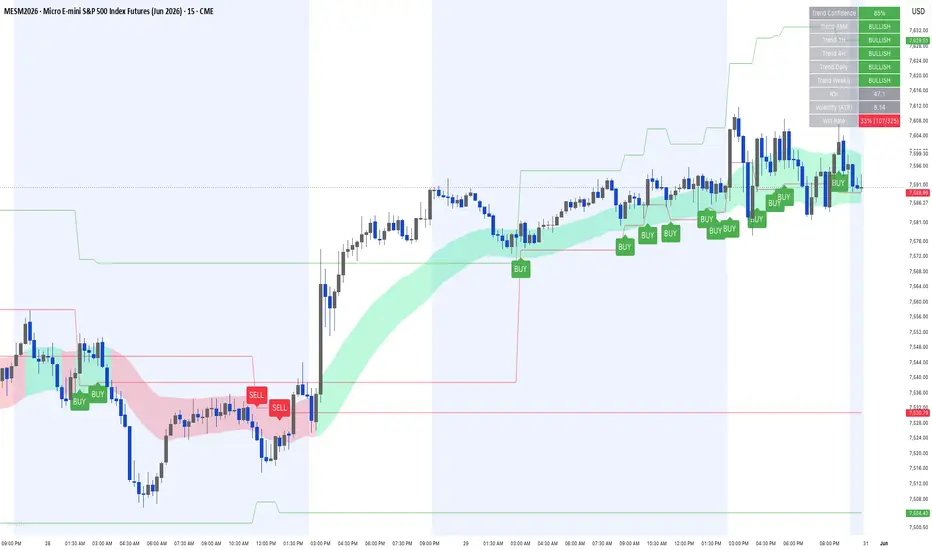
Dynamic Buy and Sell — by hitz2kk
Dynamic Buy and Sell is an all-in-one trend and signal indicator that combines a volatility-adjusted EMA ribbon, a five-timeframe trend dashboard, a configurable entry engine, and built-in ATR risk levels — all overlaid directly on price.
What it does
The core is a trend ribbon built from a fast and slow EMA with an ATR band drawn around the midline. The ribbon shades green when structure is bullish and red when bearish, and the band expands and contracts with volatility so it adapts to current conditions instead of using fixed offsets.
A multi-timeframe dashboard in the top-right reads the EMA trend across 15-minute, 1-hour, 4-hour, daily, and weekly charts. Above it, a Trend Confidence score (0–100%) blends the local trend, RSI, price position relative to the ribbon, and all five higher-timeframe trends into a single conviction reading — green at 70%+, orange at 50–69%, red below.
BUY and SELL labels print only when conditions align: the ribbon trend agrees, the fast EMA slopes in the signal's direction, RSI is on the correct side of its threshold, and your chosen entry trigger fires.
Key features
Three entry modes: Ribbon Breakout (momentum), Candlestick (engulfing and pin-bar reversals), or Either
Optional volume and MACD confirmation filters to tighten signals
ATR-based stop and target levels plotted on every signal, with adjustable risk:reward
Live win-rate tally that tracks how signals resolved against their stop/target
Five-timeframe trend dashboard with an aggregated confidence score
Configurable EMA, RSI, ATR, and threshold inputs
How to use it
Choose your trigger mode in settings. Use the dashboard and confidence score to read the broader environment, then act on labels that print in the direction of that bias. Higher-confidence signals backed by aligned higher-timeframe trends are the stronger setups; signals firing against a red dashboard warrant caution. Enable the volume and MACD filters when you want fewer, higher-conviction signals.
Notes
All calculations run on confirmed bars and higher-timeframe data uses lookahead-off, so signals and the dashboard do not repaint after a bar closes. The win-rate tally is an on-chart estimate based on bar highs and lows, not a precise backtest — for exact statistics, run a strategy version through TradingView's tester. This is a decision-support tool, not a standalone system; test settings on your own instrument and timeframe and always apply your own risk management.
This script is original and provided for educational purposes. Nothing here is financial advice.
Dynamic Buy and Sell is an all-in-one trend and signal indicator that combines a volatility-adjusted EMA ribbon, a five-timeframe trend dashboard, a configurable entry engine, and built-in ATR risk levels — all overlaid directly on price.
What it does
The core is a trend ribbon built from a fast and slow EMA with an ATR band drawn around the midline. The ribbon shades green when structure is bullish and red when bearish, and the band expands and contracts with volatility so it adapts to current conditions instead of using fixed offsets.
A multi-timeframe dashboard in the top-right reads the EMA trend across 15-minute, 1-hour, 4-hour, daily, and weekly charts. Above it, a Trend Confidence score (0–100%) blends the local trend, RSI, price position relative to the ribbon, and all five higher-timeframe trends into a single conviction reading — green at 70%+, orange at 50–69%, red below.
BUY and SELL labels print only when conditions align: the ribbon trend agrees, the fast EMA slopes in the signal's direction, RSI is on the correct side of its threshold, and your chosen entry trigger fires.
Key features
Three entry modes: Ribbon Breakout (momentum), Candlestick (engulfing and pin-bar reversals), or Either
Optional volume and MACD confirmation filters to tighten signals
ATR-based stop and target levels plotted on every signal, with adjustable risk:reward
Live win-rate tally that tracks how signals resolved against their stop/target
Five-timeframe trend dashboard with an aggregated confidence score
Configurable EMA, RSI, ATR, and threshold inputs
How to use it
Choose your trigger mode in settings. Use the dashboard and confidence score to read the broader environment, then act on labels that print in the direction of that bias. Higher-confidence signals backed by aligned higher-timeframe trends are the stronger setups; signals firing against a red dashboard warrant caution. Enable the volume and MACD filters when you want fewer, higher-conviction signals.
Notes
All calculations run on confirmed bars and higher-timeframe data uses lookahead-off, so signals and the dashboard do not repaint after a bar closes. The win-rate tally is an on-chart estimate based on bar highs and lows, not a precise backtest — for exact statistics, run a strategy version through TradingView's tester. This is a decision-support tool, not a standalone system; test settings on your own instrument and timeframe and always apply your own risk management.
This script is original and provided for educational purposes. Nothing here is financial advice.
Mã nguồn mở
Theo đúng tinh thần TradingView, tác giả của tập lệnh này đã công bố nó dưới dạng mã nguồn mở, để các nhà giao dịch có thể xem xét và xác minh chức năng. Chúc mừng tác giả! Mặc dù bạn có thể sử dụng miễn phí, hãy nhớ rằng việc công bố lại mã phải tuân theo Nội quy.

Thông báo miễn trừ trách nhiệm
Thông tin và các ấn phẩm này không nhằm mục đích, và không cấu thành, lời khuyên hoặc khuyến nghị về tài chính, đầu tư, giao dịch hay các loại khác do TradingView cung cấp hoặc xác nhận. Đọc thêm tại Điều khoản Sử dụng.
Mã nguồn mở
Theo đúng tinh thần TradingView, tác giả của tập lệnh này đã công bố nó dưới dạng mã nguồn mở, để các nhà giao dịch có thể xem xét và xác minh chức năng. Chúc mừng tác giả! Mặc dù bạn có thể sử dụng miễn phí, hãy nhớ rằng việc công bố lại mã phải tuân theo Nội quy.
Thông báo miễn trừ trách nhiệm
Thông tin và các ấn phẩm này không nhằm mục đích, và không cấu thành, lời khuyên hoặc khuyến nghị về tài chính, đầu tư, giao dịch hay các loại khác do TradingView cung cấp hoặc xác nhận. Đọc thêm tại Điều khoản Sử dụng.