Cập nhật
Relative Strength Alpha Pro [LevelUp]
Relative Strength Alpha Pro is designed for traders who want to own the strongest stocks in the market, not the ones simply moving with it. Built on the relative strength principles of William O'Neil, Nicolas Darvas, and Jesse Livermore, it measures risk-adjusted outperformance against two benchmarks at once and tracks the Relative Strength Line for new highs and for weakness against its own moving average. Everything surfaces as chart visuals, an on-chart stats table, and Pine Screener columns and filters.
The indicator name, Alpha, reflects what separates it from a conventional RS Line. Without Alpha, raw relative strength rewards any high-beta stock in a rising market. Alpha is risk-adjusted outperformance versus a benchmark: a name only scores well when it is beating the market after accounting for how much market risk it actually carries, and it must do so against both a cap-weighted and an equal-weight benchmark. The risk adjustment is one-sided: a stock gets no extra credit for being less volatile than the market. It only has to outperform by more when it is more volatile than the market. Daily and weekly analysis run independently, with separate settings throughout.
🔹—— What Makes This Different ——🔹
Most relative strength tools plot a single ratio line and leave the interpretation to you. This indicator differs in five specific ways.
1. Alpha, not raw outperformance
A conventional RS Line is simply the stock's price divided by the benchmark's, and that measurement favors any volatile stock in a rising market. A name carrying twice the market's volatility — a beta of 2 — should rise roughly twice as much as the market when the market rises, so beating the index in an up-market is exactly what its volatility predicts, not evidence of strength: you were owed that extra move for taking on the extra risk. Real strength is beating the market by more than volatility alone explains — the leftover after that expected move is stripped out — and that leftover is alpha, which is what this indicator measures instead of the raw ratio.
This indicator estimates each stock's beta and subtracts the return that beta alone would explain. What remains is genuine outperformance, not leverage on the index. The adjustment only ever raises the bar, never lowers it: a low-beta stock still has to beat the benchmark outright to score, it is never given a discount for being the less volatile name.
Beta is stabilized before use, so low-correlation names such as recent IPOs and biotechs cannot distort the result with extreme readings. The long-term leg additionally uses a beta measured over its own full window, so a stock whose character changed during the year is judged by the beta that actually prevailed over that period.
2. Two benchmarks, and only the lower score counts
A stock can look strong against a cap-weighted index simply by being carried along in a narrow, top-heavy rally. Scoring the same stock against an equal-weight benchmark reveals whether it is also outperforming the typical stock. The indicator computes both scores independently and reports the lower of the two. Nothing scores well by beating only one. Strength has to be real against both the market and its average member.
3. Four independent tests, three horizons
The 0-4 RS Score awards one point each for four separate checks across three time windows, plus price trend: outperforming over the last two weeks, outperforming over the last six weeks and improving, outperforming over the last four and a half months and improving, and price above its own trend average.
The improvement requirement on the two longer legs means a stock that outperformed months ago but has since gone flat loses those points rather than coasting on a stale result — leadership has to still be building, not just have happened once. A stock that only just began outperforming and one that has led for months both look identical under a single lookback; here they do not.
The state is also smoothed, so a stock hovering at the threshold does not flicker on and off bar to bar. Lookback windows adapt to the history available, so recent IPOs are scored on their record to date instead of being excluded for lacking a long one.
4. Relative strength that leads price
A key moment in a base is when the RS Line makes a new high while price is not hitting a new high. That means the stock is losing less ground than the market during a pullback, often the earliest visible sign of accumulation. The indicator separates this case (NHBP) from an ordinary coincident new high (NH), rather than treating every new high the same.
5. Ranking and timing, both on the chart
A high score answers whether a stock has been a leader. It does not by itself say whether that leadership just emerged this week. Watch the RS Line against its own moving average for early signs a leader is weakening, distinct from the multi-horizon score that ranks it.
The optional pane background color flags exactly this moment: a stock still scoring well but whose RS Line has dropped below its fast moving average shows a different color than a stock whose leadership is fully intact, so ranking and timing are both visible without one number trying to do both jobs.
Everything is built for scanning, not just charting. Sortable columns and filters run across a full watchlist in the Pine Screener, and every lookback has separate daily and weekly values so each timeframe can be tuned for its own purpose.
🔹—— Key Features ——🔹
Dual Benchmark Alpha Score
Risk-Adjusted Scoring
▪ The RS Score (0-4) awards one point each for four independent tests across three horizons: outperforming over ~2 weeks, over ~6 weeks and improving, over ~4.5 months and improving, plus price above its trend average.
▪ Measures against a primary benchmark (default SPY) and a secondary benchmark (default RSP).
▪ Reports the lower of the two scores, so a stock must beat both the market and the average stock.
▪ The risk hurdle is never below the market itself: high-beta names must clear their leverage, low-beta names get no discount for being less volatile.
▪ Configurable activation threshold: choose how many points are required before the Alpha state turns on.
▪ Pane background color highlights bars where the Alpha condition is active, with an optional second color for when leadership is intact by the score but the RS Line has broken its own moving average.
Relative Strength Line
New High Detection
▪ Plots the RS Line versus the primary benchmark.
▪ NHBP, the RS Line makes a new high while price has not, relative strength leading price.
▪ NH, the RS Line makes a new high alongside price.
▪ Symbol position selectable: on the line or above it.
▪ Separate daily and weekly lookback windows.
Custom Moving Averages
▪ Up to four RS Line moving averages, two for daily charts and two for weekly.
▪ Specify type (EMA/SMA), length and color for each, toggled independently.
▪ Optional Highlight RS Line MA Breaks recolors the RS Line itself as it loses each average — amber below the faster average while that average still leads the slower one, red once it is below both.
Leadership Timing
▪ A separate, optional background color flags the moment an active leader's RS Line drops below its own fast moving average — the earliest warning signs that a winning position's leadership may be decelerating.
▪ Shows only while the Alpha state is active; a moving-average break on a stock that is not already ranked as a leader is not flagged, since there is no leadership yet to warn about.
▪ The "fast" average is resolved automatically as whichever of the two configured RS moving averages has the shorter length, so the signal stays correct even if their order is changed.
▪ Distinct from the RS Score by design: the score answers whether a stock has been a leader, this answers whether that leadership is currently intact, and both can be read from the chart at the same time.
Stats Table
At-a-Glance Status
▪ Ticker and both benchmarks with their percentage change for the current bar (daily change on daily charts, weekly change on weekly charts).
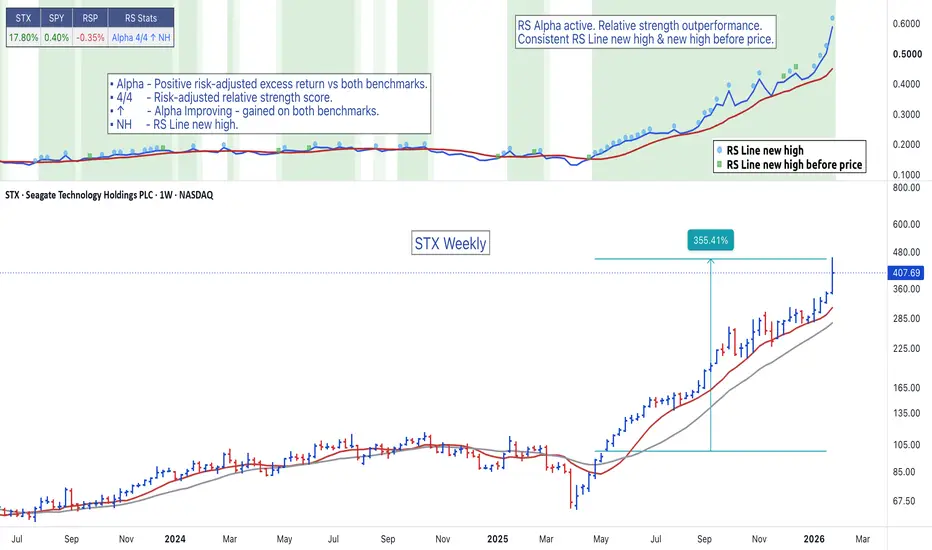
▪ Composite RS Stats text combining every active state, for example
Alpha 4/4 ↑ NHBP:
Alpha - Alpha state is active.
4/4 - RS Score out of a possible 4.
↑ - Relative strength is improving (positive short-term alpha against both benchmarks).
NHBP - RS Line made a new high before price on this bar.
Note: "-" in RS Stats means the Alpha state is off (and no ↑/NH/NHBP this bar),
which is different from "Alpha 0/4", where Alpha is still active with a zero score.
▪ Hover tooltip explains each active component in plain language, including the score and the activation threshold in force. On a bar where the Alpha state is held through a brief dip, the shown score can read below the threshold (see the note on this under Custom Screening) — the tooltip flags it as such.
▪ Two column groups — Symbols & Benchmarks and RS Stats — can each be shown or hidden independently, so the table can be reduced to just the reading you want on the chart. Remaining columns close up with no empty gaps.
🔹—— Timeframe ——🔹
The alpha calculations compare the stock and both benchmarks close to close on the same bars, so a daily chart measures day over day and a weekly chart measures week over week. Volatility and percentage change are handled separately, always from daily data, so those columns read the same on either timeframe. The indicator runs on daily and weekly charts only. The settings you control have independent Daily and Weekly values, so switching timeframes needs no re-tuning.
Intraday charts are not supported because they would measure minutes of stock movement against a benchmark that updates once a session, which is not a meaningful comparison. Monthly charts are excluded because the lookback windows are calibrated for daily and weekly bars only.
Daily and weekly are not the same measurement at different speeds. A weekly bar absorbs intra-week reversals entirely. A stock that drops on Tuesday and recovers by Friday appears as chop on a daily chart and as one clean up-bar on a weekly chart. Daily answers whether a stock is moving. Weekly answers whether it matters.
🔹—— Daily Chart Examples ——🔹
Daily charts are ideal for timing entries and spotting relative strength as it turns.


🔹—— Weekly Chart Example ——🔹
Weekly charts are better suited to confirming true market leaders in sustained uptrends.

🔹—— Settings ——🔹
Every setting below states what it controls, why it matters, and how to choose a value.
Benchmarks
▪ Primary Benchmark (default SPY). The cap-weighted market. The RS Line and its new-high signals are measured against this one, and it is the primary side of the dual-benchmark RS Score.
▪ Secondary Benchmark (default RSP). The equal-weight S&P 500, standing in for the typical stock. Only the RS Score uses it, as the second half of the dual-benchmark test.
Both are entered as text in EXCHANGE:TICKER form, for example AMEX:SPY. Entering them as text rather than through a symbol picker is deliberate: it is the form the Pine Screener reads reliably, so a benchmark you change on the chart carries over to your scans instead of silently reverting to the default.
The defaults are chosen as a deliberate pair. SPY is the market as it is actually weighted, dominated by its largest names, so it answers whether a stock is beating the index everyone measures against. RSP holds the same 500 stocks equally weighted, so it stands in for the typical stock and answers whether the name is leading its peers or merely being carried by a narrow rally. Together they close the gap a single benchmark leaves open, which is why the score requires strength against both.
Substitution ideas: set the primary to a sector or industry ETF to see whether a stock is leading its own group, not just the market — often the more demanding test, since group leaders are the names institutions concentrate in. Swapping a benchmark is also a quick diagnostic when a score reads lower than expected, since it reveals which benchmark the stock is failing against.
Traders focused on a narrower universe can substitute accordingly, for example QQQ as the primary for large-cap growth work, paired with its equal-weight counterpart QQQE as the secondary so the dual-benchmark test carries over intact.
Minimum RS Score for Alpha (default 2)
What it is: the RS Score — the 0-4 rating described under Key Features — a stock must reach against both benchmarks before the Alpha state activates. Everything downstream keys off that state: the pane background, the stats table status, the Bars Since Alpha counter, and the Alpha Active and Alpha Started filters and alerts.
Why it matters: it is the strictness dial for what "Alpha" means. The four score points are independent tests, so each step up demands a genuinely different kind of strength, not just more of the same one.
▪ 1 — Watchlist mode. Any single sign of strength activates. Catches turnarounds and early emergers at the cost of many false starts. Best in early-stage rallies or off market bottoms, when leadership is just forming and nothing has a track record yet.
▪ 2 — Standard (default). Two independent confirmations. Enough to filter one-off pops, loose enough to catch leaders early in their run. If you have no reason to move it, this is the setting.
▪ 3 — Established leaders. Three of four checks against both benchmarks is hard to fake. Fewer names, later in their moves, high conviction. Best in confirmed uptrends, or when a threshold-2 scan returns more names than you can review.
▪ 4 — Elite only. Everything firing at once: current, improving over six weeks, improving over four and a half months, and trending. Very few names qualify, mostly extended ones, so it is better for identifying the market's true leaders than for finding fresh entries.
Be aware that maximum strength includes late-stage names: a climax run scores perfectly right up until it tops, since leaders often top on their strongest action, and the score cannot tell a durable leader mid-run from a blowoff in its final weeks — that judgment belongs to the chart, and the Leadership Timing background below is built for exactly that judgment.
When in doubt, leave it at 2 and sort by the RS Score column in the screener instead. Sorting gives you the entire strictness spectrum at once without changing what Alpha means, which keeps your alerts and saved scans consistent.
Background When In Alpha (default on) and Background On RS Line MA Break (default on)
What they are: a pair of pane fills, both active only while the Alpha state is on. The first shows while the RS Line sits at or above its own fast moving average — leadership fully intact. The second replaces it with a separate color the moment the RS Line drops below that fast average while Alpha is still active — the RS Score still calls the stock a leader, but its relative strength has just started to weaken. Neither fill appears while Alpha is inactive; a moving-average break on a stock the score does not consider a leader is not a meaningful warning, so it stays unflagged.
How it's determined: "fast" is resolved automatically from whichever of the two RS Line moving averages configured under RS Line below has the shorter length, so the signal remains correct even if their order is changed. It works whether or not those moving average lines are set to display, so the background reflects the break even on a chart kept visually clean of the RS moving averages.
RS Line Lookback (defaults: 20 daily, 4 weekly)
The window for new high detection on the RS Line. A new high means the RS Line's highest reading over this many bars, so the setting decides what "new high" means: 20 daily bars is roughly a month, 4 weekly bars the same. Shorter windows fire more NH and NHBP signals on smaller wiggles; longer windows reserve the signals for more meaningful highs. The daily and weekly values are fully independent, so set each to the real-world window you care about on that timeframe.
Highlight RS Line MA Breaks (default off)
Recolors the RS Line itself, independently of the pane background above and independently of the Alpha state. Amber when the RS Line drops below the faster of its two moving averages while that average is still above the slower one. Red once the RS Line is below both — the deeper break. Turn it on when you want the degradation visible on the line rather than in the background, or when you want to see it on names that are not currently ranked as leaders, which the pane background deliberately will not show.
🔹—— Custom Screening ——🔹
Relative Strength Alpha Pro is a powerful and comprehensive screening tool. Sortable columns and filters run across a full watchlist in the Pine Screener.
Sortable Columns
▪ RS Score: the 0-4 composite. Each point is an independent test passed against both benchmarks, and the reported number is the lower of the two benchmark scores. Filter at 3 or above to cut a large watchlist to a workable shortlist in one step; sort descending when you want the strictness spectrum without committing to a threshold. This is the tool's single strength measure — the whole scoring engine distilled to one sortable number.
▪ Bars Since Alpha: how long the Alpha state has been active, blank while inactive. Under 5 finds this week's fresh triggers. Over 60 on a daily scan finds names that have led for a full quarter — a completely different population, and the right one for a core-position list rather than a swing list. This is the tool's freshness dimension: it is what separates a leader that just turned on from one that has been running for months.
▪ % Off 52w High: distance below the 52-week high, where lower is stronger: 2 is a stock at its highs, 40 is one cut nearly in half. Cap it to keep beaten-down bounces out of any scan sorted by speed, or band it (for example 1 to 15) for leaders trading below their own highs. The number measures distance only, not how the stock got there — a steady climber and a genuine pullback can print the same reading, so use the column to narrow and the chart to decide.
▪ 1-Day % Δ and 1-Week % Δ: both always measured from daily data, so they read identically on daily and weekly scans. 1-Day is the current tape: check it before charting anything, since a large single-day move usually means a news gap rather than a trend. 1-Week is the shortest window long enough to show a genuine direction rather than single-day noise. A new RS high with a positive week is price advancing and outpacing the benchmark, while the same signal with a negative week means the stock merely fell less than the market.
▪ ATR %: roughly how far the stock moves on a typical day, as a percentage of price. Use it to keep a scan inside the volatility your position sizing can hold, and to exclude names too slow to reach a target.
Filters
▪ Alpha Active: the ongoing Alpha state.
▪ Alpha Started: the first bar Alpha turns on.
▪ Setting Up (Alpha, RS NHBP): Alpha with relative strength leading price.
▪ Breaking Out (Alpha, RS NH): Alpha with the RS Line at a new high.
▪ Alpha Improving: relative strength gaining against both benchmarks.
Example Scans
▪ New Leaders: Alpha Active, Bars Since Alpha 5 or less, sorted by RS Score descending. Everything that turned on this week, highest score first.
▪ Breakout Watch: Breaking Out (Alpha, RS NH), % Off 52w High 3 or less. Stocks pushing into new high ground today with relative strength confirming the move rather than lagging it.
▪ Confirmed Strength: Alpha Active, Alpha Improving, RS Score 4, ATR % capped at whatever your position sizing tolerates. The shortest, highest-conviction list the tool produces, and a standing scan rather than a daily one.
▪ Established Leadership: Alpha Active, RS Score 3 or above, Bars Since Alpha 60 or more, % Off 52w High 15 or less. Names that have held leadership for a full quarter and are still near their highs.
Screening Notes
▪ Newly listed stocks are scored on the history they have: lookback windows adapt automatically, so a recent IPO gets a real score immediately rather than sitting at zero for two years. Treat very young names with the usual caution — their long-term component is measured on a shorter record.
▪ Blank cells are not zeros. Bars Since Alpha is blank whenever the Alpha state is off, which is not the same as a zero.
▪ Two stocks can both show a full RS Score while looking different on the chart: one with its RS Line comfortably above its fast moving average, one that has just broken below it. If Background On RS Line MA Break is enabled, that difference is the pane color; in the screener, the score alone will not show it, so pair a high-score scan with a look at the chart before treating every 4 the same.
▪ The RS Line, and NH and NHBP, are measured against the primary benchmark only. The dual-benchmark test applies to the RS Score, not to the new-high signals — a stock can make an RS new high against SPY while still lagging the average stock, and the score is where that shows up.
▪ Alpha Active can show a score momentarily below the threshold (you may even see "Alpha 0/4" in the table). This is deliberate, not an error. The Alpha state is smoothed: it turns on only after two consecutive bars at or above the threshold, and turns off only after two consecutive bars below it. So a single bar where the raw score dips does not switch the state off — the name stays flagged Active for that bar, and the displayed score honestly shows the dip.
The smoothing exists so the Alpha state, the pane background, the alerts, and especially the Bars Since Alpha counter do not flicker on and off bar to bar for a stock hovering right at the line. A score of 0 while Active means a stock that was a leader and just broke lower on the current bar; it drops out of an Alpha Active scan once it prints a second consecutive bar below the threshold.
🔹—— Custom Alerts ——🔹
The Relative Strength Alpha Pro indicator supports custom alerts, each with a ready-made message identifying the symbol and signal:
▪ Alpha Active, fires while the condition holds. Pair with Once Per Bar Close.
▪ Alpha Started, the first bar Alpha turns on.
▪ Setting Up (Alpha, RS NHBP).
▪ Breaking Out (Alpha, RS NH).
▪ Alpha Improving.
The three single-bar conditions — Alpha Started, Setting Up and Breaking Out — are the ones that work best as alerts, since an alert catches the exact bar the event happens on, which is precisely what a screener scan run the next day cannot do. Setting them on a watchlist is the natural complement to the standing Alpha Active scans above.
🔹—— Best Practices ——🔹
▪ Look for relative strength confirmation on both daily and weekly timeframes.
▪ RS Alpha plus a rising RS Line during a market pullback is a strong signal of relative strength.
▪ If a stock breaks its fast RS Line moving average, treat it as an early warning to tighten risk, not as a reason to exit a position outright.
▪ Avoid chasing extended stocks.
▪ Always define risk before entering a trade. Know where you will exit.
▪ Size positions based on volatility and conviction, not emotion.
▪ Be patient. Relative strength trends take time to develop.
The indicator name, Alpha, reflects what separates it from a conventional RS Line. Without Alpha, raw relative strength rewards any high-beta stock in a rising market. Alpha is risk-adjusted outperformance versus a benchmark: a name only scores well when it is beating the market after accounting for how much market risk it actually carries, and it must do so against both a cap-weighted and an equal-weight benchmark. The risk adjustment is one-sided: a stock gets no extra credit for being less volatile than the market. It only has to outperform by more when it is more volatile than the market. Daily and weekly analysis run independently, with separate settings throughout.
🔹—— What Makes This Different ——🔹
Most relative strength tools plot a single ratio line and leave the interpretation to you. This indicator differs in five specific ways.
1. Alpha, not raw outperformance
A conventional RS Line is simply the stock's price divided by the benchmark's, and that measurement favors any volatile stock in a rising market. A name carrying twice the market's volatility — a beta of 2 — should rise roughly twice as much as the market when the market rises, so beating the index in an up-market is exactly what its volatility predicts, not evidence of strength: you were owed that extra move for taking on the extra risk. Real strength is beating the market by more than volatility alone explains — the leftover after that expected move is stripped out — and that leftover is alpha, which is what this indicator measures instead of the raw ratio.
This indicator estimates each stock's beta and subtracts the return that beta alone would explain. What remains is genuine outperformance, not leverage on the index. The adjustment only ever raises the bar, never lowers it: a low-beta stock still has to beat the benchmark outright to score, it is never given a discount for being the less volatile name.
Beta is stabilized before use, so low-correlation names such as recent IPOs and biotechs cannot distort the result with extreme readings. The long-term leg additionally uses a beta measured over its own full window, so a stock whose character changed during the year is judged by the beta that actually prevailed over that period.
2. Two benchmarks, and only the lower score counts
A stock can look strong against a cap-weighted index simply by being carried along in a narrow, top-heavy rally. Scoring the same stock against an equal-weight benchmark reveals whether it is also outperforming the typical stock. The indicator computes both scores independently and reports the lower of the two. Nothing scores well by beating only one. Strength has to be real against both the market and its average member.
3. Four independent tests, three horizons
The 0-4 RS Score awards one point each for four separate checks across three time windows, plus price trend: outperforming over the last two weeks, outperforming over the last six weeks and improving, outperforming over the last four and a half months and improving, and price above its own trend average.
The improvement requirement on the two longer legs means a stock that outperformed months ago but has since gone flat loses those points rather than coasting on a stale result — leadership has to still be building, not just have happened once. A stock that only just began outperforming and one that has led for months both look identical under a single lookback; here they do not.
The state is also smoothed, so a stock hovering at the threshold does not flicker on and off bar to bar. Lookback windows adapt to the history available, so recent IPOs are scored on their record to date instead of being excluded for lacking a long one.
4. Relative strength that leads price
A key moment in a base is when the RS Line makes a new high while price is not hitting a new high. That means the stock is losing less ground than the market during a pullback, often the earliest visible sign of accumulation. The indicator separates this case (NHBP) from an ordinary coincident new high (NH), rather than treating every new high the same.
5. Ranking and timing, both on the chart
A high score answers whether a stock has been a leader. It does not by itself say whether that leadership just emerged this week. Watch the RS Line against its own moving average for early signs a leader is weakening, distinct from the multi-horizon score that ranks it.
The optional pane background color flags exactly this moment: a stock still scoring well but whose RS Line has dropped below its fast moving average shows a different color than a stock whose leadership is fully intact, so ranking and timing are both visible without one number trying to do both jobs.
Everything is built for scanning, not just charting. Sortable columns and filters run across a full watchlist in the Pine Screener, and every lookback has separate daily and weekly values so each timeframe can be tuned for its own purpose.
🔹—— Key Features ——🔹
Dual Benchmark Alpha Score
Risk-Adjusted Scoring
▪ The RS Score (0-4) awards one point each for four independent tests across three horizons: outperforming over ~2 weeks, over ~6 weeks and improving, over ~4.5 months and improving, plus price above its trend average.
▪ Measures against a primary benchmark (default SPY) and a secondary benchmark (default RSP).
▪ Reports the lower of the two scores, so a stock must beat both the market and the average stock.
▪ The risk hurdle is never below the market itself: high-beta names must clear their leverage, low-beta names get no discount for being less volatile.
▪ Configurable activation threshold: choose how many points are required before the Alpha state turns on.
▪ Pane background color highlights bars where the Alpha condition is active, with an optional second color for when leadership is intact by the score but the RS Line has broken its own moving average.
Relative Strength Line
New High Detection
▪ Plots the RS Line versus the primary benchmark.
▪ NHBP, the RS Line makes a new high while price has not, relative strength leading price.
▪ NH, the RS Line makes a new high alongside price.
▪ Symbol position selectable: on the line or above it.
▪ Separate daily and weekly lookback windows.
Custom Moving Averages
▪ Up to four RS Line moving averages, two for daily charts and two for weekly.
▪ Specify type (EMA/SMA), length and color for each, toggled independently.
▪ Optional Highlight RS Line MA Breaks recolors the RS Line itself as it loses each average — amber below the faster average while that average still leads the slower one, red once it is below both.
Leadership Timing
▪ A separate, optional background color flags the moment an active leader's RS Line drops below its own fast moving average — the earliest warning signs that a winning position's leadership may be decelerating.
▪ Shows only while the Alpha state is active; a moving-average break on a stock that is not already ranked as a leader is not flagged, since there is no leadership yet to warn about.
▪ The "fast" average is resolved automatically as whichever of the two configured RS moving averages has the shorter length, so the signal stays correct even if their order is changed.
▪ Distinct from the RS Score by design: the score answers whether a stock has been a leader, this answers whether that leadership is currently intact, and both can be read from the chart at the same time.
Stats Table
At-a-Glance Status
▪ Ticker and both benchmarks with their percentage change for the current bar (daily change on daily charts, weekly change on weekly charts).
▪ Composite RS Stats text combining every active state, for example
Alpha 4/4 ↑ NHBP:
Alpha - Alpha state is active.
4/4 - RS Score out of a possible 4.
↑ - Relative strength is improving (positive short-term alpha against both benchmarks).
NHBP - RS Line made a new high before price on this bar.
Note: "-" in RS Stats means the Alpha state is off (and no ↑/NH/NHBP this bar),
which is different from "Alpha 0/4", where Alpha is still active with a zero score.
▪ Hover tooltip explains each active component in plain language, including the score and the activation threshold in force. On a bar where the Alpha state is held through a brief dip, the shown score can read below the threshold (see the note on this under Custom Screening) — the tooltip flags it as such.
▪ Two column groups — Symbols & Benchmarks and RS Stats — can each be shown or hidden independently, so the table can be reduced to just the reading you want on the chart. Remaining columns close up with no empty gaps.
🔹—— Timeframe ——🔹
The alpha calculations compare the stock and both benchmarks close to close on the same bars, so a daily chart measures day over day and a weekly chart measures week over week. Volatility and percentage change are handled separately, always from daily data, so those columns read the same on either timeframe. The indicator runs on daily and weekly charts only. The settings you control have independent Daily and Weekly values, so switching timeframes needs no re-tuning.
Intraday charts are not supported because they would measure minutes of stock movement against a benchmark that updates once a session, which is not a meaningful comparison. Monthly charts are excluded because the lookback windows are calibrated for daily and weekly bars only.
Daily and weekly are not the same measurement at different speeds. A weekly bar absorbs intra-week reversals entirely. A stock that drops on Tuesday and recovers by Friday appears as chop on a daily chart and as one clean up-bar on a weekly chart. Daily answers whether a stock is moving. Weekly answers whether it matters.
🔹—— Daily Chart Examples ——🔹
Daily charts are ideal for timing entries and spotting relative strength as it turns.
🔹—— Weekly Chart Example ——🔹
Weekly charts are better suited to confirming true market leaders in sustained uptrends.
🔹—— Settings ——🔹
Every setting below states what it controls, why it matters, and how to choose a value.
Benchmarks
▪ Primary Benchmark (default SPY). The cap-weighted market. The RS Line and its new-high signals are measured against this one, and it is the primary side of the dual-benchmark RS Score.
▪ Secondary Benchmark (default RSP). The equal-weight S&P 500, standing in for the typical stock. Only the RS Score uses it, as the second half of the dual-benchmark test.
Both are entered as text in EXCHANGE:TICKER form, for example AMEX:SPY. Entering them as text rather than through a symbol picker is deliberate: it is the form the Pine Screener reads reliably, so a benchmark you change on the chart carries over to your scans instead of silently reverting to the default.
The defaults are chosen as a deliberate pair. SPY is the market as it is actually weighted, dominated by its largest names, so it answers whether a stock is beating the index everyone measures against. RSP holds the same 500 stocks equally weighted, so it stands in for the typical stock and answers whether the name is leading its peers or merely being carried by a narrow rally. Together they close the gap a single benchmark leaves open, which is why the score requires strength against both.
Substitution ideas: set the primary to a sector or industry ETF to see whether a stock is leading its own group, not just the market — often the more demanding test, since group leaders are the names institutions concentrate in. Swapping a benchmark is also a quick diagnostic when a score reads lower than expected, since it reveals which benchmark the stock is failing against.
Traders focused on a narrower universe can substitute accordingly, for example QQQ as the primary for large-cap growth work, paired with its equal-weight counterpart QQQE as the secondary so the dual-benchmark test carries over intact.
Minimum RS Score for Alpha (default 2)
What it is: the RS Score — the 0-4 rating described under Key Features — a stock must reach against both benchmarks before the Alpha state activates. Everything downstream keys off that state: the pane background, the stats table status, the Bars Since Alpha counter, and the Alpha Active and Alpha Started filters and alerts.
Why it matters: it is the strictness dial for what "Alpha" means. The four score points are independent tests, so each step up demands a genuinely different kind of strength, not just more of the same one.
▪ 1 — Watchlist mode. Any single sign of strength activates. Catches turnarounds and early emergers at the cost of many false starts. Best in early-stage rallies or off market bottoms, when leadership is just forming and nothing has a track record yet.
▪ 2 — Standard (default). Two independent confirmations. Enough to filter one-off pops, loose enough to catch leaders early in their run. If you have no reason to move it, this is the setting.
▪ 3 — Established leaders. Three of four checks against both benchmarks is hard to fake. Fewer names, later in their moves, high conviction. Best in confirmed uptrends, or when a threshold-2 scan returns more names than you can review.
▪ 4 — Elite only. Everything firing at once: current, improving over six weeks, improving over four and a half months, and trending. Very few names qualify, mostly extended ones, so it is better for identifying the market's true leaders than for finding fresh entries.
Be aware that maximum strength includes late-stage names: a climax run scores perfectly right up until it tops, since leaders often top on their strongest action, and the score cannot tell a durable leader mid-run from a blowoff in its final weeks — that judgment belongs to the chart, and the Leadership Timing background below is built for exactly that judgment.
When in doubt, leave it at 2 and sort by the RS Score column in the screener instead. Sorting gives you the entire strictness spectrum at once without changing what Alpha means, which keeps your alerts and saved scans consistent.
Background When In Alpha (default on) and Background On RS Line MA Break (default on)
What they are: a pair of pane fills, both active only while the Alpha state is on. The first shows while the RS Line sits at or above its own fast moving average — leadership fully intact. The second replaces it with a separate color the moment the RS Line drops below that fast average while Alpha is still active — the RS Score still calls the stock a leader, but its relative strength has just started to weaken. Neither fill appears while Alpha is inactive; a moving-average break on a stock the score does not consider a leader is not a meaningful warning, so it stays unflagged.
How it's determined: "fast" is resolved automatically from whichever of the two RS Line moving averages configured under RS Line below has the shorter length, so the signal remains correct even if their order is changed. It works whether or not those moving average lines are set to display, so the background reflects the break even on a chart kept visually clean of the RS moving averages.
RS Line Lookback (defaults: 20 daily, 4 weekly)
The window for new high detection on the RS Line. A new high means the RS Line's highest reading over this many bars, so the setting decides what "new high" means: 20 daily bars is roughly a month, 4 weekly bars the same. Shorter windows fire more NH and NHBP signals on smaller wiggles; longer windows reserve the signals for more meaningful highs. The daily and weekly values are fully independent, so set each to the real-world window you care about on that timeframe.
Highlight RS Line MA Breaks (default off)
Recolors the RS Line itself, independently of the pane background above and independently of the Alpha state. Amber when the RS Line drops below the faster of its two moving averages while that average is still above the slower one. Red once the RS Line is below both — the deeper break. Turn it on when you want the degradation visible on the line rather than in the background, or when you want to see it on names that are not currently ranked as leaders, which the pane background deliberately will not show.
🔹—— Custom Screening ——🔹
Relative Strength Alpha Pro is a powerful and comprehensive screening tool. Sortable columns and filters run across a full watchlist in the Pine Screener.
Sortable Columns
▪ RS Score: the 0-4 composite. Each point is an independent test passed against both benchmarks, and the reported number is the lower of the two benchmark scores. Filter at 3 or above to cut a large watchlist to a workable shortlist in one step; sort descending when you want the strictness spectrum without committing to a threshold. This is the tool's single strength measure — the whole scoring engine distilled to one sortable number.
▪ Bars Since Alpha: how long the Alpha state has been active, blank while inactive. Under 5 finds this week's fresh triggers. Over 60 on a daily scan finds names that have led for a full quarter — a completely different population, and the right one for a core-position list rather than a swing list. This is the tool's freshness dimension: it is what separates a leader that just turned on from one that has been running for months.
▪ % Off 52w High: distance below the 52-week high, where lower is stronger: 2 is a stock at its highs, 40 is one cut nearly in half. Cap it to keep beaten-down bounces out of any scan sorted by speed, or band it (for example 1 to 15) for leaders trading below their own highs. The number measures distance only, not how the stock got there — a steady climber and a genuine pullback can print the same reading, so use the column to narrow and the chart to decide.
▪ 1-Day % Δ and 1-Week % Δ: both always measured from daily data, so they read identically on daily and weekly scans. 1-Day is the current tape: check it before charting anything, since a large single-day move usually means a news gap rather than a trend. 1-Week is the shortest window long enough to show a genuine direction rather than single-day noise. A new RS high with a positive week is price advancing and outpacing the benchmark, while the same signal with a negative week means the stock merely fell less than the market.
▪ ATR %: roughly how far the stock moves on a typical day, as a percentage of price. Use it to keep a scan inside the volatility your position sizing can hold, and to exclude names too slow to reach a target.
Filters
▪ Alpha Active: the ongoing Alpha state.
▪ Alpha Started: the first bar Alpha turns on.
▪ Setting Up (Alpha, RS NHBP): Alpha with relative strength leading price.
▪ Breaking Out (Alpha, RS NH): Alpha with the RS Line at a new high.
▪ Alpha Improving: relative strength gaining against both benchmarks.
Example Scans
▪ New Leaders: Alpha Active, Bars Since Alpha 5 or less, sorted by RS Score descending. Everything that turned on this week, highest score first.
▪ Breakout Watch: Breaking Out (Alpha, RS NH), % Off 52w High 3 or less. Stocks pushing into new high ground today with relative strength confirming the move rather than lagging it.
▪ Confirmed Strength: Alpha Active, Alpha Improving, RS Score 4, ATR % capped at whatever your position sizing tolerates. The shortest, highest-conviction list the tool produces, and a standing scan rather than a daily one.
▪ Established Leadership: Alpha Active, RS Score 3 or above, Bars Since Alpha 60 or more, % Off 52w High 15 or less. Names that have held leadership for a full quarter and are still near their highs.
Screening Notes
▪ Newly listed stocks are scored on the history they have: lookback windows adapt automatically, so a recent IPO gets a real score immediately rather than sitting at zero for two years. Treat very young names with the usual caution — their long-term component is measured on a shorter record.
▪ Blank cells are not zeros. Bars Since Alpha is blank whenever the Alpha state is off, which is not the same as a zero.
▪ Two stocks can both show a full RS Score while looking different on the chart: one with its RS Line comfortably above its fast moving average, one that has just broken below it. If Background On RS Line MA Break is enabled, that difference is the pane color; in the screener, the score alone will not show it, so pair a high-score scan with a look at the chart before treating every 4 the same.
▪ The RS Line, and NH and NHBP, are measured against the primary benchmark only. The dual-benchmark test applies to the RS Score, not to the new-high signals — a stock can make an RS new high against SPY while still lagging the average stock, and the score is where that shows up.
▪ Alpha Active can show a score momentarily below the threshold (you may even see "Alpha 0/4" in the table). This is deliberate, not an error. The Alpha state is smoothed: it turns on only after two consecutive bars at or above the threshold, and turns off only after two consecutive bars below it. So a single bar where the raw score dips does not switch the state off — the name stays flagged Active for that bar, and the displayed score honestly shows the dip.
The smoothing exists so the Alpha state, the pane background, the alerts, and especially the Bars Since Alpha counter do not flicker on and off bar to bar for a stock hovering right at the line. A score of 0 while Active means a stock that was a leader and just broke lower on the current bar; it drops out of an Alpha Active scan once it prints a second consecutive bar below the threshold.
🔹—— Custom Alerts ——🔹
The Relative Strength Alpha Pro indicator supports custom alerts, each with a ready-made message identifying the symbol and signal:
▪ Alpha Active, fires while the condition holds. Pair with Once Per Bar Close.
▪ Alpha Started, the first bar Alpha turns on.
▪ Setting Up (Alpha, RS NHBP).
▪ Breaking Out (Alpha, RS NH).
▪ Alpha Improving.
The three single-bar conditions — Alpha Started, Setting Up and Breaking Out — are the ones that work best as alerts, since an alert catches the exact bar the event happens on, which is precisely what a screener scan run the next day cannot do. Setting them on a watchlist is the natural complement to the standing Alpha Active scans above.
🔹—— Best Practices ——🔹
▪ Look for relative strength confirmation on both daily and weekly timeframes.
▪ RS Alpha plus a rising RS Line during a market pullback is a strong signal of relative strength.
▪ If a stock breaks its fast RS Line moving average, treat it as an early warning to tighten risk, not as a reason to exit a position outright.
▪ Avoid chasing extended stocks.
▪ Always define risk before entering a trade. Know where you will exit.
▪ Size positions based on volatility and conviction, not emotion.
▪ Be patient. Relative strength trends take time to develop.
Phát hành các Ghi chú
Version 1.1What's New
▪ Filter for Sustained Momentum: RS Line Above Fast MA
When screening for Alpha, turn on this Pine Screener filter to isolate stocks whose Relative Strength Line is holding above its fast moving average. This helps you focus on names showing persistent outperformance rather than short-lived spikes, making it easier to build higher-quality watchlists of true market leaders.
▪ View Alpha & Price Action on the Main Chart
Enable “Show Alpha Background Colors On Main Chart” to see Alpha overlaid on your price chart. This lets you quickly confirm when strong relative performance is supporting price moves (or spot divergence) without having to glance at a separate pane.
Có sẵn trong Gói trả phí
Chỉ báo này chỉ dành cho người đăng ký TrendPro Suite — Find Your Edge. Tham gia ngay để truy cập chỉ báo này và các tập lệnh khác của LevelUpTools.

Join traders in over 40 countries and LevelUp!
tradingview.com/spaces/LevelUpTools/
tradingview.com/spaces/LevelUpTools/
Thông báo miễn trừ trách nhiệm
Thông tin và các ấn phẩm này không nhằm mục đích, và không cấu thành, lời khuyên hoặc khuyến nghị về tài chính, đầu tư, giao dịch hay các loại khác do TradingView cung cấp hoặc xác nhận. Đọc thêm tại Điều khoản Sử dụng.
Có sẵn trong Gói trả phí
Chỉ báo này chỉ dành cho người đăng ký TrendPro Suite — Find Your Edge. Tham gia ngay để truy cập chỉ báo này và các tập lệnh khác của LevelUpTools.
Join traders in over 40 countries and LevelUp!
tradingview.com/spaces/LevelUpTools/
tradingview.com/spaces/LevelUpTools/
Thông báo miễn trừ trách nhiệm
Thông tin và các ấn phẩm này không nhằm mục đích, và không cấu thành, lời khuyên hoặc khuyến nghị về tài chính, đầu tư, giao dịch hay các loại khác do TradingView cung cấp hoặc xác nhận. Đọc thêm tại Điều khoản Sử dụng.