Sessions (Asia,London,NY RTH)
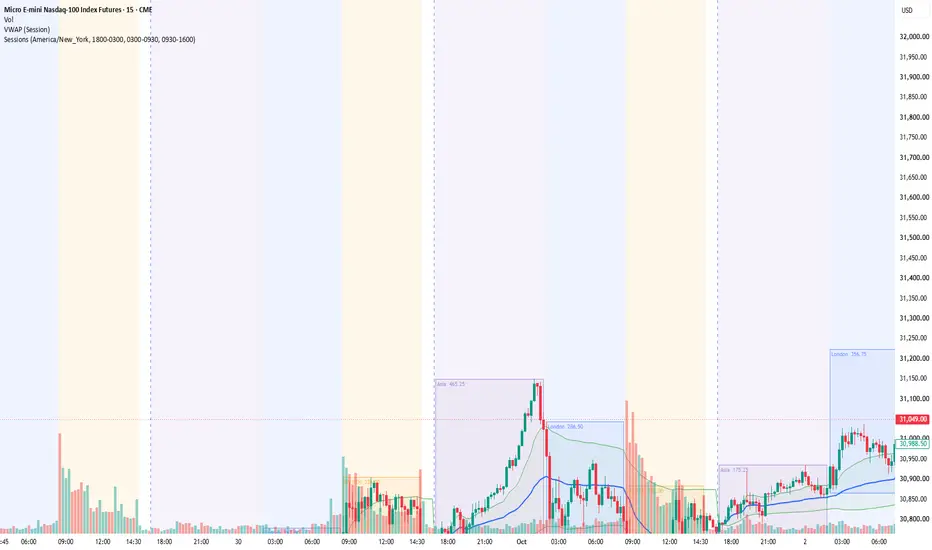
Marks the three main trading sessions on any intraday chart — Asia, London and New York Regular Trading Hours — with a background shade and a high/low range box for each session.
WHAT IT SHOWS
• Background shading for each session
• A box from each session's high to its low, growing live as the session runs
• Session name and range (high − low, in points) printed inside the box
• Optional 50% midline of each session's range
DEFAULT SESSIONS (New York time)
• Asia: 18:00 – 03:00 (from the CME Globex reopen)
• London: 03:00 – 09:30
• NY RTH: 09:30 – 16:00
All times can be changed. Sessions that cross midnight are supported.
TIMEZONE
Session times are read in the timezone you choose (default America/New_York). It adjusts for daylight saving automatically, so the boxes stay on the correct bars whatever timezone your chart uses. Also available: America/Chicago, Europe/London, Asia/Tokyo, Asia/Kolkata and UTC.
FULLY CUSTOMISABLE COLOURS
Each session has three colour settings, each with its own opacity slider:
• Background — the session shade
• Box fill — the inside of the high/low box
• Border / text — the box outline, label and midline
The defaults are light tints so price stays readable. Set any opacity to 0% to hide that part, for example to show box outlines only.
SETTINGS
• Turn each session on or off
• Turn background shading, boxes, labels and the midline on or off
• Edit session times and colours
USAGE IDEAS
• See the Asia and London highs and lows going into the NY open
• Spot range expansion or compression from one session to the next
• Frame the opening-range and liquidity-sweep setups around session extremes
NOTES
• Works on intraday timeframes only; nothing is drawn on Daily and above
• TradingView's own extended-hours background may overlap the shading. You can turn it off in Chart Settings → Symbol
• For ICT-style "kill zones", change the times to Asia 20:00–00:00 and London 02:00–05:00
This indicator is for visual and educational use only and is not financial advice.
WHAT IT SHOWS
• Background shading for each session
• A box from each session's high to its low, growing live as the session runs
• Session name and range (high − low, in points) printed inside the box
• Optional 50% midline of each session's range
DEFAULT SESSIONS (New York time)
• Asia: 18:00 – 03:00 (from the CME Globex reopen)
• London: 03:00 – 09:30
• NY RTH: 09:30 – 16:00
All times can be changed. Sessions that cross midnight are supported.
TIMEZONE
Session times are read in the timezone you choose (default America/New_York). It adjusts for daylight saving automatically, so the boxes stay on the correct bars whatever timezone your chart uses. Also available: America/Chicago, Europe/London, Asia/Tokyo, Asia/Kolkata and UTC.
FULLY CUSTOMISABLE COLOURS
Each session has three colour settings, each with its own opacity slider:
• Background — the session shade
• Box fill — the inside of the high/low box
• Border / text — the box outline, label and midline
The defaults are light tints so price stays readable. Set any opacity to 0% to hide that part, for example to show box outlines only.
SETTINGS
• Turn each session on or off
• Turn background shading, boxes, labels and the midline on or off
• Edit session times and colours
USAGE IDEAS
• See the Asia and London highs and lows going into the NY open
• Spot range expansion or compression from one session to the next
• Frame the opening-range and liquidity-sweep setups around session extremes
NOTES
• Works on intraday timeframes only; nothing is drawn on Daily and above
• TradingView's own extended-hours background may overlap the shading. You can turn it off in Chart Settings → Symbol
• For ICT-style "kill zones", change the times to Asia 20:00–00:00 and London 02:00–05:00
This indicator is for visual and educational use only and is not financial advice.

Thông báo miễn trừ trách nhiệm
Thông tin và các ấn phẩm này không nhằm mục đích, và không cấu thành, lời khuyên hoặc khuyến nghị về tài chính, đầu tư, giao dịch hay các loại khác do TradingView cung cấp hoặc xác nhận. Đọc thêm tại Điều khoản Sử dụng.
Thông báo miễn trừ trách nhiệm
Thông tin và các ấn phẩm này không nhằm mục đích, và không cấu thành, lời khuyên hoặc khuyến nghị về tài chính, đầu tư, giao dịch hay các loại khác do TradingView cung cấp hoặc xác nhận. Đọc thêm tại Điều khoản Sử dụng.