VIBE QSFM-00024946 L v1.0 Trailing SL Indicator Pine by Panduck
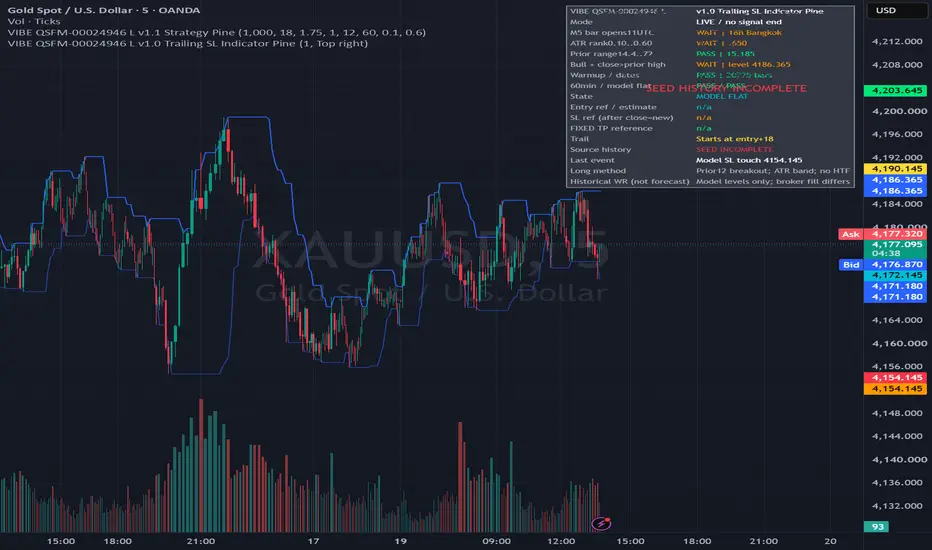
From Quant Strategy Finder Machine
VIBE QSFM-00024946 L v1.0 Indicator Pine — manual guide
What it does
Long-only breakout on standard OANDA:XAUUSD5-minute candles. It keeps the Strategy Pine v1.1 entry rules: previous12-bar high breakout, bullish close, prior range14.4..72, ATR14 rank120 between0.10 and0.60, weekdays with signal bar opening11:00–11:59UTC,60-minute cooldown and one chart-model position at a time. Default live mode removes the expired October16 signal-end date; reference-validation checkbox restores it. Indicator and Strategy Pine have independent versions.
The user requested indicator creation after the18-trade comparison matched. This authorizes this artifact; no broker action or publishing is performed. The indicator still needs TradingView compilation/replay and realtime alert verification. The strategy test does not establish this new indicator has passed those checks.
Install and create alerts
Copy ALL text from VIBE QSFM-00024946 L v1.0 Trailing SL Indicator Pine.pine into a new TradingView indicator in Pine Editor. Save and add to standard OANDA:XAUUSD5-minute candles.
Keep Reference validation OFF for ongoing signals. It is ON only for original-sample comparison. Leave seed/start defaults for comparison; load sufficient history. A chart indicator does not inherit the strategy's Deep Backtest history: if fewer bars load, initialization/cooldown/model trades can differ. The table warns about incomplete seed coverage; at least241 source bars must be loaded before setups qualify.
In indicator settings, enable PREPARE, EXECUTE, MOVE SL and MODEL EXIT as desired. Choose table anchor and visual options.
Create ONE TradingView alert. Select this indicator and Any alert() function call. Enable your app/push/sound notifications, set a suitable expiration and create it. The script controls each event's timing. This single alert carries all enabled event types with dynamic details; do not create duplicates for the same script/input set.
Delete/recreate the alert whenever code, input settings, symbol or timeframe changes. TradingView keeps a server copy of the setup; changing the chart does not update that copy. See official alert documentation.
PREPARE versus EXECUTE
PREPARE is a provisional intrabar heads-up: all current filters pass and bullish developing price is within$1 below prior12 high or above it. Threshold is configurable; it does not change the entry rule. It alerts at most once per5-minute candle and may later cancel. Historical prepare signals are not reconstructed because OHLC cannot reproduce the realtime path. Never use PREPARE alone as an entry.
EXECUTE requires all accepted entry criteria at the confirmed candle close. It does NOT require a preceding PREPARE notification; price can jump straight to an executable close. Enter at the start of the next available candle if you choose to take the trade. The signal-close message's entry/SL/TP are ESTIMATES: the next open and actual fill can differ.
The session refers to signal BAR OPEN: first eligible11:00UTC candle closes11:05UTC (18:05Bangkok), last11:55 candle closes12:00UTC (19:00Bangkok). Thus a final valid execute notification can arrive19:00Bangkok. Other filters still control qualification.
TP is fixed. Only SL trails.
All distances are gold PRICE DOLLARS, not pips/ticks and not the amount of account risk.
Let E be YOUR actual buy fill. Immediately place broker protection:
Initial SL = E−18.00.
Fixed TP = E+31.50.
Trailing activation price = E+18.00.
TP stays at the original price for the entire trade. Do not move TP when SL moves. The original tested R:R before trailing is1.75; trailing can exit earlier at smaller gains.
At every completed5-minute candle while the trade is still open:
The SL/TP already in force protect that candle. If either closes the trade, stop managing it. Do not wait for an indicator MODEL EXIT notification to honor the broker stop/target.
For a surviving trade, update H=highest high since entry, including the entry candle. Use only completed candles for stop changes. For actual broker management use a consistent executable/bid price basis if available; chart midpoint highs are only approximate execution references.
If H<E+18, leave the original SL unchanged.
If H>=E+18, newSL=max(existingSL,H−18). Raise the broker stop to this level AFTER the candle closes, for the next candle. Never lower or widen the stop. Leave TP unchanged.
The activation test uses the candle HIGH, not its close. A wick reaching+18 activates the rule if the trade survives that candle under the existing protection. If the newly calculated stop is already at/above the executable market price, a stop amendment may be invalid or cause immediate exit. Do not widen the stop to force acceptance; close the surviving trade at the next tradable price if following this rule, recognizing the actual fill can differ from the backtest. Gaps and manual amendment delays also differ.
Worked example: buy fill E=4300.00
Stage after a completed surviving M5 candle Highest H SL for following candle TP
Entry protection 4300.00 4282.00 4331.50
Below activation 4317.00 4282.00 4331.50
Activation wick reaches+18 4318.00 4300.00 4331.50
New high 4324.00 4306.00 4331.50
Lower subsequent high 4324.00 remains 4306.00 unchanged 4331.50
New high 4330.00 4312.00 4331.50
If the bid/execution price reaches4331.50, fixed TP closes the trade. If price falls to a stop currently in force, that stop closes it. At4300SL, nominal price breakeven is not necessarily net breakeven after spread, fees and slippage.
Reading the chart and MOVE SL alerts
Blue lines=prior12-bar range. Green triangle=confirmed EXECUTE. Cyan=model next-bar OPEN reference. Red=SL active during the displayed bar. Orange dots/labels=new SL calculated at that close for the following bar. Green line=fixed TP. Yellow line=activation threshold. Red EXIT marker=chart-model exit at the completed candle. Table states current model status and filter values. Historical marks plot confirmed decisions; prepare shading is provisional realtime only.
MOVE SL messages provide chart-model stop/TP, not broker instructions sent automatically. If your actual entry differs from model entry, recompute from E and your highest executable price. Do not blindly apply model stops to a differently filled/late trade. Initial SL/TP must be based on your actual fill even though the table uses the next chart open. The table cannot confirm whether you entered, skipped, closed early or got stopped by a spread.
This indicator locks further signals while its ONE virtual position is open and enforces source cooldown from model entry. A skipped signal still creates a chart-model trade. Real broker and model states can diverge; the tool cannot synchronize without broker data. Treat model management alerts as reference only, and do not open a second actual position just because the model is flat. No size recommendation is generated.
Why a broker's built-in trailing stop can differ
A continuous broker trailing stop can move on each tick. QSFM instead checks old protection first and updates the stop once per completed5-minute candle, starting only after+18. Setting an immediate continuous$18 trailing stop changes the tested management. Use a regular SL and raise it manually on the completed-candle schedule to follow this rule.
OANDA TradingView charts use midpoint; broker orders use bid/ask. Chart touches and model exits are not proof of broker fills. Official OANDA chart/execution explanation.
Validation to perform next
Load with reference-validation ON and enough history: compare green execute marks with the matched Strategy Pine v1.1. First supplied reference decision June8 2026 11:05UTC, entry11:10 at4306.22, exit-bar12:40 at4337.72. Indicator historical management is source-conservative stop-first, whereas native Strategy Pine can choose a different path on bars touching both levels. Do not expect universal simulator identity. The original18-trade strategy result was10wins/8losses,55.56%WR; this is historical evidence, not expected future accuracy.
Then return to LIVE mode, recreate the alert and confirm event types, duplicate suppression and table output in realtime. Record any Pine compiler error verbatim. No indicator compilation or realtime alert delivery is claimed yet.
VIBE QSFM-00024946 L v1.0 Indicator Pine — manual guide
What it does
Long-only breakout on standard OANDA:XAUUSD5-minute candles. It keeps the Strategy Pine v1.1 entry rules: previous12-bar high breakout, bullish close, prior range14.4..72, ATR14 rank120 between0.10 and0.60, weekdays with signal bar opening11:00–11:59UTC,60-minute cooldown and one chart-model position at a time. Default live mode removes the expired October16 signal-end date; reference-validation checkbox restores it. Indicator and Strategy Pine have independent versions.
The user requested indicator creation after the18-trade comparison matched. This authorizes this artifact; no broker action or publishing is performed. The indicator still needs TradingView compilation/replay and realtime alert verification. The strategy test does not establish this new indicator has passed those checks.
Install and create alerts
Copy ALL text from VIBE QSFM-00024946 L v1.0 Trailing SL Indicator Pine.pine into a new TradingView indicator in Pine Editor. Save and add to standard OANDA:XAUUSD5-minute candles.
Keep Reference validation OFF for ongoing signals. It is ON only for original-sample comparison. Leave seed/start defaults for comparison; load sufficient history. A chart indicator does not inherit the strategy's Deep Backtest history: if fewer bars load, initialization/cooldown/model trades can differ. The table warns about incomplete seed coverage; at least241 source bars must be loaded before setups qualify.
In indicator settings, enable PREPARE, EXECUTE, MOVE SL and MODEL EXIT as desired. Choose table anchor and visual options.
Create ONE TradingView alert. Select this indicator and Any alert() function call. Enable your app/push/sound notifications, set a suitable expiration and create it. The script controls each event's timing. This single alert carries all enabled event types with dynamic details; do not create duplicates for the same script/input set.
Delete/recreate the alert whenever code, input settings, symbol or timeframe changes. TradingView keeps a server copy of the setup; changing the chart does not update that copy. See official alert documentation.
PREPARE versus EXECUTE
PREPARE is a provisional intrabar heads-up: all current filters pass and bullish developing price is within$1 below prior12 high or above it. Threshold is configurable; it does not change the entry rule. It alerts at most once per5-minute candle and may later cancel. Historical prepare signals are not reconstructed because OHLC cannot reproduce the realtime path. Never use PREPARE alone as an entry.
EXECUTE requires all accepted entry criteria at the confirmed candle close. It does NOT require a preceding PREPARE notification; price can jump straight to an executable close. Enter at the start of the next available candle if you choose to take the trade. The signal-close message's entry/SL/TP are ESTIMATES: the next open and actual fill can differ.
The session refers to signal BAR OPEN: first eligible11:00UTC candle closes11:05UTC (18:05Bangkok), last11:55 candle closes12:00UTC (19:00Bangkok). Thus a final valid execute notification can arrive19:00Bangkok. Other filters still control qualification.
TP is fixed. Only SL trails.
All distances are gold PRICE DOLLARS, not pips/ticks and not the amount of account risk.
Let E be YOUR actual buy fill. Immediately place broker protection:
Initial SL = E−18.00.
Fixed TP = E+31.50.
Trailing activation price = E+18.00.
TP stays at the original price for the entire trade. Do not move TP when SL moves. The original tested R:R before trailing is1.75; trailing can exit earlier at smaller gains.
At every completed5-minute candle while the trade is still open:
The SL/TP already in force protect that candle. If either closes the trade, stop managing it. Do not wait for an indicator MODEL EXIT notification to honor the broker stop/target.
For a surviving trade, update H=highest high since entry, including the entry candle. Use only completed candles for stop changes. For actual broker management use a consistent executable/bid price basis if available; chart midpoint highs are only approximate execution references.
If H<E+18, leave the original SL unchanged.
If H>=E+18, newSL=max(existingSL,H−18). Raise the broker stop to this level AFTER the candle closes, for the next candle. Never lower or widen the stop. Leave TP unchanged.
The activation test uses the candle HIGH, not its close. A wick reaching+18 activates the rule if the trade survives that candle under the existing protection. If the newly calculated stop is already at/above the executable market price, a stop amendment may be invalid or cause immediate exit. Do not widen the stop to force acceptance; close the surviving trade at the next tradable price if following this rule, recognizing the actual fill can differ from the backtest. Gaps and manual amendment delays also differ.
Worked example: buy fill E=4300.00
Stage after a completed surviving M5 candle Highest H SL for following candle TP
Entry protection 4300.00 4282.00 4331.50
Below activation 4317.00 4282.00 4331.50
Activation wick reaches+18 4318.00 4300.00 4331.50
New high 4324.00 4306.00 4331.50
Lower subsequent high 4324.00 remains 4306.00 unchanged 4331.50
New high 4330.00 4312.00 4331.50
If the bid/execution price reaches4331.50, fixed TP closes the trade. If price falls to a stop currently in force, that stop closes it. At4300SL, nominal price breakeven is not necessarily net breakeven after spread, fees and slippage.
Reading the chart and MOVE SL alerts
Blue lines=prior12-bar range. Green triangle=confirmed EXECUTE. Cyan=model next-bar OPEN reference. Red=SL active during the displayed bar. Orange dots/labels=new SL calculated at that close for the following bar. Green line=fixed TP. Yellow line=activation threshold. Red EXIT marker=chart-model exit at the completed candle. Table states current model status and filter values. Historical marks plot confirmed decisions; prepare shading is provisional realtime only.
MOVE SL messages provide chart-model stop/TP, not broker instructions sent automatically. If your actual entry differs from model entry, recompute from E and your highest executable price. Do not blindly apply model stops to a differently filled/late trade. Initial SL/TP must be based on your actual fill even though the table uses the next chart open. The table cannot confirm whether you entered, skipped, closed early or got stopped by a spread.
This indicator locks further signals while its ONE virtual position is open and enforces source cooldown from model entry. A skipped signal still creates a chart-model trade. Real broker and model states can diverge; the tool cannot synchronize without broker data. Treat model management alerts as reference only, and do not open a second actual position just because the model is flat. No size recommendation is generated.
Why a broker's built-in trailing stop can differ
A continuous broker trailing stop can move on each tick. QSFM instead checks old protection first and updates the stop once per completed5-minute candle, starting only after+18. Setting an immediate continuous$18 trailing stop changes the tested management. Use a regular SL and raise it manually on the completed-candle schedule to follow this rule.
OANDA TradingView charts use midpoint; broker orders use bid/ask. Chart touches and model exits are not proof of broker fills. Official OANDA chart/execution explanation.
Validation to perform next
Load with reference-validation ON and enough history: compare green execute marks with the matched Strategy Pine v1.1. First supplied reference decision June8 2026 11:05UTC, entry11:10 at4306.22, exit-bar12:40 at4337.72. Indicator historical management is source-conservative stop-first, whereas native Strategy Pine can choose a different path on bars touching both levels. Do not expect universal simulator identity. The original18-trade strategy result was10wins/8losses,55.56%WR; this is historical evidence, not expected future accuracy.
Then return to LIVE mode, recreate the alert and confirm event types, duplicate suppression and table output in realtime. Record any Pine compiler error verbatim. No indicator compilation or realtime alert delivery is claimed yet.

Thông báo miễn trừ trách nhiệm
Thông tin và các ấn phẩm này không nhằm mục đích, và không cấu thành, lời khuyên hoặc khuyến nghị về tài chính, đầu tư, giao dịch hay các loại khác do TradingView cung cấp hoặc xác nhận. Đọc thêm tại Điều khoản Sử dụng.
Thông báo miễn trừ trách nhiệm
Thông tin và các ấn phẩm này không nhằm mục đích, và không cấu thành, lời khuyên hoặc khuyến nghị về tài chính, đầu tư, giao dịch hay các loại khác do TradingView cung cấp hoặc xác nhận. Đọc thêm tại Điều khoản Sử dụng.