Cập nhật
HTF Rejection Blocks (RB) v2 [louis]
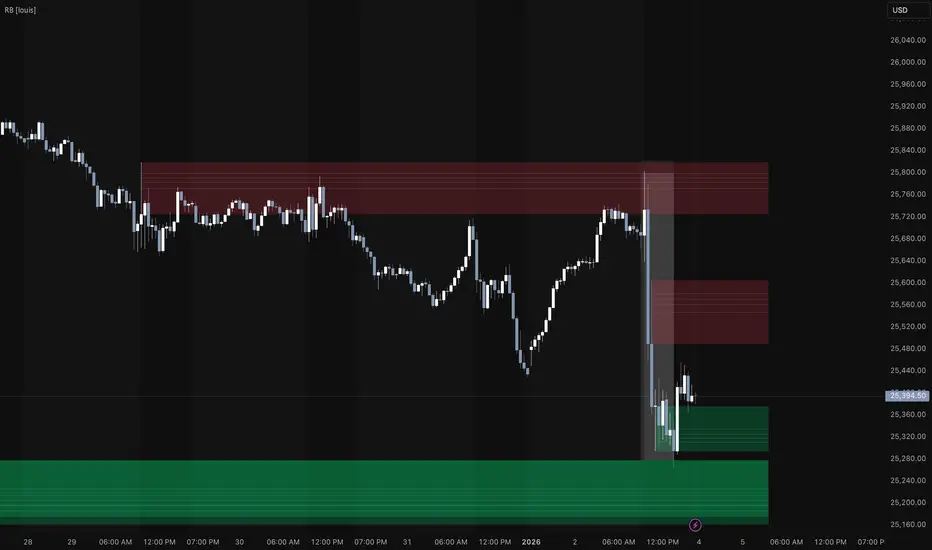
Overview
HTF Rejection Blocks is a price action tool designed to automatically identify and visualize areas of significant market rejection. By analyzing candle wicks relative to their bodies and historical volatility, this indicator highlights zones where institutional buying or selling pressure has occurred.
Unlike standard support and resistance indicators, this script focuses specifically on wick rejection, which often signals where price failed to sustain a move due to a wall of opposing orders.
How It Works
Key Features
1. Multi-Timeframe (MTF) Dashboard
2. Smart Filtering (Advanced Options)
3. OTE Fib Levels
4. Zone Management
Settings Guide
Zone Settings
Timeframe Configuration
OTE Fib Levels
Advanced Options
HTF Rejection Blocks is a price action tool designed to automatically identify and visualize areas of significant market rejection. By analyzing candle wicks relative to their bodies and historical volatility, this indicator highlights zones where institutional buying or selling pressure has occurred.
Unlike standard support and resistance indicators, this script focuses specifically on wick rejection, which often signals where price failed to sustain a move due to a wall of opposing orders.
How It Works
- The script utilizes a percentile based ranking system. It analyzes the upper and lower wicks of the most recent candles and compares them to the lookback period.
- Bearish Zones: Created when an Upper Wick is significantly larger than the average, indicating sellers pushed price down aggressively.
- Bullish Zones: Created when a Lower Wick is significantly larger than the average, indicating buyers stepped in to reverse the price.
- Once a zone is identified, it draws a box extending to the right until price closes beyond the zone, mitigating/invalidating it.
Key Features
1. Multi-Timeframe (MTF) Dashboard
- Monitor higher timeframe structures without leaving your current chart. The script allows you to configure up to 4 distinct timeframes simultaneously.
- Example: You can view 15m, 1H, and 4H wick zones while trading on a 1m chart.
- Each timeframe has independent Bull/Bear color settings and toggle controls.
2. Smart Filtering (Advanced Options)
- Reduce noise and focus on high-probability setups using the built-in filters
3. OTE Fib Levels
- Automatically plots Optimal Trade Entry (OTE) Fibonacci levels inside every active zone.
- Includes customizable levels: 0.50, 0.62, 0.705, and 0.79.
- Useful for precision entries upon a retest of the wick.
4. Zone Management
- Live Invalidation: Zones are automatically removed when price closes outside the wick range.
- Mitigated Zones: Option to leave a faint "ghosts" of broken zones to see historical reaction points.
- Wick Highlighting: Optional outline around the specific candle that created the zone for visual clarity. Helpful for HTF zones.
Settings Guide
Zone Settings
- Highlight Wick: Toggles the border outline of the candle that generated the zone.
- Mitigated Zones: If checked, broken zones remain on the chart as faint gray boxes (Ghosting).
Timeframe Configuration
- Enable/Disable: Use the checkbox to turn specific timeframes on or off.
- Timeframe Selector: Choose the specific TF (e.g., 15m, 4H, D).
- Colors: Customize the Bull (Support) and Bear (Resistance) colors for each timeframe to distinguish them easily.
OTE Fib Levels
- Enable retracement levels to appear inside the zones.
Advanced Options
- Experimental Filtering: Enables the RSI and minimum spacing logic to filter out weaker signals.
- Calculated Bars Count: specific how far back the script processes data (lower numbers improve performance).
Phát hành các Ghi chú
updated chart image to show example usagePhát hành các Ghi chú
Upgraded default historical bar lookback valuePhát hành các Ghi chú
- Bugfix for overlapping rejection blocks not getting invalidated
- Optimized performance
Phát hành các Ghi chú
Changed some default values again
Thông báo miễn trừ trách nhiệm
Thông tin và các ấn phẩm này không nhằm mục đích, và không cấu thành, lời khuyên hoặc khuyến nghị về tài chính, đầu tư, giao dịch hay các loại khác do TradingView cung cấp hoặc xác nhận. Đọc thêm tại Điều khoản Sử dụng.
Thông báo miễn trừ trách nhiệm
Thông tin và các ấn phẩm này không nhằm mục đích, và không cấu thành, lời khuyên hoặc khuyến nghị về tài chính, đầu tư, giao dịch hay các loại khác do TradingView cung cấp hoặc xác nhận. Đọc thêm tại Điều khoản Sử dụng.