OPEN-SOURCE SCRIPT
H4 Open Marker + 2H Trendline (ICT Times)
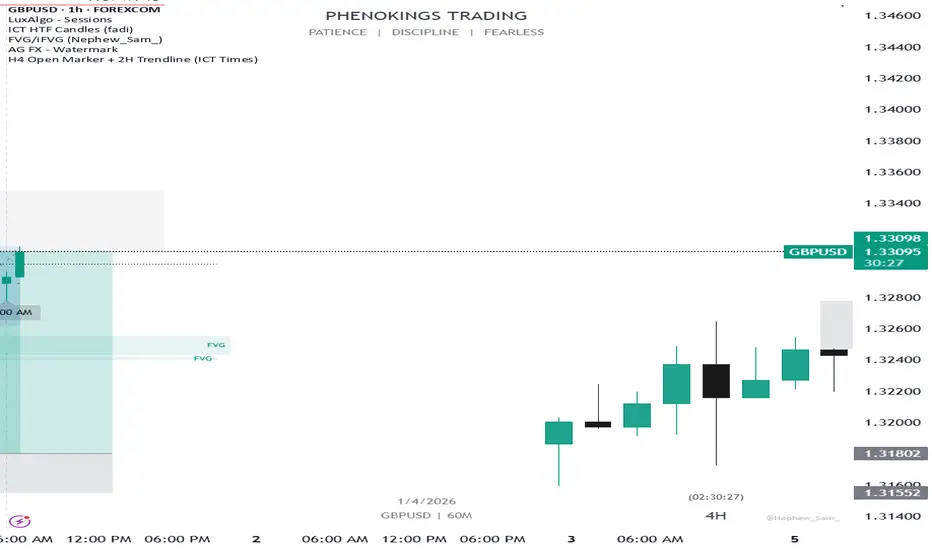
This indicator helps ICT traders visualize H4 session opens and the first 2 hours of price action with dynamic labeling. ( Note: insight came from personal study of ICT concepts)
🔹 FEATURES:
• Marks H4 candle opens at ICT times (1AM, 5AM, 9AM, 1PM, 5PM, 9PM) based on your local time zone
• Draws a horizontal trendline at the open price that extends for the first 2 hours only
• Time labels positioned dynamically:
- Bullish candles → label BELOW the candle (pointing up)
- Bearish candles → label ABOVE the candle (pointing down)
• Optional vertical lines at each selected H4 open
• Configurable colors, line styles, and label sizes
🔹 SETTINGS:
• UTC Offset – Adjust to your time zone (e.g., -5 for New York EST)
• Individual toggles for each H4 session (1AM, 5AM, 9AM, 1PM, 5PM, 9PM)
• Vertical line: color, style (Solid/Dashed/Dotted)
• 2H Trendline: color, style
• Label: background color, text color, size
🔹 HOW TO USE:
1. Add the indicator to your chart
2. Set your UTC offset correctly for your time zone
3. Toggle on/off specific H4 sessions you want to see
4. The horizontal line will appear at the H4 open and extend for the next 2 hours
5. Labels automatically position based on candle direction
🔹 NOTES:
• Only shows the last 7 days of data to avoid clutter
• Works on any timeframe, but designed for H4 analysis
• Max 500 lines drawn for performance.
🔹 FEATURES:
• Marks H4 candle opens at ICT times (1AM, 5AM, 9AM, 1PM, 5PM, 9PM) based on your local time zone
• Draws a horizontal trendline at the open price that extends for the first 2 hours only
• Time labels positioned dynamically:
- Bullish candles → label BELOW the candle (pointing up)
- Bearish candles → label ABOVE the candle (pointing down)
• Optional vertical lines at each selected H4 open
• Configurable colors, line styles, and label sizes
🔹 SETTINGS:
• UTC Offset – Adjust to your time zone (e.g., -5 for New York EST)
• Individual toggles for each H4 session (1AM, 5AM, 9AM, 1PM, 5PM, 9PM)
• Vertical line: color, style (Solid/Dashed/Dotted)
• 2H Trendline: color, style
• Label: background color, text color, size
🔹 HOW TO USE:
1. Add the indicator to your chart
2. Set your UTC offset correctly for your time zone
3. Toggle on/off specific H4 sessions you want to see
4. The horizontal line will appear at the H4 open and extend for the next 2 hours
5. Labels automatically position based on candle direction
🔹 NOTES:
• Only shows the last 7 days of data to avoid clutter
• Works on any timeframe, but designed for H4 analysis
• Max 500 lines drawn for performance.
Mã nguồn mở
Theo đúng tinh thần TradingView, tác giả của tập lệnh này đã công bố nó dưới dạng mã nguồn mở, để các nhà giao dịch có thể xem xét và xác minh chức năng. Chúc mừng tác giả! Mặc dù bạn có thể sử dụng miễn phí, hãy nhớ rằng việc công bố lại mã phải tuân theo Nội quy.

Thông báo miễn trừ trách nhiệm
Thông tin và các ấn phẩm này không nhằm mục đích, và không cấu thành, lời khuyên hoặc khuyến nghị về tài chính, đầu tư, giao dịch hay các loại khác do TradingView cung cấp hoặc xác nhận. Đọc thêm tại Điều khoản Sử dụng.
Mã nguồn mở
Theo đúng tinh thần TradingView, tác giả của tập lệnh này đã công bố nó dưới dạng mã nguồn mở, để các nhà giao dịch có thể xem xét và xác minh chức năng. Chúc mừng tác giả! Mặc dù bạn có thể sử dụng miễn phí, hãy nhớ rằng việc công bố lại mã phải tuân theo Nội quy.
Thông báo miễn trừ trách nhiệm
Thông tin và các ấn phẩm này không nhằm mục đích, và không cấu thành, lời khuyên hoặc khuyến nghị về tài chính, đầu tư, giao dịch hay các loại khác do TradingView cung cấp hoặc xác nhận. Đọc thêm tại Điều khoản Sử dụng.