Understanding stop-limit orders
Stop-limit orders give you control over both the price that triggers an order and the price at which it may be filled. As a result, they provide greater control over trade execution.
CONTENTS:
How stop-limit orders work
When placing a stop-limit order, you define two values:
- Stop price: The target price that acts as a trigger to activate your order
- Limit price: The worst price at which you want your trade to be filled
A stop-limit order only comes into effect once the market hits your defined stop price, remaining hidden from the public order book. Once triggered, it becomes a limit order, filling at the price you stated or better.
- When selling: Your limit price acts as the minimum price you are willing to accept
- When buying: Your limit price acts as the maximum price you are willing to pay
For example, a stock is currently trading at $100. You believe that a move above $105 could signal the start of a new uptrend, but you don't want to pay more than $106. You place a stop-limit buy order with a stop price of $105 and a limit price of $106. Once the market reaches $105, your stop-limit order turns into a limit order and can only be filled at $106 or lower.
Placing a stop-limit order may help you secure your gains and protect your capital from losses. However, while gives you control, it also introduces execution risk and may remain unfilled under three scenarios:
- The price is never reached: The market never hits your stop price to activate the order
- Insufficient liquidity: There are not enough matching buy/sell orders at your exact price level to fill your position
- Market gaps: A fast-moving market skips completely past your specified limit price
Following the example above, your stop price is $105 and your limit price is $106. If the market gaps directly from $105 to $106.01, your stop-limit order will be triggered and a limit order will be placed. However, because the market is already trading above $106, the order may remain unfilled.
Stop-limit vs limit orders
Limit orders
- Require a specific maximum price for buying or minimum price for selling
- Become visible to the market for immediate execution once being placed
- Best used when you want to ensure you don't overpay or undersell
Stop-limit orders
- Require two price targets: a stop price and a limit price
- Become available for execution only after the stop price is reached
- Best used when you want a trade to occur only after a predefined market move while retaining price control
How to place stop-limit orders on TradingView
Make sure that your broker supports this order type. You can consult the detailed information on the compare brokers page.
Once you are connected:
- Click the "Trade" button in the upper-right corner of Supercharts
- Select "Stop limit" in the order ticket
- Enter your stop and limit prices along with other order details
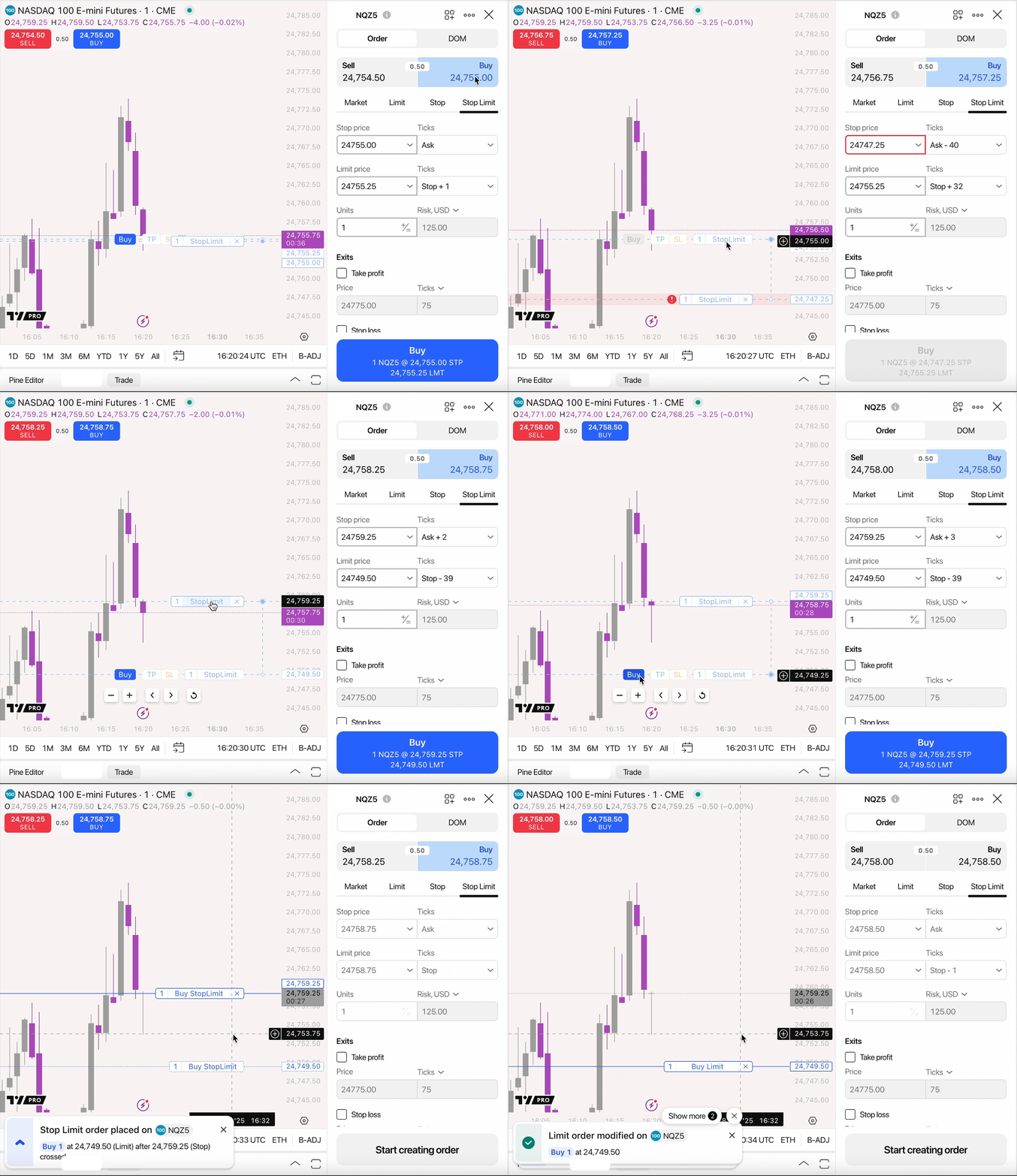
Stop-limit orders in a nutshell
Stop-limit orders help to manage risk, allowing you to execute trades only under favorable conditions. However, remember that execution is never guaranteed if the market moves too aggressively.
Also read: