
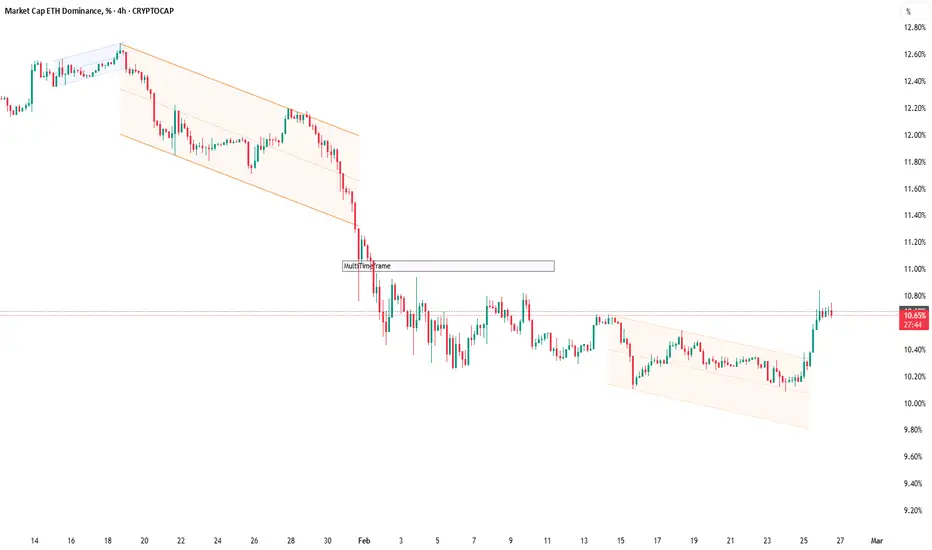
A Clean Multi‑Timeframe Workflow with Dynamic Channels (Top‑Down Structure)
If you like top‑down analysis but don’t want to draw trend channels by hand, this is a practical workflow using AG Pro Dynamic Channels V2:
Step 1 — Higher timeframe structure (1D / 4H)
- Enable only Major External + Major Internal channels.
- Use them to define:
* Main corridor (external)
* Pullback rails (internal)
- Keep the chart clean with “Delete Previous” so you’re always focused on current structure.
Step 2 — Execution timeframe (1H / 15m)
- Add selected Minor channels (only the ones you truly use).
- Look for alignment:
* Minor structure reacting inside the Major corridor
* Breaks that contradict the higher timeframe boundary (signals “reassess”)
Step 3 — Alerts as a process tool
- Higher TF: Break alerts on Major External (structure shift warning).
- Lower TF: React alerts on Internal channels (pullback monitoring).
Risk and discipline:
- Treat channels as context zones for planning, not as guaranteed entries.
- Define invalidation (where you’re wrong) before thinking about targets.
- If conditions are range-bound, consider reducing channel types or stepping up a timeframe.
Not financial advice.
If you like top‑down analysis but don’t want to draw trend channels by hand, this is a practical workflow using AG Pro Dynamic Channels V2:
Step 1 — Higher timeframe structure (1D / 4H)
- Enable only Major External + Major Internal channels.
- Use them to define:
* Main corridor (external)
* Pullback rails (internal)
- Keep the chart clean with “Delete Previous” so you’re always focused on current structure.
Step 2 — Execution timeframe (1H / 15m)
- Add selected Minor channels (only the ones you truly use).
- Look for alignment:
* Minor structure reacting inside the Major corridor
* Breaks that contradict the higher timeframe boundary (signals “reassess”)
Step 3 — Alerts as a process tool
- Higher TF: Break alerts on Major External (structure shift warning).
- Lower TF: React alerts on Internal channels (pullback monitoring).
Risk and discipline:
- Treat channels as context zones for planning, not as guaranteed entries.
- Define invalidation (where you’re wrong) before thinking about targets.
- If conditions are range-bound, consider reducing channel types or stepping up a timeframe.
Not financial advice.

Trading Suite | Flagship Workflow :
tradingview.com/script/XJmX3p98-Trading-Suite-AGPro-Series/
Crypto Setup Planner | Multi-Symbol Analysis :
tradingview.com/script/LgVRo7Ql-Crypto-Setup-Planner-AGPro-Series/
tradingview.com/script/XJmX3p98-Trading-Suite-AGPro-Series/
Crypto Setup Planner | Multi-Symbol Analysis :
tradingview.com/script/LgVRo7Ql-Crypto-Setup-Planner-AGPro-Series/
Exención de responsabilidad
La información y las publicaciones no constituyen, ni deben considerarse como, asesoramiento o recomendaciones financieras, de inversión, de trading u otro tipo, proporcionadas o respaldadas por TradingView. Obtenga más información en Condiciones de uso.
Trading Suite | Flagship Workflow :
tradingview.com/script/XJmX3p98-Trading-Suite-AGPro-Series/
Crypto Setup Planner | Multi-Symbol Analysis :
tradingview.com/script/LgVRo7Ql-Crypto-Setup-Planner-AGPro-Series/
tradingview.com/script/XJmX3p98-Trading-Suite-AGPro-Series/
Crypto Setup Planner | Multi-Symbol Analysis :
tradingview.com/script/LgVRo7Ql-Crypto-Setup-Planner-AGPro-Series/
Exención de responsabilidad
La información y las publicaciones no constituyen, ni deben considerarse como, asesoramiento o recomendaciones financieras, de inversión, de trading u otro tipo, proporcionadas o respaldadas por TradingView. Obtenga más información en Condiciones de uso.