
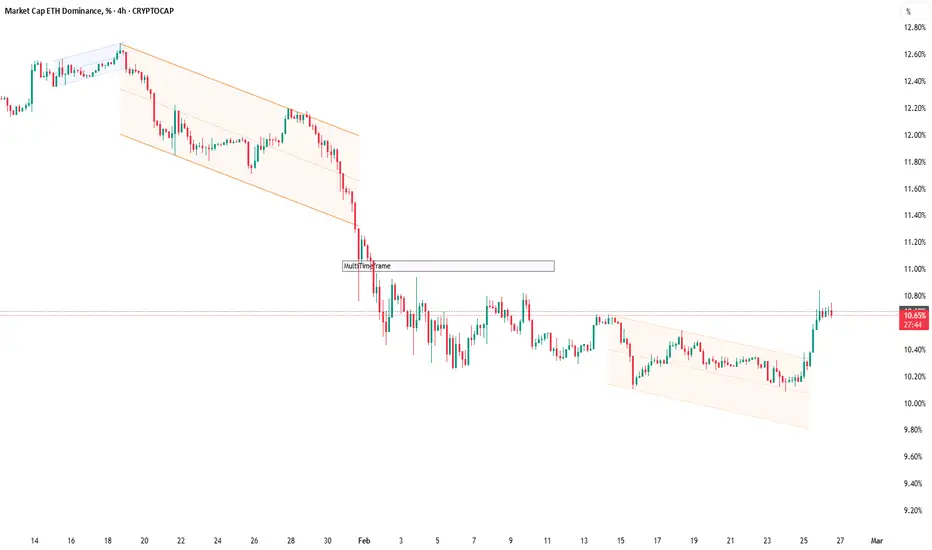
A Clean Multi‑Timeframe Workflow with Dynamic Channels (Top‑Down Structure)
If you like top‑down analysis but don’t want to draw trend channels by hand, this is a practical workflow using AG Pro Dynamic Channels V2:
Step 1 — Higher timeframe structure (1D / 4H)
- Enable only Major External + Major Internal channels.
- Use them to define:
* Main corridor (external)
* Pullback rails (internal)
- Keep the chart clean with “Delete Previous” so you’re always focused on current structure.
Step 2 — Execution timeframe (1H / 15m)
- Add selected Minor channels (only the ones you truly use).
- Look for alignment:
* Minor structure reacting inside the Major corridor
* Breaks that contradict the higher timeframe boundary (signals “reassess”)
Step 3 — Alerts as a process tool
- Higher TF: Break alerts on Major External (structure shift warning).
- Lower TF: React alerts on Internal channels (pullback monitoring).
Risk and discipline:
- Treat channels as context zones for planning, not as guaranteed entries.
- Define invalidation (where you’re wrong) before thinking about targets.
- If conditions are range-bound, consider reducing channel types or stepping up a timeframe.
Not financial advice.
If you like top‑down analysis but don’t want to draw trend channels by hand, this is a practical workflow using AG Pro Dynamic Channels V2:
Step 1 — Higher timeframe structure (1D / 4H)
- Enable only Major External + Major Internal channels.
- Use them to define:
* Main corridor (external)
* Pullback rails (internal)
- Keep the chart clean with “Delete Previous” so you’re always focused on current structure.
Step 2 — Execution timeframe (1H / 15m)
- Add selected Minor channels (only the ones you truly use).
- Look for alignment:
* Minor structure reacting inside the Major corridor
* Breaks that contradict the higher timeframe boundary (signals “reassess”)
Step 3 — Alerts as a process tool
- Higher TF: Break alerts on Major External (structure shift warning).
- Lower TF: React alerts on Internal channels (pullback monitoring).
Risk and discipline:
- Treat channels as context zones for planning, not as guaranteed entries.
- Define invalidation (where you’re wrong) before thinking about targets.
- If conditions are range-bound, consider reducing channel types or stepping up a timeframe.
Not financial advice.

Trading Suite | Flagship Workflow :
tradingview.com/script/XJmX3p98-Trading-Suite-AGPro-Series/
Crypto Setup Planner | Multi-Symbol Analysis :
tradingview.com/script/LgVRo7Ql-Crypto-Setup-Planner-AGPro-Series/
tradingview.com/script/XJmX3p98-Trading-Suite-AGPro-Series/
Crypto Setup Planner | Multi-Symbol Analysis :
tradingview.com/script/LgVRo7Ql-Crypto-Setup-Planner-AGPro-Series/
Disclaimer
The information and publications are not meant to be, and do not constitute, financial, investment, trading, or other types of advice or recommendations supplied or endorsed by TradingView. Read more in the Terms of Use.
Trading Suite | Flagship Workflow :
tradingview.com/script/XJmX3p98-Trading-Suite-AGPro-Series/
Crypto Setup Planner | Multi-Symbol Analysis :
tradingview.com/script/LgVRo7Ql-Crypto-Setup-Planner-AGPro-Series/
tradingview.com/script/XJmX3p98-Trading-Suite-AGPro-Series/
Crypto Setup Planner | Multi-Symbol Analysis :
tradingview.com/script/LgVRo7Ql-Crypto-Setup-Planner-AGPro-Series/
Disclaimer
The information and publications are not meant to be, and do not constitute, financial, investment, trading, or other types of advice or recommendations supplied or endorsed by TradingView. Read more in the Terms of Use.