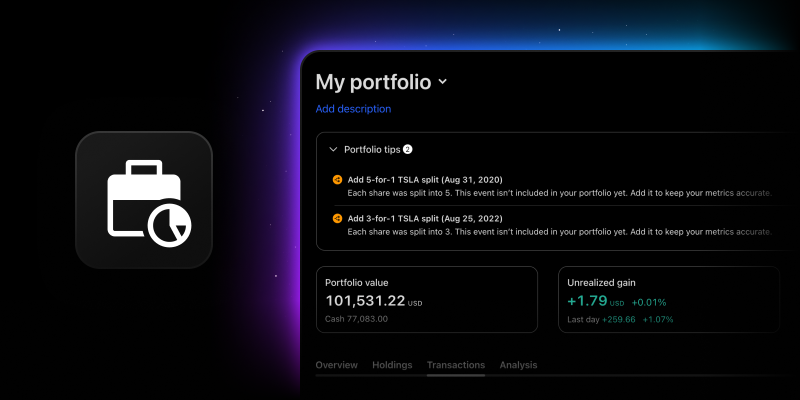
Stock splits are simple in theory and messy in practice — especially when your portfolio has to guess whether a price change is a real split or just a transaction you entered at an unusual price. Until now, Portfolios handled this with an automated heuristic: if a transaction’s price looked far enough from the market price, we assumed a split had happened and adjusted it for you, quietly, in the background.
This approach often caused more problems than it solved. Uncommon split ratios (like 15:14 or 101:100) could be misinterpreted by the system. Adjustments were applied to every detected transaction for a symbol, with no way to apply them selectively. And because it all happened silently, there was no way to see what changed or undo it if the system got something wrong.
We’re replacing that mechanism with something more direct: splits are now their own transaction type, based on real corporate action data – not a guess.
How it works now
When a data-provider-confirmed split event affects one of your holdings, you’ll see a suggestion in Portfolio Tips — the same place you already get prompted about dividends. It’ll tell you the symbol, the split date, and the ratio (for example, “AAPL split 3-for-1 on Apr 16, 2026”).
From there, you can:
- Accept it, and a prefilled split transaction opens for you to review — ticker, date, and ratio are already filled in from provider data. Confirm, and your portfolio recalculates automatically
- Leave it, and nothing changes. The suggestion stays visible in Tips until you act on it
All your split transactions live in their own Splits tab under Transactions, where you can review, edit, or delete any of them at any time.
CSV import and export are also supported for split transactions, using the same file format you already use for other transaction types.
What’s changing for existing portfolios
The old automatic adjustment system is going away entirely — there’s no setting to keep it. If you have existing positions that may have been affected by past splits, head to Portfolio Tips to check for historical split suggestions, review any that apply, and accept them to update your portfolio.
One thing worth knowing: this step isn’t automatic. Unlike the old system, nothing gets adjusted for you in the background anymore. If a Tips suggestion for a past split appears for one of your holdings, your portfolio’s metrics — P&L, average price, and position value — won’t reflect that split until you accept the suggestion (or add it manually).
Why we made this change
Previously, splits were inferred automatically from price behavior. With the new system, you have more control over adjustments and better visibility into how they’re applied. Handling splits as explicit, provider-verified transactions, following the same pattern we already use for dividends, means your transaction history reflects exactly what happened, while you decide what gets applied.
We hope this update makes managing your portfolio clearer and more reliable. Keep sharing your feedback — it helps us make TradingView better for you.
Team TradingView