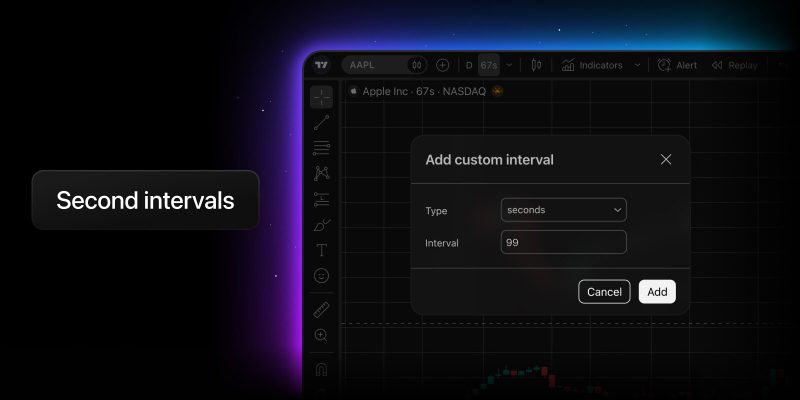
When the market moves fast, every second counts. Until now, you could only choose from a fixed set of second-based intervals: 1, 5, 10, 15, 30, and 45 seconds. Now this limit is lifted on the Ultimate plan. You can set any interval from 1 to 299 seconds and tune the chart to your trading pace.
Why use custom second-based intervals
Every strategy has its own rhythm. A 30-second candle may be too slow for a news spike, while a 15-second one may be too noisy for your setup. Pick the exact interval that suits you, whether it’s 7, 23, 95, or 248 seconds.
How to add a custom second-based interval
There are two ways:
- Open “Chart interval” on the top toolbar, click “Add custom interval”, select “seconds”, enter a number, and click “Add”
The added interval stays in the menu, so you can switch to it in one click. You can also add it to favorites to keep it on the top toolbar.
- Start typing right on the chart, for example, 3S, and press Enter
Works with all features
Custom second-based intervals work the same way as standard ones:
- In Bar Replay, to replay price movement second by second
- With Pine Script® indicators and strategies, to run your scripts on the exact timeframe you need
- In alerts, to get notifications on the exact interval you trade
The new intervals are available both on the web and in the TradingView mobile apps.
Things to know
- Custom second-based intervals from 1 to 299 seconds are available to Ultimate subscribers
- Standard second-based intervals (1, 5, 10, 15, 30, and 45 seconds) are still available starting from the Plus plan
For more details, see our What are second-based intervals article.
Head to Supercharts to set up your custom second-based intervals and add more precision to your trading. Once you’ve tried them, let us know what you think. We read every comment, and your feedback helps us make TradingView better.
Team TradingView