Understanding market structure is critical, but constantly watching TPO profiles isn’t always practical. With the new TPO alert conditions, you can stay in tune with the market without keeping your eyes glued to the chart.
Time Price Opportunity (TPO) charts highlight how the market builds value over time — revealing balance, imbalance, and areas where price is likely to react. Now, you can set alerts directly on key TPO levels and know exactly when price interacts with them.
This way, you’ll be notified about critical market events, such as:
- Acceptance or rejection around value boundaries
- Re-tests of control points
- Resolution of unfinished auctions
- Interaction with low-liquidity singleprint areas
By combining visual TPO analysis with alerts, you can track market structure efficiently — staying focused on execution and decision-making instead of constant monitoring.
New alert conditions
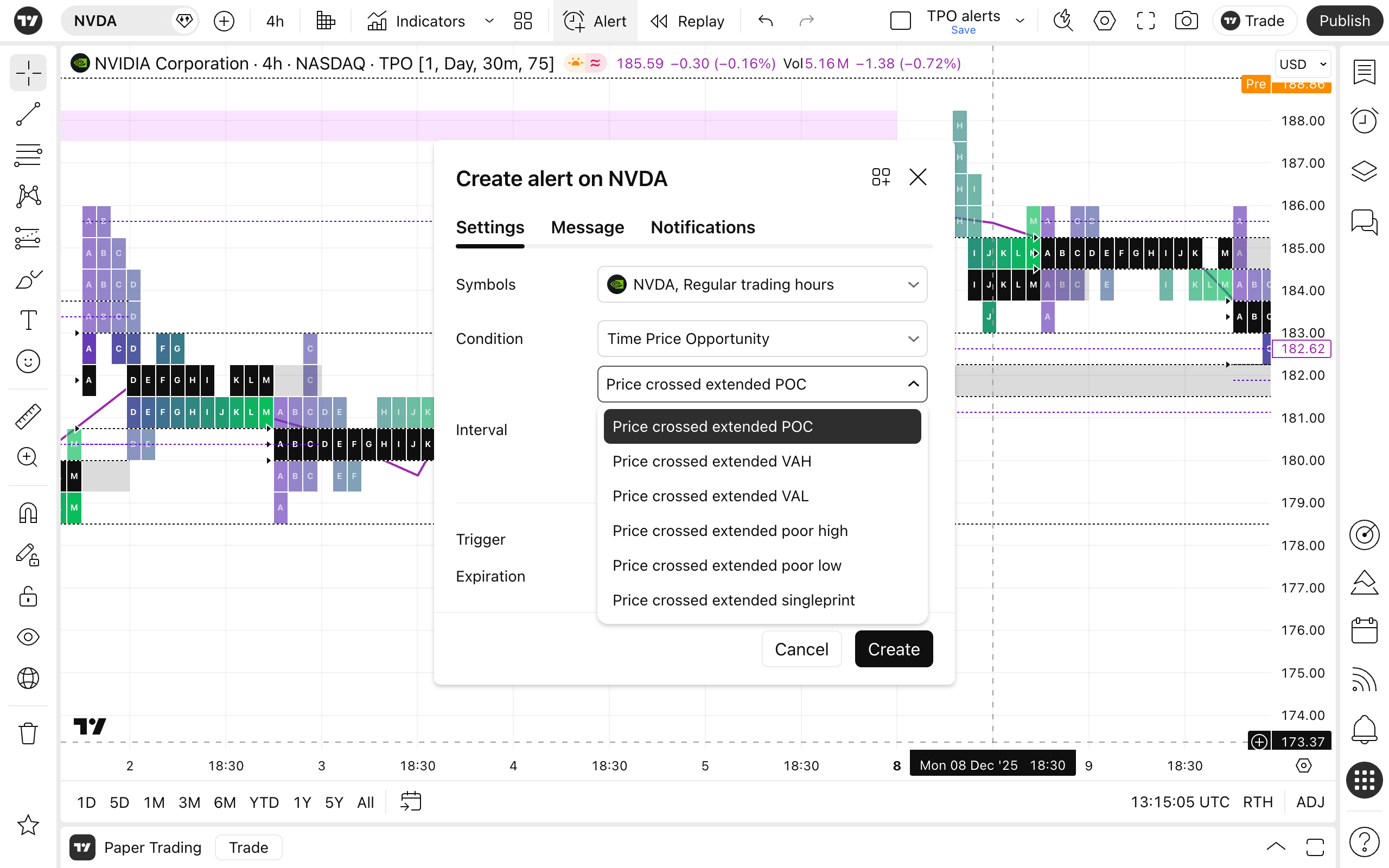
We’ve added alert conditions that cover the most widely used and actionable TPO structures:
- Price crossed extended POC
- Price crossed extended VAH
- Price crossed extended VAL
- Price crossed extended poor high
- Price crossed extended poor low
- Price crossed extended singleprint
Each alert fires only when the current price crosses levels of the already formed profiles, ignoring the currently forming TPO to reduce noise and avoid false signals.
Designed for clarity, precision, and control
TPO alerts work across TPO charts, periodic TPO profile, and session TPO profile indicators.
Alerts are available only for extended TPO levels, ensuring that notifications are tied to clearly defined and intentional structural references. If the extend option is disabled in the settings, the corresponding alert condition won’t appear — keeping the alert dialog clean and relevant.
Every alert is delivered with a clear, automatic message, so you instantly know which market structure level has been crossed and on which symbol.
How to set a TPO alert
Before creating a TPO alert, make sure the corresponding extend option is enabled in the TPO settings — only extended levels are available for alerts.
- Open a TPO chart or add a TPO profile to the chart
- In the settings, enable the desired levels and set them to extend

- Open the alert dialog
- Choose Time Price Opportunity as the condition
- Select one of the available TPO alert options
- Set your preferred alert frequency
We hope these new TPO alerts give you more control over your market profile analysis and help you stay aligned with meaningful structural changes.
As always, let us know what you think — your feedback helps us continue improving the platform.
Team TradingView