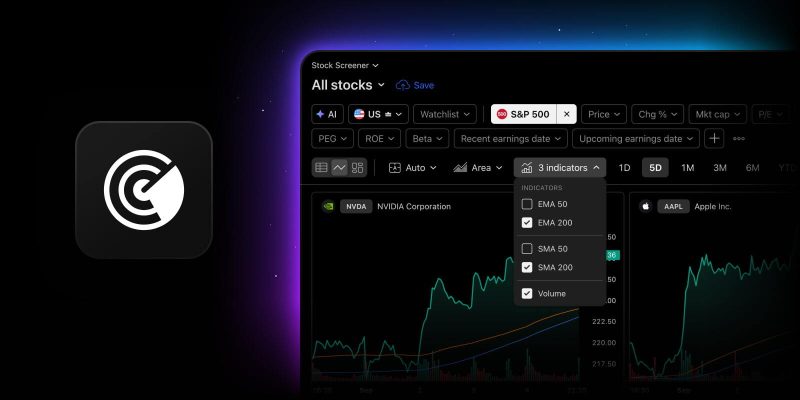
Screener chart view lets you look beyond the numbers by laying out your results as a wall of mini charts. At a glance, you can see how price is moving across symbols. Until now, those charts showed price and volume alone. You could see that something moved, but not where it stood relative to its trend.
Light technicals add that context. Now, in the Stock, ETF, Crypto Coins, and crypto pairs screeners — both CEX and DEX — you can turn on a moving average, and every chart in the view updates to show it. The feature is available in the standalone Screener, the right sidebar, mobile web, and desktop apps. The Bond Screener remains unchanged, with chart view available without indicators.
Indicator options
Five indicators are available from the Indicators button in the chart view toolbar:
- SMA 50
- SMA 200
- EMA 50
- EMA 200
- Volume (supported in all the Screeners listed above except the Crypto Coins Screener)
Moving averages are drawn over the price, while volume is displayed as bars below. Your selection applies to every chart at once, and that’s the point. You can compare symbols against the same reference rather than set up each one individually.
The calculations match the built-in SMA and EMA indicators on Supercharts, so the lines are the ones you already know. Indicators recalculate when you change the timeframe or when new market data arrives.
How it works
SMA 50, SMA 200, and Volume are on by default. EMA 50 and EMA 200 remain off until you switch them on.
The dropdown stays open while you toggle indicators, so you can build a combination in one pass. The button label tracks what is active: one or two indicators appear by name, while three or more are shown as a counter.
Your selection stays in place while you work, including when you change filters, refresh results, or switch between table and chart views. Save a screen and your indicator selection is saved with it. Undo and redo work as usual.
Volume is available on all plans, as it always has been. SMA and EMA require a paid plan.
What’s next
This first version comes with moving averages set to 50- and 200-period options, along with preset colors and line styles. Custom indicator sets can’t be saved. For now, the focus is on fast visual triage, and your feedback will help us decide which indicators and settings come next.
Put it to work — head to the Screener, switch to chart view, and find the combination that works for you. As always, we’re looking forward to your feedback.
Team TradingView