Mastering stop-market orders
Stop-market orders trigger as the price reaches a user-defined value, known as the stop price. Once that level is hit, the order instantly converts into a market order and is executed at the best available price.
CONTENTS:
- Stop-market orders overview
- Stop-market vs market orders
- Stop order types
- How to place a stop-market order
Stop-market orders overview
Stop-market orders are helpful tools designed to protect your capital and trade breakouts, though they also involve certain risks. As this order type turns into a market order upon triggering, the exact execution price cannot be guaranteed. In fast-moving markets, it may turn out to be higher or lower than your specified value.
When market prices gap rapidly past your level, your order is forced to take the next available price. This creates the risk of slippage — the gap between your trigger and actual fill price — which can lead to a much larger loss than anticipated. Therefore, you should always account for the probability of a negative execution scenario before entering a trade.
If the price never reaches the specified stop value, the order simply remains inactive until it expires or is manually canceled.
Stop-market vs market orders
Market orders
- Execute immediately at the current market price
- Used to capture current market opportunities
- Require active decision-making at the moment of entry
Stop-market orders
- Execute only after a specific price level is reached
- Allow to plan and automate trades in advance
- Used to limit losses or to chase a market breakout
Stop order types
There are three main types of stop orders, each serving a unique purpose:
- Stop-entry: An offensive order used to enter a new trade on a market breakout
- Stop-loss: A defensive order used to limit losses on an existing trade
- Trailing stop-loss: A dynamic order that automatically adjusts to lock in profits as the price moves in your favor
Stop-entry
- Triggers above the current market price for buys, or below it for sells, under the premise that continued momentum in the same direction confirms the start of a new trend
- Stays out of the order book until your trigger price is reached. If that level is never hit, you may never enter the trade
- Trades the beginning of a move in exchange for clear confirmation that a strong trend has started
For example, if a stock is trading at $50 but you only want to buy it once it proves it has upward momentum, you can set a stop-entry to automatically buy the stock only if it climbs past $53.
Stop-loss
- Helps limit potential losses through a predefined exit threshold
- Triggers an automatic exit when the market reaches your defined price
- May execute at a less favorable price than expected during sharp market moves
Important: It is highly recommended to use stop-loss orders on all active positions to protect your capital.For instance, if you buy a stock at $100 and set a stop-loss at $90, the trade will automatically close if the price drops to $90, limiting your total loss to approximately $10 before commissions.
How to place a stop-market order
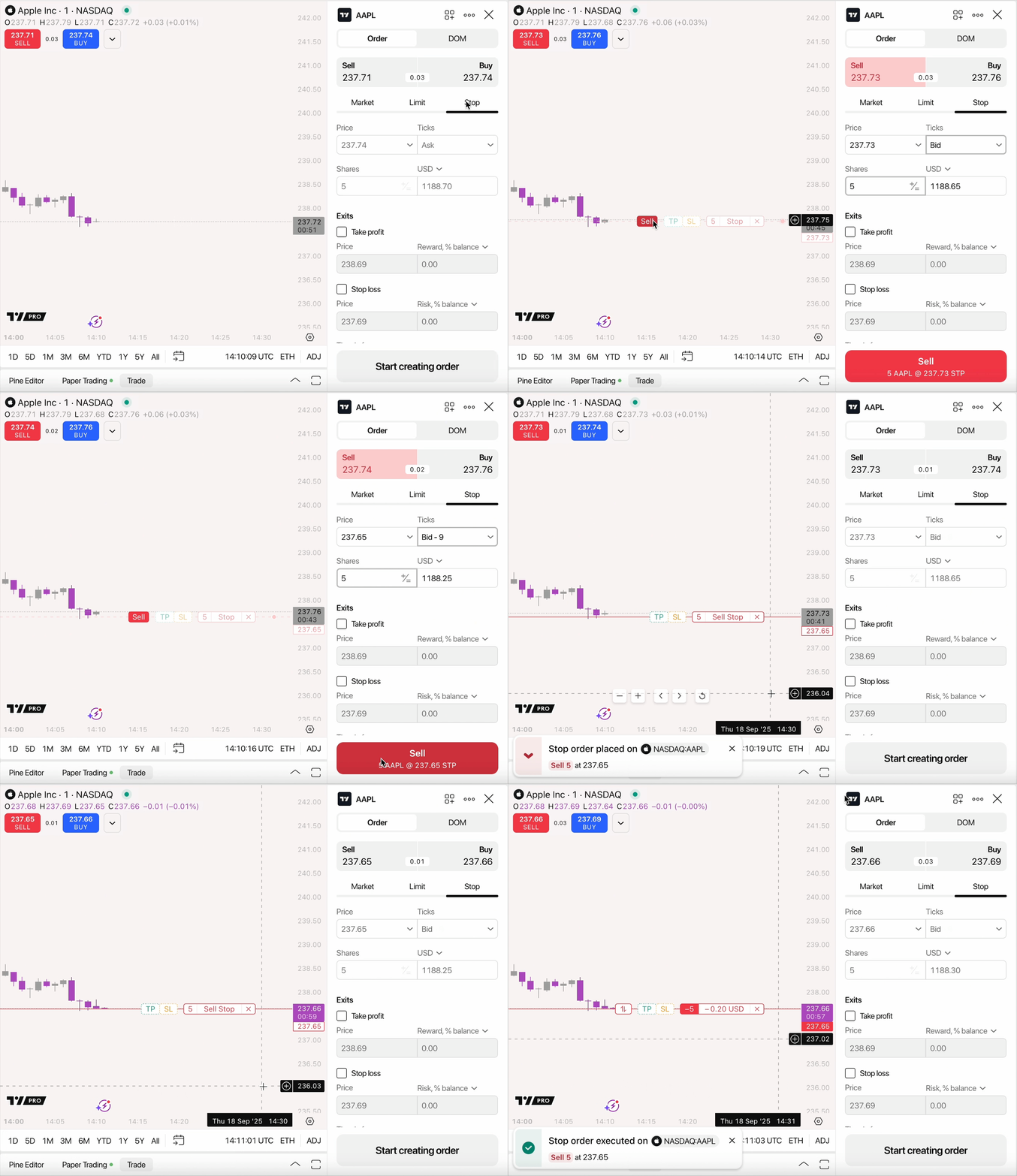
To place a stop-market order on Supercharts, connect your paper trading account or select one of our top brokers via the "Trade" button at the top-right corner.
Once you are connected:
- Click the “Trade” button again
- Select "Stop" in the order ticket
- Enter your stop price and order inputs
Stop-market orders in a nutshell
Stop-market orders help you protect your capital and manage risk. To use them effectively, always account for daily price volatility that might trigger your stop early and be prepared for potential slippage during high-volatility market events.
To practice placing these order types, learn more about paper trading — our risk-free simulator designed for you to master your skills without losing real money.
Also read: