
When you compare financial instruments across markets, issuers, and providers, names alone are rarely enough. The same asset can be labelled differently by different sources, and instruments that look alike on a list can be structurally very different — a senior bond and a convertible one, a voting share and a non-voting class, an open-end fund and a closed-end one.
That’s exactly why the market uses CFI codes — a global, standardized way to describe what a financial instrument actually is. And they’re now available on TradingView for stocks, bonds, and funds.
What is a CFI code
A CFI code (ISO 10962) is a six-letter classifier used across market infrastructure, reference data providers, and professional data environments. It covers equities, debt, and collective investment vehicles under one unified taxonomy.
Each of the six letters carries meaning:
- 1st letter — top-level category: E for Equities, D for Debt, C for Collective Investment Vehicles
- 2nd letter — group within that category (common shares, preferred shares, bonds, medium-term notes, convertible bonds, ETFs, standard funds, …)
- 3rd-6th letters — structural attributes that apply to that group: voting rights and form for shares, interest type and redemption terms for bonds, distribution policy and underlying assets for funds
The same six-letter structure describes a share, a bond, and a fund — the specifics just differ by category. Here’s how it looks for a few well-known instruments on TradingView:
| Instrument | Category | CFI | What it encodes |
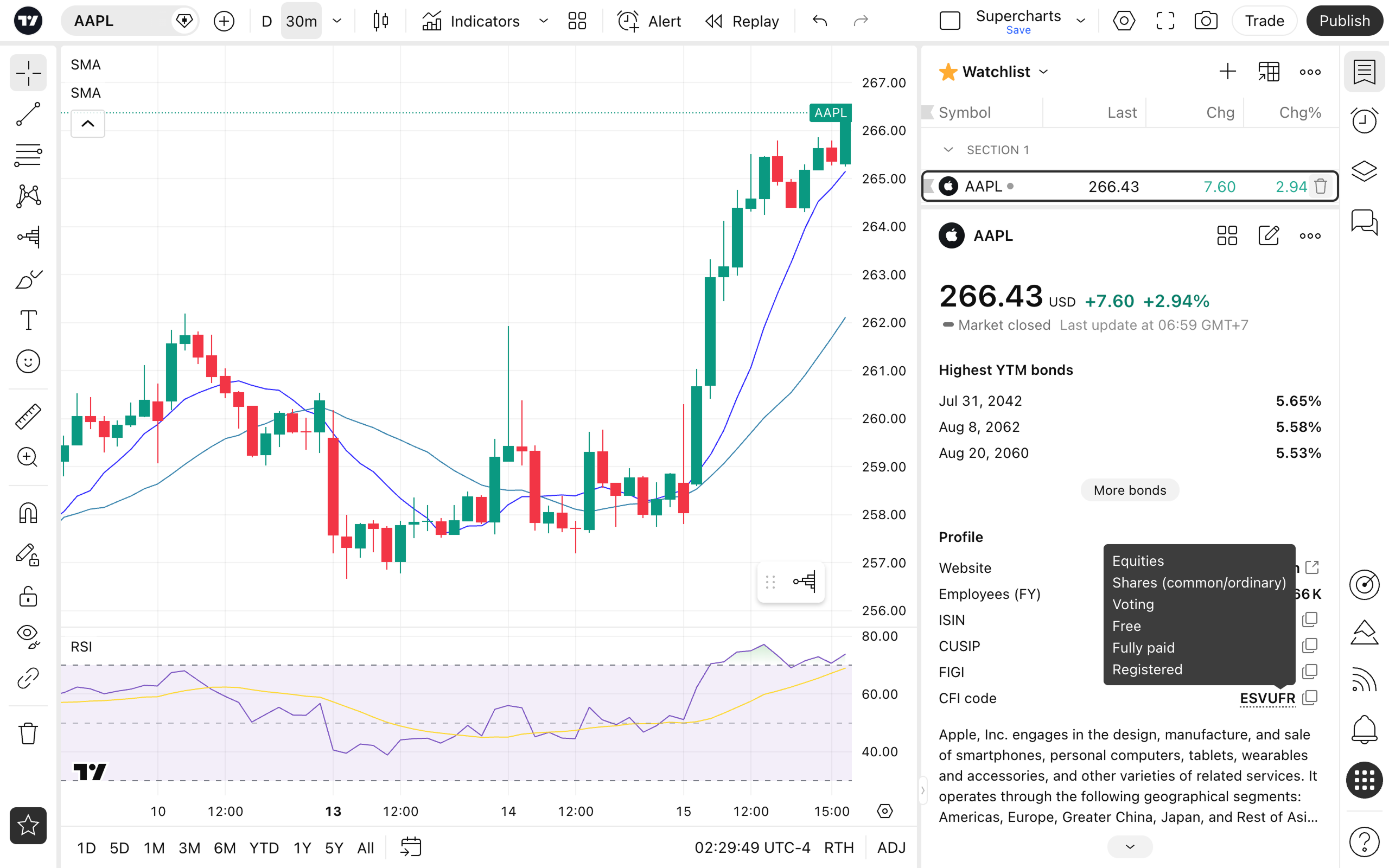
| Apple Inc. (AAPL) | Common stock | ESVUFR | Equity → Common share → Voting → Free (unrestricted)→ Fully paid → Registered |
| SPDR S&P 500 ETF Trust (SPY) | Equity ETF | CEOGEU | Collective Investment Vehicle → ETF → Open-end → Accumulation → Equity assets → Units |
| US Treasury 10-Year Note | Government bond | DBFNFR | Debt → Bond → Fixed rate → Senior → Fixed maturity → Registered |
| Apple Inc. corporate note | Corporate bond | DTFNGR | Debt → Medium-term note → Fixed rate → Senior → Fixed maturity with call feature → Registered |
Look at the last two rows. A 10-year Treasury and an Apple corporate issue are both called “bonds” in everyday language, and both sit in the debt universe (starting with D).
But CFI immediately tells you they’re structurally different kinds of debt.
The Treasury is classified as DB… — a plain bond. Apple’s corporate issue is DT… — a medium-term note, because Apple raises long-term debt through an MTN program.
That’s the kind of structural distinction that names and descriptions routinely blur, and that CFI makes explicit without you having to open a prospectus.
Hover over any of these codes on TradingView and you’ll see the full breakdown letter by letter in plain language, localized into the interface language you already use.
Read more about the CFI codes in our knowledge base to quickly grasp each asset’s nature.
Where to find CFI on TradingView
CFI codes are now visible across the main places where you explore instruments:
- Symbol pages — in the About section, next to the main identifiers. Hover over the code, and TradingView will show a full breakdown of what each letter means. The explanation is localized into all supported languages, so the code is readable, not just raw reference data.
- Details — under Profile information, alongside other key metadata.
- Charts — in Symbol Info, available without leaving your chart.
- Mobile apps — in the About section, consistent with the desktop experience.


Using CFI in Screeners
This is where CFI becomes genuinely practical.
In the Stock, Bond, and ETF Screeners, CFI codes are available as columns and filters. That means you can actively use them to narrow down the instrument universe instead of just reading them.
A few examples of what this unlocks:
- In the Stock Screener, separate voting common shares from non-voting classes or preferred shares across markets in a single step — no more guessing from ticker suffixes or labels.
- In the Bond Screener, isolate structural subsets like convertible bonds, floating-rate notes, or subordinated debt with one filter, without combing through provider-specific categories.
- In the ETF Screener, filter funds by their formal structure — open-end vs closed-end, by distribution policy, by underlying asset type — rather than by marketing labels.
For anyone who compares large sets of instruments — or builds watchlists with specific structural criteria — this turns a vague “type” field into a precise, standardized tool.
Why it matters
This release is not about adding one more field to instrument metadata. It is about improving the quality and usability of reference data on TradingView.
CFI codes help bridge the gap between TradingView and the way instruments are classified in broader market infrastructure. They add context, improve comparability, and make Screeners more precise for users who want a more structured way to work with instruments.
For professional users, this means better alignment with industry-standard classification.
For everyone else, it means one more layer of clarity when navigating complex markets.
Let us know what you think.
Team TradingView