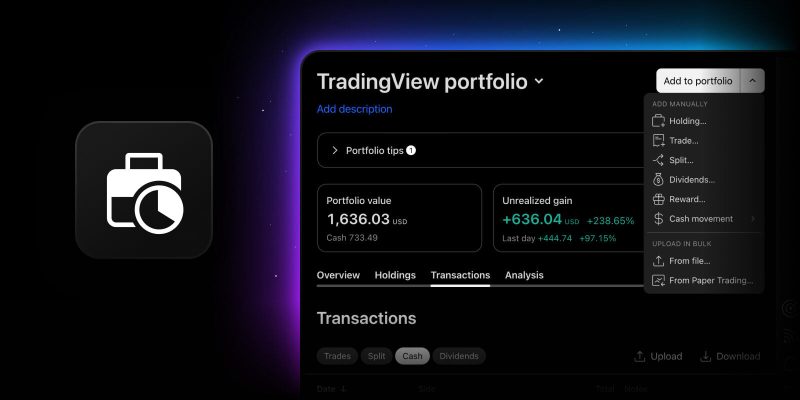
Real accounts are messier than a clean list of buys and sells. Shares land in your account through RSU vesting, gifts, or stock dividends, and you never paid for them. Cash shows up as interest on your idle balance or as fees your broker pays you for lending out your securities. Until now, Portfolios had no clean way to record either, so your numbers drifted away from your broker statement.
Two new transaction types close both gaps.
Reward: shares you received for free
A reward transaction adds shares to your portfolio at a cost basis of zero. Pick the symbol, the date, and the quantity, add a note if you like, and that’s it. There is no price field, because there was no price.
Use it whenever shares change hands without money:
- RSU vesting
- Gifted or inherited shares
- Stock dividends
- Corporate actions and zero-cost transfers
The notes field is the place to record which one it was.
You can add a reward from the Add to portfolio menu or straight from a holding’s context menu. Reward transactions appear in the Transactions tab alongside your trades with Side = Reward, and you can edit or delete them like any other transaction.
Note: If every share in a position came in as a reward, that position has no cost basis, and percentage returns cannot be calculated. For these holdings, Unrealized gain %, Total return %, and Annualized yield show a dash instead of a misleading figure. The same applies to the portfolio-level Unrealized gain % and Annualized yield if your whole portfolio has a zero cost basis. Absolute figures, including position value, P&L, and unrealized gain, remain accurate. As soon as the position includes at least one purchase at a real price, the average price is weighted as usual and all percentage metrics will be calculated as expected.
Two more things worth knowing:
- Selling reward shares: If you later sell reward shares, the whole sale amount counts as realized profit, since you paid nothing for them
- Stock dividends as rewards: If you record stock dividends as rewards, the dividend yield of that instrument won’t reflect them, because they aren’t logged as dividend payments; your position and P&L stay accurate
Income: money your account earns
Not all portfolio income comes from a specific stock. Brokers pay interest on uninvested cash. Securities lending programs pay you for letting your shares be borrowed. These are real returns, but until now there was nowhere to put them. Dividends require a ticker, and logging them as deposits would be plain wrong.
The new income transaction fixes this. You’ll find it in the Add transaction menu, in the Cash block next to Taxes and fees. Enter the date and the amount, and use the notes field to record what the income was for.
Income is the mirror image of taxes and fees: one is money leaving your account, the other is money coming in. Income transactions live in the transaction list under the Cash filter, where you can edit or delete them. In this release, income is recorded in your portfolio’s base currency.
CSV import and export
Both types are supported in CSV import and export. Here’s how the rows look:
- Reward: Side = Reward, with the price left empty or set to 0 and no commission
- Income: the same as a Taxes and fees row, but with Side = Income
Both are regular transactions and count toward your plan’s transaction limit.
We hope this latest update will help you keep your portfolio in order while tracking more of what you own. Keep sharing your thoughts with us — your feedback helps us make TradingView better for you.
Team TradingView